Inventory routing in Odoo has always been powerful but occasionally unpredictable. When a product has a route set on its category, another route on its packaging, and a third route specified on the sales order line, which one wins? Until now, the answer depended on knowing Odoo’s internal resolution logic, which wasn’t documented in any straightforward way. The latest update to the Inventory module’s routes documentation changes that by publishing a clear five-level priority system and making several structural changes to how routes get assigned in the first place.
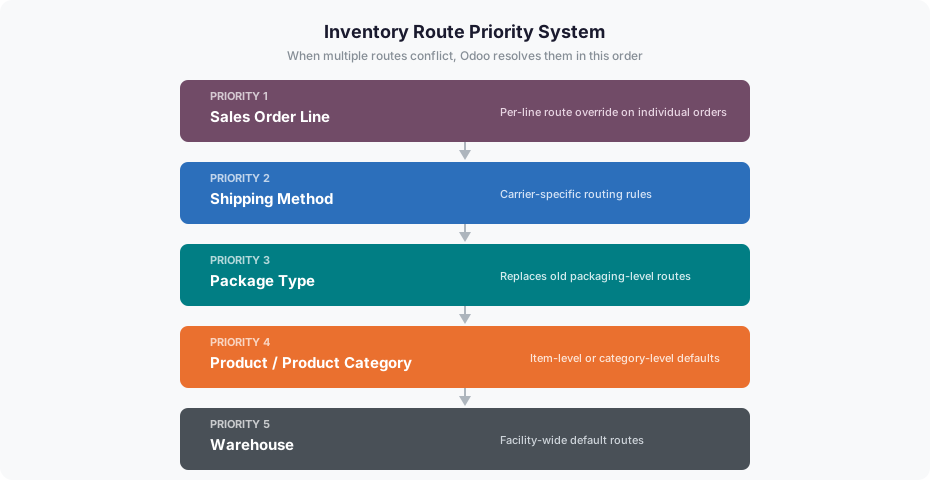
Five Levels of Route Priority
The new priority system resolves route conflicts in a specific order: a route set on a sales order line takes the highest priority, followed by the shipping method, then the package type, then the product or product category, and finally the warehouse default. This means a warehouse manager who sets a default three-step delivery route for the entire facility can still override it on specific orders or for specific carriers without worrying about which setting will win.
The hierarchy makes intuitive sense. The most specific instruction — what a salesperson puts on an individual order line — trumps everything. The broadest setting, the warehouse default, only applies when nothing more specific exists. In between, shipping methods and package types provide mid-level control that covers carrier requirements and packaging constraints.
Package Types Replace Packaging Routes
One of the more significant structural changes is the move from packaging-level route configuration to package types. Previously, routes could be assigned to individual product packagings, which created a confusing overlap with product-level and category-level routes. The update shifts route configuration to package types instead, and individual packagings inherit their route from the package type they belong to.
This simplification makes sense operationally. A “pallet” package type that always ships via a specific carrier route only needs to be configured once. Every product packaging that uses that pallet type picks up the route automatically. The change also requires the Multi-Step Routes setting to be enabled, which ties package type routing to the broader warehouse configuration rather than treating it as a standalone feature.
Buy and Manufacture Routes Go Automatic
Two of the most commonly used routes — Buy and Manufacture — now activate automatically based on product configuration. If a product has a vendor assigned, the Buy route applies without anyone having to manually select it. If a product has a Bill of Materials, the Manufacture route kicks in on its own. Both routes can still be made manually selectable for cases where automatic behavior isn’t desired, but the default is now hands-off.
This is a welcome change for businesses with large product catalogs. Manually tagging every purchased product with the Buy route was tedious and error-prone, especially during bulk imports or when adding new vendor relationships. The automatic behavior also means that removing a vendor from a product effectively deactivates the Buy route for that product, keeping routing in sync with the actual supply chain configuration.
Dropship Subcontractor Disappears as a Standalone Route
The Dropship Subcontractor on Order route has been removed as a separate entry from the route table. Instead, the standard Dropship route now covers delivery to both customers and subcontractors. This consolidation reduces the number of routes administrators need to understand and configure, though it may require teams that relied on the subcontractor-specific route to verify that their workflows still behave as expected under the unified Dropship route.
Cleaner Terminology Across the Board
Beyond the structural changes, the update simplifies location labels throughout the routing documentation. “Partners/Vendors” becomes just “Vendors” and “Partners/Customers” becomes “Customers.” The optional column on sales orders is now labeled “Routes” instead of “Route,” acknowledging that multiple routes can apply. And the Replenish on Order (MTO) route is no longer described as archived by default, suggesting it’s now active out of the box for businesses that need make-to-order workflows.
The combination of a published priority system, automatic route activation, and cleaner configuration surfaces makes inventory routing considerably more approachable. For businesses running complex multi-step fulfillment, the explicit priority hierarchy alone is worth the update — knowing which route wins when they conflict eliminates a category of warehouse misconfiguration that previously required trial and error to debug.