Setting up a loyalty program in Odoo used to mean picking from three vaguely named samples and then reshaping them into what you actually needed. The latest update to the Sales module’s Discount & Loyalty page takes a different approach: seven opinionated templates, each designed around a specific commercial strategy, paired with a proper Settings tab that finally gives administrators direct control over where and how each program operates.
The change also moves the entire section under a new menu path — Sales → Promotions → Discount & Loyalty — which signals that Odoo is treating promotions as a first-class concern rather than a sub-feature buried under product configuration.
Seven Templates Instead of Three
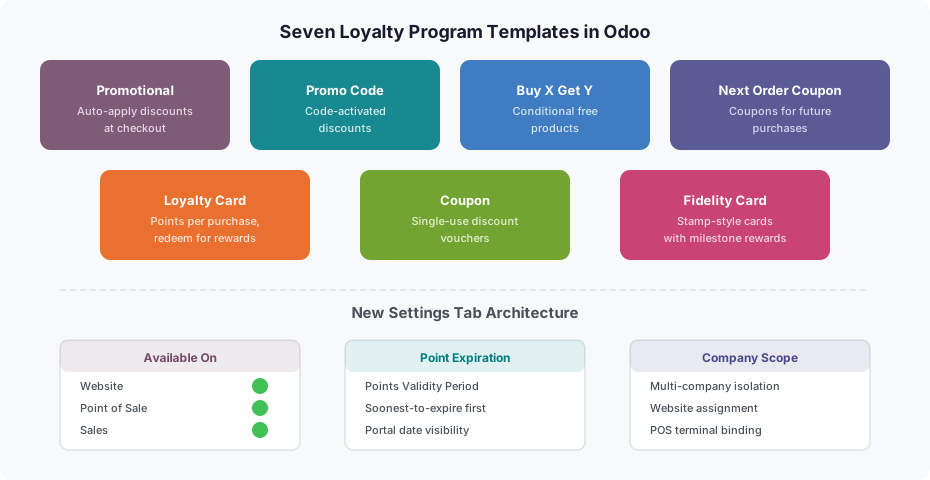
The old system offered three sample programs that tried to cover everything. The replacement lineup is more specific: Promotional Program for automatic cart-level discounts, Promo Code for code-activated offers, Buy X Get Y for conditional free products, Next Order Coupon for post-purchase incentives, Loyalty Card for points-per-purchase mechanics, Coupon for single-use vouchers, and Fidelity Card for stamp-style milestone rewards.
Each template comes pre-configured with the right combination of rules and rewards for its use case, which means less time reconfiguring fields and fewer mistakes. A Promotional Program doesn’t need the same form layout as a Fidelity Card, and the templates now reflect that.
Points That Expire — and Customers Who Can See It
One of the more practical additions is point expiration. Programs can now set a validity period on earned points, and when a customer has points across multiple earning events, the system consumes the soonest-to-expire points first. This is table stakes for any loyalty program that wants to drive urgency without alienating customers, but it’s been missing from Odoo until now.
The expiration dates are visible on the customer portal, which is a thoughtful touch. Rather than surprising customers with vanished points, Odoo surfaces the timeline directly. It’s a small detail that makes a meaningful difference in customer trust.
Form Fields Get New Names
Several fields have been renamed to better match what they actually do. “Start Date” and “End Date” merge into “Availability Dates,” which is clearer about what the date range controls. The “Pricelist” field becomes “For,” simplifying the label for a field that controls eligibility. The old “Currency” field is gone entirely — the program now inherits currency from its context.
On the rules side, the button to add conditional rules now reads “+ Add a rule” instead of the previous label, and there’s a new Discard option for backing out of rule creation without saving. The rewards button follows the same pattern: “+ Add a reward.” Discount units are now clearly presented as %, a flat amount, or a per-point amount, and Free Shipping gains its own description field.
A Proper Settings Tab
The biggest structural change is the new Settings tab on the program form. Previously, availability controls for website, point of sale, and company were scattered across the form or missing entirely. The Settings tab consolidates them into one place: Available On determines which channels can use the program, Website controls which site it appears on in multi-site setups, Point of Sale ties it to specific terminals, and Company handles multi-company isolation.
This matters for any business running Odoo across multiple storefronts or sales channels. A loyalty program that works in retail stores but not on the website — or vice versa — is now a configuration toggle rather than a workaround. And for multi-company environments, the scoping is explicit rather than inherited from ambiguous defaults.
What This Means for Existing Setups
The template expansion doesn’t break existing programs, but it does change the starting point for new ones. Teams that previously built custom programs by heavily modifying the old samples will find the new templates closer to what they were trying to achieve. The Settings tab centralizes controls that were previously hard to discover, which should reduce support tickets from teams wondering why their program isn’t showing up on the right channel.
The point expiration feature will require a decision from any business adopting it: how long should points last, and is the soonest-to-expire-first consumption the right fit? For most retail and e-commerce setups, it is. But businesses with long sales cycles may want to leave the validity period open.