Procurement planning in manufacturing has always been a balancing act between ordering too much (tying up cash in warehouse shelves) and ordering too little (shutting down a production line because a $2 component didn’t arrive). Most ERP systems offer some form of material requirements planning, but the gap between “the system can calculate what you need” and “the system helps you see what’s about to go wrong” is wider than vendors like to admit.
Odoo has rebuilt its Master Production Schedule into something that bridges that gap — a forecasting dashboard that shows procurement teams not just what to order, but when they’re falling behind, and how demand from active manufacturing orders cascades through the supply chain.
The Dashboard at a Glance
The MPS presents a time-bucketed view of every product the company produces or procures. Each column represents a planning period — daily, weekly, or monthly, depending on how the company configures it. Within each cell, the system shows the forecasted demand, actual confirmed demand from sales orders, indirect demand from open manufacturing orders that consume the product as a component, current stock levels, and a suggested replenishment quantity.
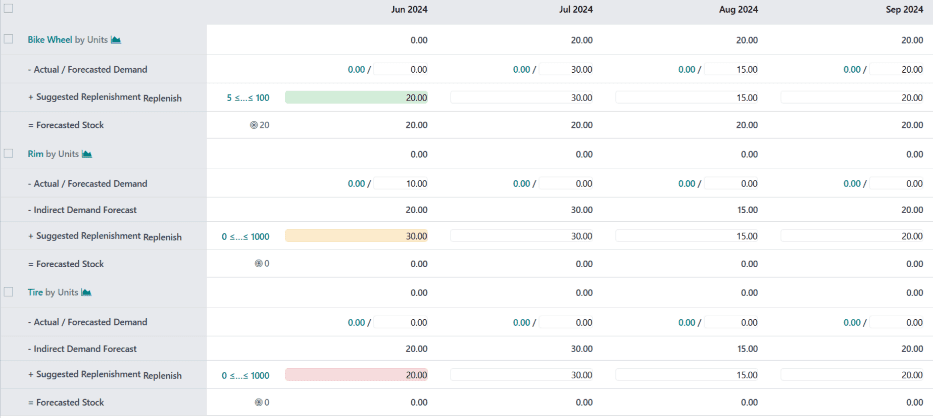
The color coding is where it gets immediately useful. Green means the current replenishment plan meets demand for that period. Orange means there’s a potential shortfall. Red means the numbers don’t add up and something needs to happen now. This traffic-light system lets a procurement manager scan dozens of products in seconds and focus attention on the ones that actually need intervention.
Indirect Demand Changes Everything
The feature that separates this from a basic reorder point system is indirect demand tracking. When a manufacturing order for a finished product is confirmed, the MPS automatically calculates the downstream demand for every component in the bill of materials. If the production floor needs 500 units of Product A next week, and Product A requires three units of Component X, the MPS shows 1,500 units of indirect demand for Component X in that same period.
This cascading visibility is what prevents the classic manufacturing failure mode: the production schedule says everything is on track, but nobody noticed that a sub-component’s lead time means it should have been ordered two weeks ago. With indirect demand visible in the MPS, procurement teams can see the problem forming before it becomes a line stoppage.
Forecasted vs. Actual Demand
The system maintains two distinct demand channels. Forecasted demand is the procurement team’s estimate of what they expect to need — based on seasonal patterns, upcoming promotions, or just historical intuition. Actual demand reflects confirmed sales orders already in the system.
Keeping these separate matters because it lets teams see when reality is diverging from their plan. If forecasted demand for a product was 200 units but actual confirmed orders are already at 280, the MPS makes that gap visible immediately rather than waiting for a stockout to surface it.
Safety Stock and Replenishment Boundaries
Each product in the MPS can have its own safety stock target, minimum replenishment quantity, and maximum stock level. The suggested replenishment calculations respect all three constraints. If the system suggests ordering 150 units but the minimum order quantity from the vendor is 200, the suggestion adjusts upward. If ordering 200 would exceed the maximum stock threshold, the system flags the conflict rather than silently creating an overstock situation.
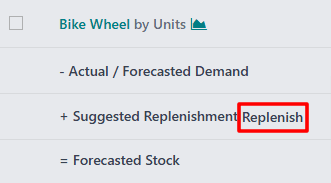
The one-click replenishment action takes the suggested quantity and creates the appropriate document — a purchase order for bought components or a manufacturing order for produced items. No copy-pasting quantities between screens, no switching between the MPS and the purchasing module to manually create orders.
Where Manual Judgment Still Wins
Odoo is upfront that the MPS is a manual planning tool, not an autopilot. The forecasting calculations provide a starting point, but procurement teams can override any suggested quantity based on information the system doesn’t have — a supplier who mentioned capacity constraints, a customer who hinted at a large order that hasn’t been confirmed yet, or a seasonal pattern that historical data doesn’t fully capture.
This blend of algorithmic suggestion and human override is arguably the right approach for manufacturing procurement. Fully automated reorder systems work well for commodity items with stable demand, but for anything with variable lead times, seasonal patterns, or supplier uncertainty, having a human in the loop — armed with good data — still produces better outcomes than pure automation.
For manufacturing companies that have been running procurement on spreadsheets or basic reorder rules, the MPS dashboard represents a significant step up in visibility. Not because it does anything magical, but because it puts all the relevant signals — confirmed demand, forecasted demand, indirect demand, stock levels, lead times — into a single view where a human can actually make good decisions.