Some of the worst bugs in any software system aren’t crashes or error messages. They’re the ones where everything looks fine but nothing works. The manufacturing module in Odoo had one of these: a configuration mistake so easy to make that experienced users stumbled into it, and so silent in its effects that diagnosing it could take hours.
The problem involved scrap locations. Specifically, what happens when someone accidentally sets a scrap location as the destination on a manufacturing order. The answer, until recently, was: nothing good, and nothing obvious.
How the Trap Works
In Odoo’s inventory system, locations come in different types. There are physical warehouse locations where stock actually sits. There are virtual locations used for accounting purposes. And there are scrap locations, which are essentially a one-way destination for products that have been written off — defective parts, damaged goods, expired materials.
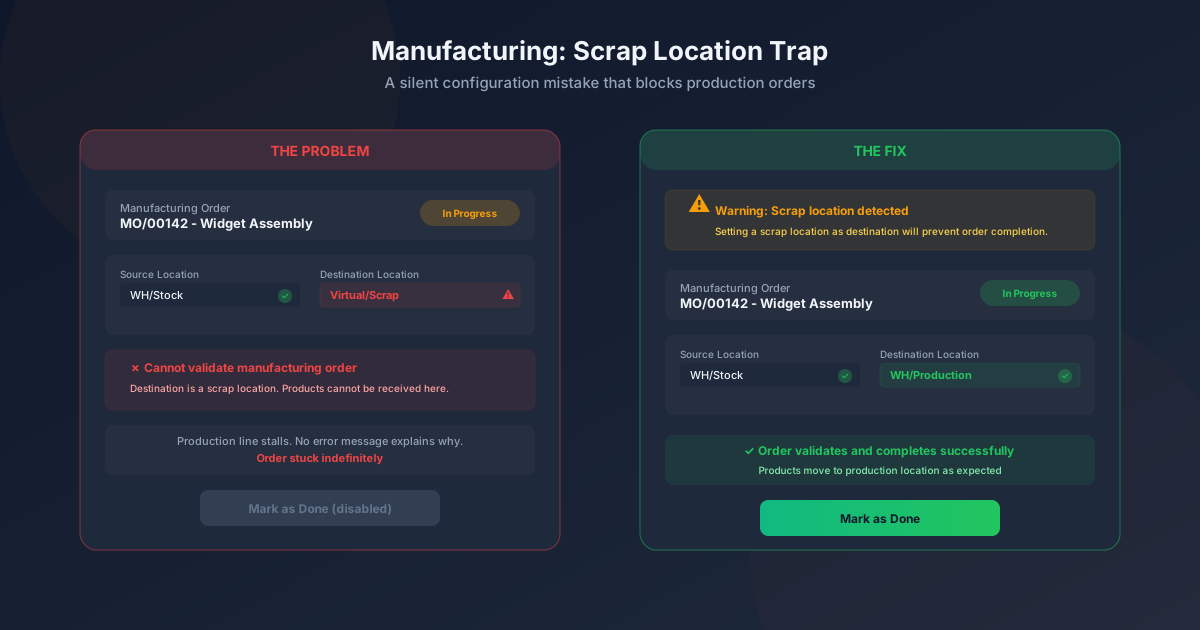
Scrap locations are designed to receive products, not to send them. They’re a dead end by design. When a manufacturing order finishes producing something, it tries to move the finished product from the production area to a destination location. If that destination is a regular stock location, the order completes normally. If the destination is a scrap location, the system can’t complete the movement — and it doesn’t tell you why.
The manufacturing order just sits there, stuck in a state where the “Mark as Done” button either doesn’t appear or doesn’t do anything. There’s no error banner, no validation warning, no red text explaining the problem. For the production manager staring at the screen, the order simply refuses to complete.
Why People Make This Mistake
The destination location field on a manufacturing order is a dropdown that shows all available locations in the warehouse hierarchy. Scrap locations appear in this list alongside regular locations, because the dropdown isn’t filtered by location type. If your warehouse has dozens of locations with similar naming conventions, selecting the wrong one is a matter of one misclick.
It’s also a mistake that can be introduced systematically. If someone configures a new production line and copies settings from an existing one but points the destination at the wrong location, every order on that line will fail silently. The error doesn’t surface until someone tries to close a manufacturing order and can’t figure out why it won’t complete.
The Fix: Warn Before It’s Too Late
Odoo’s fix is preventive rather than reactive. The system now displays a clear warning when a user selects a scrap location as the destination on a manufacturing order. The warning explains that scrap locations will prevent order completion and suggests using a regular stock or production location instead.
It’s a simple change — a validation check and a warning message — but its impact on production floor operations is outsized. Instead of discovering the problem after the production run is complete and the order won’t close, users get immediate feedback at the point of configuration. The fix takes five seconds instead of five hours of troubleshooting.
The Debugging Tax
What makes this kind of issue particularly costly isn’t the bug itself — it’s the debugging time. When a manufacturing order won’t complete, the production manager checks the bill of materials, verifies the raw material availability, reviews the work order status, checks the routing, and possibly contacts support. The destination location is one of the last things anyone thinks to check, because it’s a field that gets set once and forgotten.
In a busy manufacturing environment, every hour spent debugging a phantom issue is an hour of delayed production. Multiply that by the number of people involved in the investigation, and a single misconfigured location field can cost a company a full day of productive capacity across its manufacturing team.
Small Fix, Big Principle
This is the kind of improvement that never makes a headline at a product launch event. Nobody demos “we added a warning message to a dropdown field.” But for the manufacturing teams that have lost hours to this exact problem, it’s the kind of change that restores trust in the software. When a system lets you make an unrecoverable mistake silently, you start second-guessing every configuration decision. When it warns you before the mistake takes effect, you can move faster because you know the guardrails are there.
The best ERP improvements aren’t always new features. Sometimes they’re removing the quiet traps that make existing features unreliable. This is one of those.