Double opt-in is one of those things every email marketer knows they should do but few enjoy setting up. The confirmation email, the subscription link, the server action that actually writes the contact to the list — in previous versions of Odoo, wiring all of that together meant navigating the Marketing Automation module like someone who already understood how server actions work. Most marketers don’t.
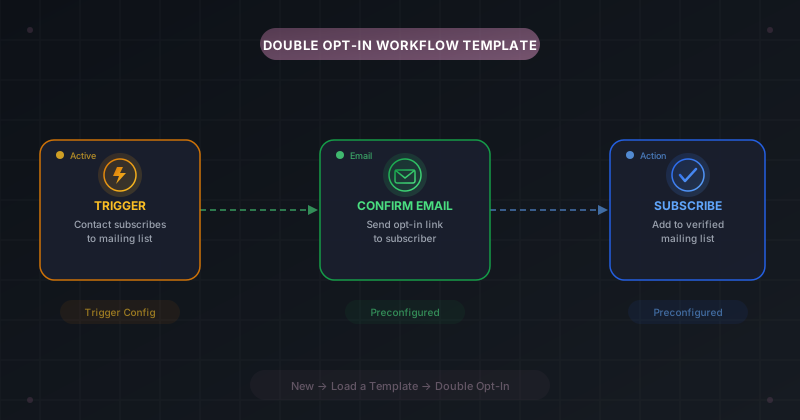
Odoo 20 takes a different approach. The double opt-in campaign is now a preconfigured template with three workflow steps already connected and ready to go. You load it from a pop-up, configure the trigger, and launch. No server actions, no manual email-then-action chaining, no guesswork about which fields to target.
Templates Load From a Pop-Up, Not a Card Picker
The old way of starting a campaign from a template involved picking from a set of cards displayed on the campaign creation screen. Those cards are gone. In their place, Odoo 20 uses a New → Load a Template pop-up that lists available templates with descriptions of what each one does. Selecting the Double Opt-In template drops a fully wired campaign into the visual workflow builder, trigger included.
This is a better entry point for two reasons. First, it separates the act of creating a blank campaign from loading a template, which means users who want to start from scratch aren’t forced to scroll past templates they don’t need. Second, the template descriptions are right there in the pop-up, so you know what you’re getting before you commit.
Triggers Replace the Old Target and Filter Fields
Previous versions of Odoo configured campaign audiences through Target and Filter fields directly on the campaign form. The double opt-in template relied on those same fields to identify which contacts should receive the confirmation email. That entire approach is gone.
Odoo 20 campaigns use a dedicated trigger system instead. The double opt-in template comes with its trigger already configured: it fires when a contact subscribes to a mailing list. The trigger configuration lives in its own pop-up with an Enrollment tab for setting the target model and trigger type, and an Options tab for fine-tuning behavior. It’s more explicit than the old filter-based approach, and it makes the “what starts this campaign” question impossible to miss.
Three Activities, Zero Server Actions
The biggest change is what happens after the trigger fires. The old double opt-in setup required you to manually create an email activity, then a server action that would add the confirmed contact to your mailing list. The server action part was particularly painful — it required understanding Odoo’s server action framework, selecting the right model, and configuring the “Add to list” operation by hand.
The new template ships with three preconfigured activities already placed on the workflow canvas. The first sends the confirmation email with the opt-in link. The second waits for the click confirmation. The third adds the contact to the verified mailing list. All three are connected, labeled, and ready to run. You can customize the email content and adjust timing, but the structural wiring is done.
Why This Matters for GDPR and List Quality
Double opt-in isn’t just a best practice — in many jurisdictions, it’s the standard for demonstrable consent under regulations like GDPR. The problem is that the harder it is to set up, the more likely teams are to skip it and go with single opt-in, which creates legal risk and fills lists with bad addresses.
By packaging double opt-in as a one-click template, Odoo removes the technical barrier that kept many teams from implementing it. A marketing manager can now launch a compliant subscription flow without asking a developer to configure server actions. That’s not a small thing — it’s the difference between a feature that exists in the documentation and one that people actually use.
A Template Built for the Workflow Builder
This template only works because of the visual workflow builder that Odoo 20 introduced. The old campaign form displayed activities as a flat list with configuration panels. The new builder shows them as connected nodes on a canvas, which means a three-step template actually looks like a three-step flow. You can see the trigger, follow the arrows to the email, and trace the path to the final subscription action.
The practical impact is that customizing the template is intuitive in a way it never was before. Want to add a reminder email for contacts who haven’t confirmed after 48 hours? Drag a new node onto the canvas and connect it to the confirmation step. The visual layout makes branching logic visible instead of hiding it behind form fields, and that visibility is what turns a template from a starting point into something people actually adapt to their needs.