Marketing Automation in Odoo has always been powerful, but using it felt like filling out tax forms. Every campaign step lived inside a nested activity record, audience targeting required memorizing which filter fields did what, and testing a campaign meant squinting at log entries after the fact. The latest release throws all of that out and rebuilds the experience around a visual canvas that looks and behaves like the workflow tools marketers actually want to use.
The Workflow Builder Changes Everything
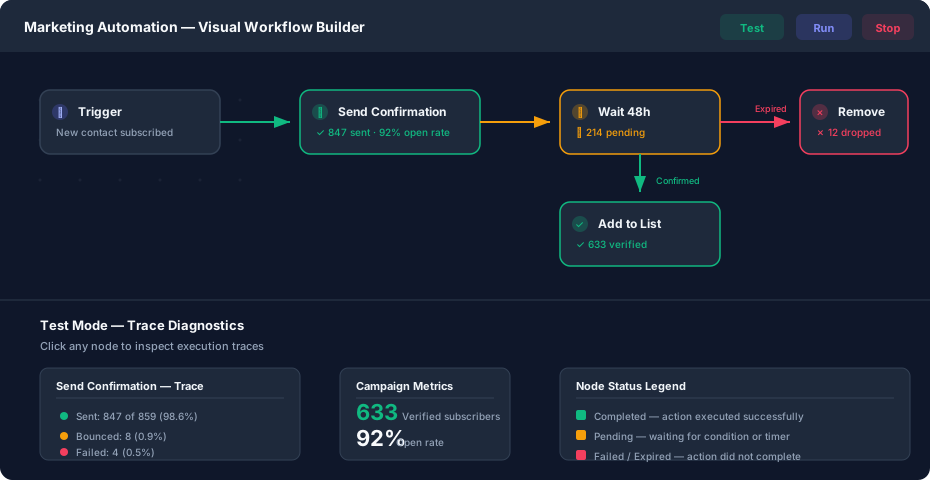
The old activity form is gone. In its place is a full drag-and-drop canvas where each campaign step — an email, a wait condition, a server action — is a node you can place, connect, and rearrange visually. The shift is not cosmetic. Building a five-step nurture sequence that used to require opening and saving five separate records now happens on a single screen, with branches and conditions visible at a glance.
AI-assisted campaign creation is baked in from the start. Describe what you want the campaign to do, and the system generates a starting workflow you can modify. It’s not a replacement for strategy, but it eliminates the blank-canvas problem that stalls marketers who know their goal but not the optimal path to get there.
A Test Mode That Actually Tells You What Happened
The new Test button renders the entire workflow as a color-coded preview. Green nodes completed successfully. Amber nodes are waiting on a timer or condition. Red nodes failed or expired. It’s the kind of immediate visual feedback that was completely absent before, where testing meant running a campaign and then hunting through trace records to figure out which step misfired.
Click any node in test mode and a diagnostic pop-up shows the full trace for that step: how many contacts entered, how many completed, bounce rates, failure reasons. This is trace-level granularity delivered in a way that doesn’t require navigating away from the workflow or understanding the underlying data model. A marketer who has never touched a server log can diagnose why a confirmation email isn’t reaching 3% of their list.
The run and stop controls have been merged into a streamlined section alongside the test button. No more hunting through separate menus to launch, pause, or kill a campaign.
Double Opt-In Gets a Proper Template
Double opt-in — the practice of requiring subscribers to confirm their email before being added to a list — is table stakes for any serious email operation. Yet in the previous version, setting it up in Odoo required manually wiring an email activity to a custom server action that added confirmed contacts to the right mailing list. Most users either got the configuration wrong or skipped it entirely.
The rebuilt double opt-in template loads from a new “Load a Template” pop-up accessible when creating a campaign. It ships with three preconfigured activities: a trigger that enrolls new contacts, a confirmation email with a built-in verification link, and a subscription action that adds confirmed addresses to the verified list. The old manual email-plus-server-action approach is gone, along with the card-based template selector that preceded it.
Audience Targeting Moves to a Trigger System
The previous campaign form had Target and Filter fields that controlled which contacts entered the workflow. These have been replaced by a dedicated trigger pop-up with enrollment tabs, trigger types, and per-record enrollment rules. The change matters because it separates “who enters the campaign” from “what happens to them” — a distinction the old form blurred by cramming both concepts onto the same screen.
Trigger types now include event-based enrollment alongside the existing filter-based approach. A contact updating their preferences, a deal reaching a specific pipeline stage, or a support ticket being closed can all kick off a targeted campaign without the marketer needing to write domain filters or wait for a scheduled batch run.
Metrics Live on the Nodes
Campaign metrics used to live in separate reports — activity-block graphs, filter tabs, and a dedicated statistics page. The redesign pulls key numbers directly onto each workflow node. Open rates, click counts, and conversion figures appear inline, updating as the campaign runs. The old graphs and filter tabs have been removed entirely.
Supporting the inline metrics are redesigned Kanban card counters that show campaign-level performance, smart buttons for quick access to link statistics, and restructured Traces and Participants reports that replace the old activity-block view. The data is the same; the access path is radically shorter.
What It Means for Marketing Teams
This is the most significant Marketing Automation update in at least three major Odoo releases. The visual builder, the diagnostic test mode, the preconfigured templates, and the inline metrics all address the same underlying problem: the module was built by engineers for engineers, and marketers either underused it or worked around it with external tools. The new interface meets them where they are — on a canvas, not in a form.