Every Odoo developer has encountered the sequence field in a module manifest at some point. Open the __manifest__.pyof CRM, Sales, Inventory, Accounting, or virtually any default Odoo application, and there it is — a plain integer sitting among the more familiar keys like name, version, and depends. Set it to 10 and the module appears near the top of the app menu. Set it to 300and it drifts toward the bottom. Simple enough in practice, but until now, you wouldn’t find a single line about it in Odoo’s official documentation.
That has finally changed. Odoo has added the sequence field to its official module manifest reference, giving developers a clear, documented explanation of what it does, what values it accepts, and how it affects the ordering of applications across the system.
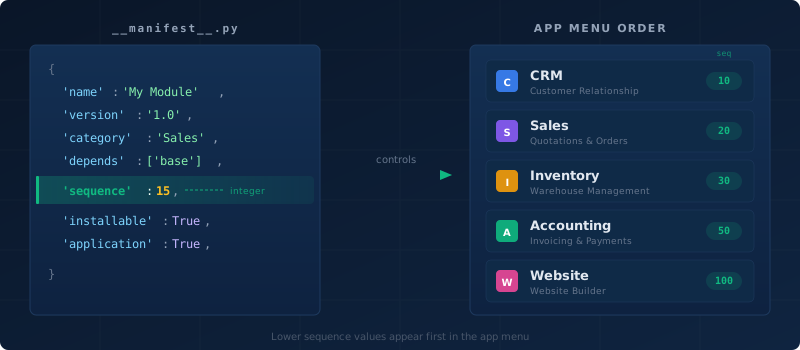
What the Sequence Field Actually Does
The sequence key in a module’s __manifest__.pyfile accepts an integer value that controls two things. First, it determines the position of the module’s app entry in the main navigation menu — the horizontal bar of icons that users see across the top of every Odoo instance. Lower numbers appear first, higher numbers appear later. Second, it influences the default sort order in the Apps list view, which is the gallery of available and installable modules that administrators use to manage their Odoo installation.
The default value, when no sequence is specified, is 100. This means any module that omits the field will sort after all of Odoo’s core applications, which typically use values well below that threshold. CRM uses 5, Sales uses 5, Inventory uses 25, Accounting uses 25, and Manufacturing uses 50. The exact numbers vary between Odoo versions, but the pattern is consistent: core business apps sit in the low single digits to low double digits, while utility modules and less-central apps use higher values.
Why It Was Never Documented
The sequencefield has existed in Odoo’s module system for years — long enough that most experienced developers treat it as common knowledge. It’s the kind of feature that gets passed along through source code reading, community forum answers, and blog posts rather than through official references. The manifest documentation historically covered the essential fields like name, version, depends, data, installable, and application, but stopped short of the fields that were considered “obvious” or “self-explanatory.”
The problem with undocumented features, even obvious ones, is that they create uncertainty. Developers building custom modules had to reverse-engineer the behavior by reading the source code of existing apps. What happens if two modules have the same sequence? Doessequence affect anything beyond menu ordering? Is the field respected in all views, or only in specific contexts? These are the kinds of questions that documentation is supposed to answer, and without it, every developer had to figure them out independently.
Using Sequence in Custom Modules
For developers building custom Odoo modules, the sequence field is straightforward to use. Add it to your __manifest__.py file alongside your other manifest keys:
{
    'name': 'Custom Dashboard',
    'version': '1.0',
    'category': 'Productivity',
    'depends': ['base', 'web'],
    'sequence': 15,
    'application': True,
    'installable': True,
}
The value is a plain integer. There are no constraints on the range, no validation rules, and no requirement that values be unique across modules. If two modules share the same sequence number, Odoo falls back to alphabetical ordering by the module’s technical name to break the tie.
Best Practices for Choosing Sequence Numbers
The convention among Odoo’s own modules suggests a few practical guidelines. Core business applications — the ones users interact with daily — use values in the range of 5 to 50. Supporting apps that extend core functionality without being standalone workflows tend to use values between 50 and 100. Configuration-only modules, libraries, and technical dependencies typically omit the field entirely, letting them default to 100 and sort to the end of the list.
For custom modules, the safest approach is to choose values in the gaps between existing Odoo apps. If you want your custom module to appear between Sales and Inventory in the menu, look at their sequence values in the current version and pick a number in between. Leave room for future modules — jumping by increments of 5 or 10 is preferable to using consecutive integers, since it gives you space to insert additional modules later without renumbering everything.
Avoid using very low numbers like 1 or 2 unless you genuinely want your module to appear before CRM and Sales in the menu. Users expect the standard apps in their usual positions, and pushing them down by inserting a custom module at the front of the list can be disorienting.
Impact on the Apps List View
Beyond the main menu, the sequencefield also affects the Apps list — the view where administrators browse, install, and uninstall modules. When sorted by default, modules appear in sequence order, which means core apps float to the top and third-party or custom modules appear further down. This is by design: it keeps the most commonly needed apps visible and accessible without scrolling.
For module publishers distributing through the Odoo Apps Store, the sequence value determines where their module appears relative to others in the same category when a user first opens the Apps list. A well-chosen sequence number can mean the difference between appearing on the first screen and being buried pages deep.
A Small Documentation Win That Matters
Adding one field to a reference page might seem like a minor change, and in terms of effort, it is. But documentation gaps have a compounding cost. Every developer who has to read source code instead of a reference page loses time. Every Stack Overflow answer and forum thread explaining the sequence field represents duplicated effort that a single paragraph of official documentation would have prevented. Every custom module that ships with a default sequence of 100because the developer didn’t know the field existed represents a slightly worse user experience that could have been avoided.
Odoo’s module manifest is the front door of every custom application. Documenting all of its fields — not just the ones that are strictly required — is the kind of completeness that makes a platform genuinely developer-friendly. The sequencefield was the most visible gap, and now it’s closed.