Multi-company setups in any ERP come with a particular category of headaches that single-entity businesses never think about. One of the most persistent is email. When you have three companies sharing one Odoo instance — each with its own domain, its own SMTP server, and its own sender reputation — making sure that emails go out through the right server isn’t a feature request. It’s a deliverability requirement.
Odoo has added a capability that addresses this directly: outgoing email server selection based on the “From” address. It sounds straightforward, but the implementation has a few layers that are worth understanding, especially if you’re running a multi-company environment where email deliverability keeps you up at night.
The Problem With Shared Email Servers
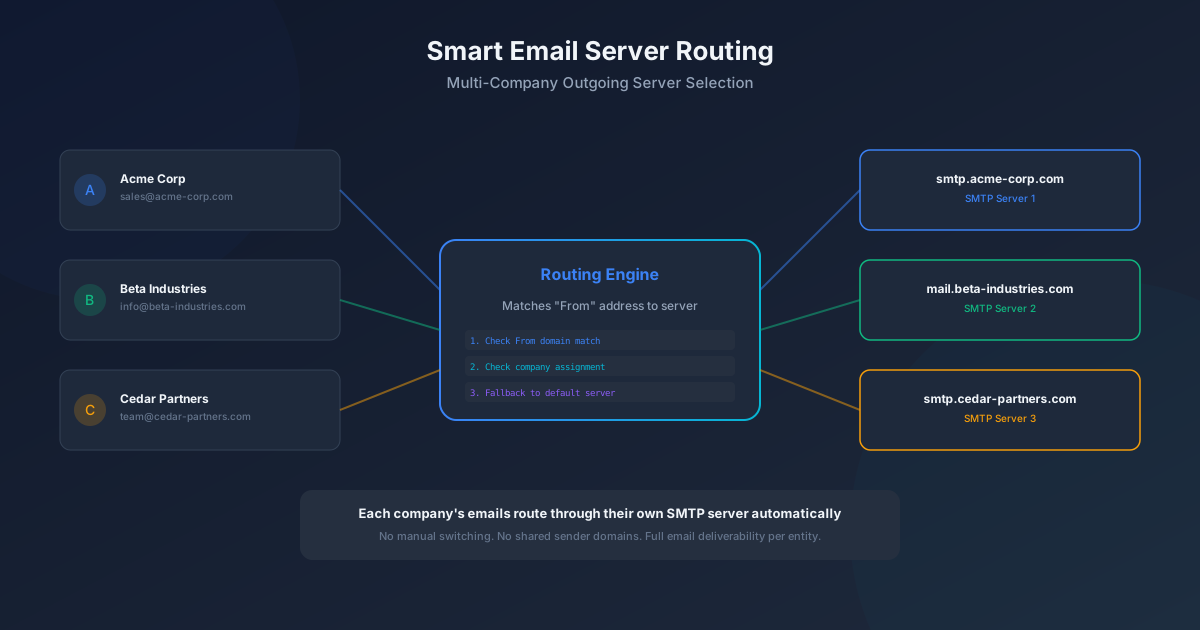
In a typical multi-company Odoo setup, you might have Acme Corp sending from sales@acme-corp.com, Beta Industries from info@beta-industries.com, and Cedar Partners from team@cedar-partners.com. Each domain has its own SPF records, DKIM signatures, and DMARC policies. Each company might use a different email provider entirely.
Without intelligent routing, all three companies’ emails go through whatever SMTP server happens to be configured as the default. That means an email from sales@acme-corp.com might get sent through Beta Industries’ mail server, immediately failing SPF checks and landing in spam. The sales rep doesn’t know why their emails aren’t getting responses. The IT admin doesn’t get alerted. The deal dies quietly.
How the Routing Engine Works
Odoo’s solution is a three-step matching algorithm that evaluates the “From” address on every outgoing email and selects the appropriate SMTP server.
First, it checks for a direct domain match. If the sender’s email domain matches the domain configured on a specific outgoing server, that server wins. This is the most common case and the most reliable — acme-corp.com emails go through the SMTP server labeled for acme-corp.com.
Second, if no domain match exists, the system checks the company assignment. Each outgoing server can be assigned to a specific company in the multi-company hierarchy. If the email is being sent in the context of Beta Industries, and a server is assigned to Beta Industries, that server is selected even if the domain match isn’t exact.
Third, if neither domain nor company produces a match, the system falls back to the default outgoing server. This ensures that emails always get sent, even if the configuration isn’t perfectly set up. The fallback is a safety net, not a design feature — if you’re relying on it, your configuration probably needs attention.
Why This Matters for Deliverability
Email deliverability has become significantly more complex in recent years. Google and Yahoo’s 2024 sender requirements made SPF, DKIM, and DMARC alignment mandatory for bulk senders. Microsoft followed with similar enforcement. The practical effect is that sending an email from one domain through another domain’s SMTP server is increasingly likely to result in rejection rather than just spam folder placement.
For multi-company Odoo instances, correct server routing isn’t optional anymore. It’s the difference between emails that arrive and emails that bounce. The automatic routing feature turns what was previously a manual, error-prone configuration task into something the system handles transparently on every send.
Setting It Up
The configuration is straightforward. In the outgoing mail server settings, each server now accepts a “From Filter” field that specifies which sender addresses or domains should route through it. Set up one server for each company domain, add the appropriate domain filter, assign the server to the correct company, and the routing handles itself from that point forward.
The system also handles edge cases gracefully. If an employee works across multiple companies and sends emails from different contexts, the routing evaluates each email independently based on its specific “From” address. Switch companies in the Odoo interface, and the next email automatically routes through the appropriate server.
The Broader Pattern
This feature is part of a broader trend in Odoo’s multi-company architecture: making shared instances behave as if each company has its own dedicated system. From separate chart of accounts to independent inventory warehouses to company-specific website domains, the platform has been systematically eliminating the compromises that multi-company setups traditionally require.
Email routing feels like a small feature in isolation. But for the IT administrator managing a three-company Odoo instance who used to spend time troubleshooting why Company B’s invoices were going to spam, it eliminates an entire category of support tickets. That’s the kind of quiet improvement that makes an ERP genuinely easier to live with.