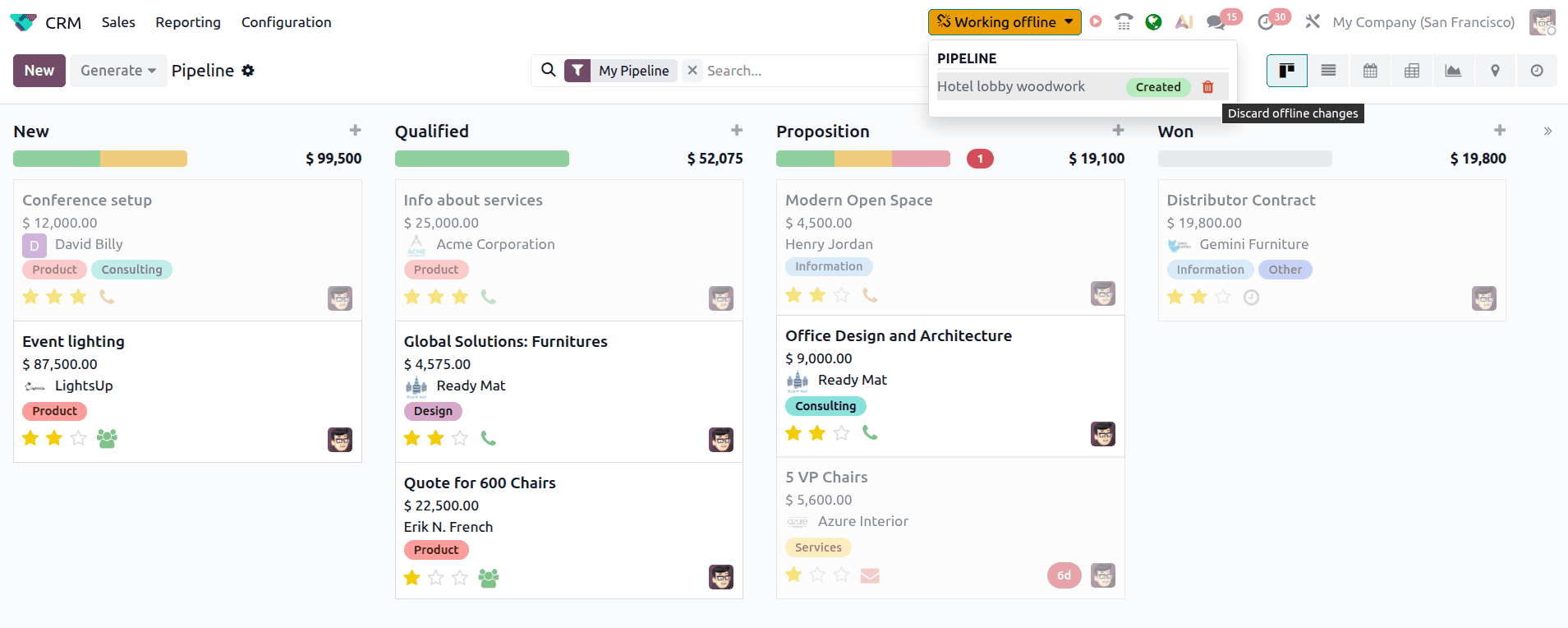
Losing internet in the middle of a workday used to mean losing access to your entire ERP. You could stare at a loading spinner, switch to a spreadsheet, or just wait. Odoo had a basic offline mode that let you view previously opened records, but you couldn’t actually do anything with them. That changes now.
Odoo’s offline mode has been rebuilt to support real work during connectivity gaps. Records can be edited, created, deleted, archived, and unarchived — all while fully disconnected. The system queues every change locally and syncs it automatically the moment your connection comes back. For field teams, traveling executives, and anyone who’s ever had a Wi-Fi dropout during a critical data entry session, this is a fundamental shift in how the platform handles unreliable networks.
What You Can Actually Do Without a Connection
The new offline capabilities come with clear rules. You can create new records, but only if you’ve previously created a record of the same type while online. The system needs to have cached the form structure and default values at least once. Similarly, you can edit, delete, archive, or unarchive any record you’ve previously opened in that browser session.
There are limits. Attachments and images can be viewed offline, but you can’t upload new ones or delete existing files until you’re back online. And anything you haven’t touched during your current session won’t be available — the system grays out navigation items and views it can’t serve from its local cache.
These constraints are sensible. Rather than trying to replicate the entire database locally (which would create a nightmare of merge conflicts), Odoo caches only what you’ve actually interacted with. It’s offline mode for short-term interruptions, not a substitute for a locally installed application.
Cached Searches Work Like Bookmarks
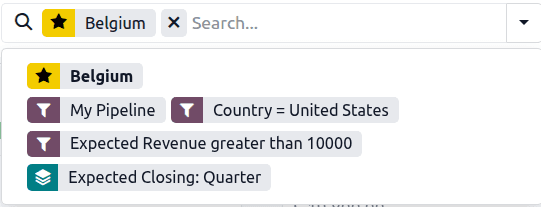
One of the more thoughtful additions is search replay. Any search query you’ve run while online gets cached and can be repeated offline. Click the search bar and you’ll see your previous searches listed as options. The results won’t include records created by other users since your last online session, but for your own workflow — finding that opportunity you were working on, pulling up a specific customer record — it works exactly as you’d expect.
This is a small feature that removes a disproportionate amount of friction. Without it, working offline would mean manually remembering and navigating to every record you need. With it, your recent search patterns effectively become offline bookmarks.
The Change Queue Shows You Exactly What’s Pending
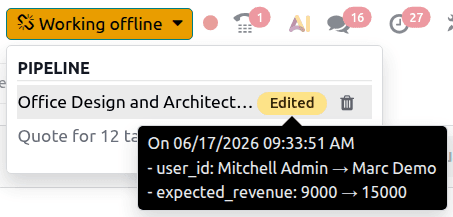
When you go offline, a “Working offline” button appears in the header. Clicking it reveals every pending change in a dropdown list. Each modified record shows a tag indicating whether it was created, edited, archived, or unarchived. Hover over an “Edited” tag and you’ll see exactly which fields were changed and what the old and new values are.
This transparency matters because offline changes can go wrong. Maybe you edited the wrong record, or made changes in an order that doesn’t make sense once you think about it. The queue view lets you review everything before it syncs, and you can discard individual changes with a trash icon if something looks off.
When connectivity returns, the queue drains automatically. There’s no manual sync button to remember, no confirmation dialog to click through. Your changes just appear in the database as if you’d made them online.
Administrators Can Disable Caching for Sensitive Views
Not every view should be available offline. Reporting dashboards that show aggregate financial data, for instance, could be misleading if they’re serving stale cached numbers. Odoo now lets administrators disable data caching on a per-view basis through developer mode.
The process is straightforward: open the view, enable developer mode, click the debug icon in the header, select “Action,” and toggle off “Data caching.” That view will simply be unavailable when the user is offline, rather than showing potentially outdated information. It’s a blunt instrument, but it’s the right one — better to show nothing than to show wrong numbers on a financial report.
Why This Matters Beyond the Feature Itself
Offline capability in an ERP isn’t a nice-to-have for a significant chunk of Odoo’s user base. Field service technicians updating work orders in basements with no signal. Sales reps entering orders at trade shows with overloaded conference Wi-Fi. Warehouse workers in facilities where concrete walls eat radio waves. These are real, daily scenarios for businesses running Odoo, and until now they’ve required workarounds.
The implementation is deliberately conservative — short-term interruptions only, no long-term offline capability, no conflict resolution for simultaneous edits. But that conservatism is actually reassuring. Odoo isn’t pretending that a browser-based ERP can fully replace a locally installed application. It’s solving the common case — a ten-minute connectivity gap — and solving it well.