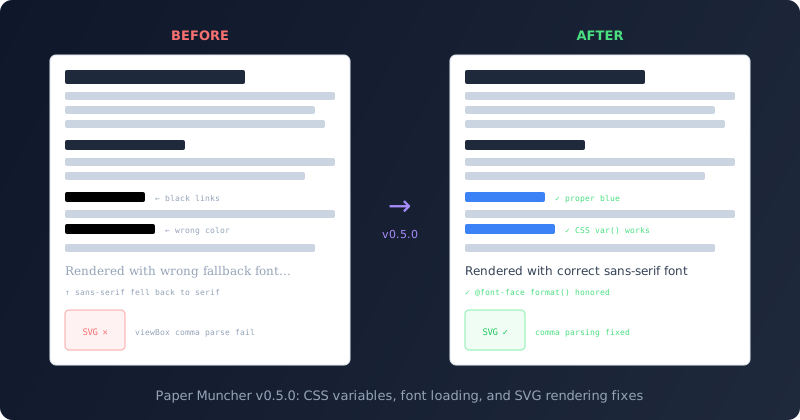
If you’ve ever generated a report in Odoo and wondered why all the hyperlinks showed up as black text instead of the expected blue, the answer was buried deep in the report rendering engine. Paper Muncher — Odoo’s purpose-built HTML-to-PDF rendering engine — didn’t properly handle CSS custom properties with initial values. The v0.5.0 release fixes that, along with several other rendering issues that have been quietly degrading report output quality.
CSS Variables Finally Work in Reports
Modern CSS relies heavily on custom properties (the var()syntax). Odoo’s own stylesheets use them extensively — link colors, brand colors, spacing tokens, and theme values are all defined as CSS variables. The problem was that Paper Muncher’s CSS engine didn’t support var() substitution on custom properties that had an initial value declared through@property rules.
The result was predictable: any style that depended on a CSS variable with a registered initial value fell back to the property’s default, which for text color meant black. Links, buttons, branded elements — anything styled through the variable system lost its color in PDF output. The fix adds proper var() resolution to the property value computation pipeline, so custom properties with initial values now substitute correctly.
Font Loading That Stops Downloading Everything
The @font-face descriptor in CSS is designed as a prioritized list. You declare multiple srcentries — WOFF2, WOFF, TTF, EOT — and the browser is supposed to walk the list, check the format()hint, skip any formats it can’t decode, and stop at the first one that loads successfully. Paper Muncher was doing none of that.
Instead, it was downloading and attempting to embed every single source in the list, regardless of format. EOT fonts that it couldn’t render? Downloaded anyway. SVG font files? Fetched and double-processed. The engine was doing three to four times the network requests necessary for every custom font on a page.
The fix is straightforward but the impact is real: the engine now reads the format()hint before fetching, skips formats it can’t decode, and breaks after the first successful load. Reports with custom fonts render faster, and the output actually uses the correct font file instead of potentially picking up a fallback from a later source entry.
SVG Elements Stopped Breaking on Commas
A surprisingly subtle bug was causing SVG elements to fail silently in reports. The CSS property parser was using a token factory method to match commas, but the factory produced a token with empty data while the actual lexer emitted commas with data=",". The mismatch meant the parser couldn’t skip past commas in comma-separated value lists.
This affected two things directly: multi-value font-familydeclarations (only the first font in the list was parsed, causing most stylesheets to fall back to the initial sans-serif) and SVG viewBoxattributes (comma-separated coordinates weren’t consumed properly). The fix switches comma matching from the factory method to the token type constant, which matches regardless of the data field.
Better Image Sizing in the Layout Engine
Report layouts that include images — product photos, logos, chart exports — now render with more accurate dimensions. The layout engine’s image sizing logic has been reworked to better handle intrinsic aspect ratios, explicit width/height attributes, and CSS sizing constraints. A suite of reference tests (pixel-perfect comparisons against expected output) was added alongside the fix to prevent regressions.
What v0.5.0 Means for Odoo Users
Paper Muncher is still a relatively young project. Odoo built it to replace wkhtmltopdf, the aging WebKit-based converter that had been the default report renderer for years. Each release closes the gap between what modern CSS can express and what actually ends up in the PDF. Version 0.5.0 addresses the kind of issues that users notice but can’t easily diagnose — wrong colors, wrong fonts, missing SVG icons — all traced back to gaps in the CSS and rendering pipeline.
The release also integrates a new prose rendering system, though details on that are still sparse. What’s clear is that the Odoo team is treating PDF report quality as a first-class concern, not an afterthought — and the pace of fixes suggests they’re hearing from users who care about how their invoices, quotes, and delivery slips actually look when printed.