Two of Odoo’s more operationally critical modules — Payroll and Repairs — just received significant interface overhauls that change how users interact with them daily. The payroll side moves to a template-driven contract model, while the repairs module consolidates its multi-screen setup process into a single form. Neither change adds flashy new capabilities, but both remove friction from workflows that thousands of businesses run every day.
Payroll Contracts: Templates Replace the Dashboard
The most visible change in Odoo’s Payroll module is the removal of the contracts dashboard. Previously, HR teams managed employee contracts through a dedicated overview screen that displayed active contracts, pending renewals, and contract statuses. That dashboard is gone.
In its place, Odoo introduces a template-first approach where all contracts stem from predefined templates. The shift reflects how most companies actually handle employment contracts: they have a handful of standard contract types (full-time, part-time, fixed-term, freelance) and create individual contracts by cloning and customizing a template rather than building each one from scratch.
The documentation rewrite strips out ten screenshots from the old interface and replaces the entire contract creation workflow with a leaner process. The old flow required navigating through separate screens for contract details, salary information, garnishments, and signatories. The new approach consolidates these into a template-based flow where the common fields are pre-populated and HR only fills in the employee-specific details.
A separate “send and sign” process that was previously embedded in the contracts documentation has been extracted into its own dedicated section. This is a sensible split — contract creation and contract signing are distinct workflows with different stakeholders, and mixing them in a single page created confusion about which steps were required at which stage.
Repair Orders: One Form Instead of Five Screenshots
The Repairs module receives a parallel simplification. The old repair order creation process was documented across multiple sections with separate screenshots for the left side of the form, additional options, product moves, and the completed form. The new version consolidates everything into a single repair order form with clearly defined tabs.
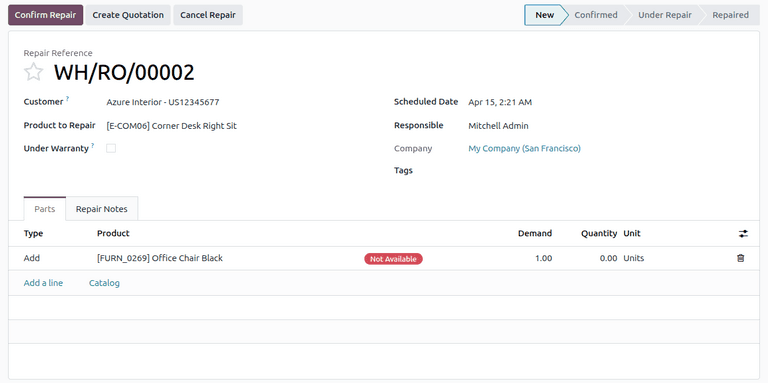
The Parts tab now prominently features three part type options: Add, Remove, and Recycle. The “Recycle” option is worth noting — it tracks components that are removed from a product during repair but returned to inventory rather than discarded. For businesses in electronics repair, automotive service, or any industry where salvageable parts have value, this keeps the material flow visible without requiring separate inventory adjustments.
What the Heading Changes Signal
Both updates include structural changes to their documentation headings, which might seem cosmetic but reflects a deeper reorganization. The repair orders section moves from a flat list of instructions to a hierarchical structure: form configuration, parts management, repair notes, initiation, and return. Each phase of the repair lifecycle gets its own subsection, making it easier for technicians to find the specific step they’re stuck on rather than scrolling through a monolithic procedure.
The payroll documentation follows the same pattern, breaking the contract workflow into discrete stages that map to how HR teams actually process employment agreements.
The Return Workflow Gets Warranty Logic
One practical improvement in the repairs module is the return section, which now distinguishes between warranty and non-warranty scenarios. When a repair is complete, the process for returning the product to the customer differs based on whether the repair was covered under warranty. The documentation now separates these paths clearly, reducing the guesswork for service desk operators who handle both types of repairs.
Why Simplification Beats New Features
Neither of these updates introduces capabilities that didn’t exist before. Template-based contracts were already possible, and repair orders already tracked parts. What changed is the interface complexity. Fewer screens to navigate, fewer screenshots to reference, fewer decisions to make at each step.
For the HR manager setting up their twentieth employee contract this quarter or the repair technician logging their fifth service order today, that reduction in clicks and cognitive load compounds into real time savings. It’s the kind of improvement that doesn’t make headlines but makes the software noticeably better to use every day.