“Batches” was never a great name for payroll runs. The term suggested a technical operation — queue up some records, process them in bulk, hope nothing goes wrong. For HR managers who aren’t database administrators, it communicated exactly nothing about what they were supposed to do or in what order.
Odoo 19 acknowledges this by dropping the terminology entirely. Payroll batches are now “Pay Runs,” and the rename isn’t just cosmetic. The entire interface has been redesigned around a guided workflow that makes the payroll cycle feel less like navigating a spreadsheet and more like following a recipe.
Four Steps, Clearly Marked, Impossible to Skip
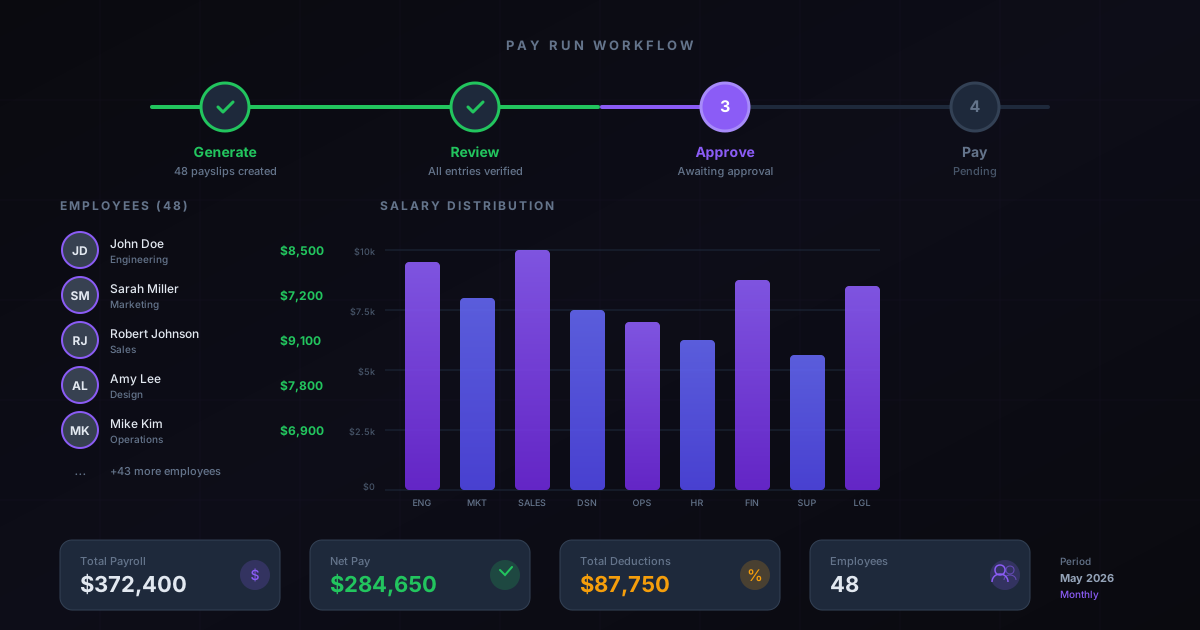
The new Pay Run interface organizes payroll processing into four sequential stages, each presented as a distinct step with its own screen, validation checks, and action buttons.
Step 1: Generate Work Entries.The system pulls attendance records, leave requests, overtime logs, and planning schedules into work entries for each employee. HR reviews these entries for accuracy — does the system have the right number of hours? Are approved leave days reflected? Were overtime requests captured? Any discrepancies show up here with clear flags before a single payslip calculation runs.
Step 2: Generate Payslips. Once work entries are confirmed, the system computes payslips for all employees in the run. Salary rules fire, deductions apply, allowances add up, and each employee gets a detailed payslip with gross-to-net breakdowns. The system presents a summary view showing total amounts, flagged anomalies, and employees with unusual variances from their typical pay.
Step 3: Review and Approve.This is where the human judgment lives. HR managers review payslips individually or in bulk, checking for anything the automated rules might have miscalculated. The interface highlights employees whose pay changed significantly from the previous period — new hires on their first payslip, employees who took unpaid leave, people with commission or bonus adjustments. Approval is explicit: someone has to sign off before the system moves to payment.
Step 4: Process Payment.Approved payslips generate payment entries and, depending on configuration, bank payment files. For companies using the Wage Protection System in the UAE, this step generates the WPS-compliant SIF file. For European businesses, it creates SEPA payment files. The payment step is the final gate — once processed, the payroll is done and journal entries post automatically.
Why the Guided Approach Matters
The old batch interface presented everything at once. Buttons for generating payslips sat next to buttons for confirming them, which sat next to buttons for creating payment entries. An experienced payroll manager knew the right sequence. A new hire in HR did not, and the consequences of clicking the wrong button at the wrong time ranged from duplicate payslips to premature payment file generation.
The step-based design eliminates that risk. You can’t generate payments before payslips are approved. You can’t approve payslips before work entries are verified. Each step validates the previous one’s completion before unlocking the next action. The workflow enforces the correct sequence even when the person running it doesn’t know what the correct sequence is.
This matters especially for small businesses where payroll falls to whoever happens to wear the HR hat that month. The guided workflow turns payroll from a process that requires training into one that explains itself as you go.
The Master Report Gives Management a Single View
Running alongside the Pay Run redesign is a new Master Report that aggregates payroll data across all employees for any time period. This isn’t a payslip report — those show individual employee detail. The Master Report shows the organizational view: total payroll cost by department, comparisons between periods, breakdowns of base salary versus allowances versus deductions, and employer contribution totals.
For CFOs asking “what did we spend on people last quarter,” the answer is now a single report. For HR directors tracking compensation trends, the period-over-period comparison highlights where costs are climbing and why. The report works across all localizations, so multinational companies get a consistent format regardless of which country’s salary rules generated the underlying payslips.
Salary Rules and Structures Get Cleaner Organization
The back-end changes support the front-end redesign. Salary rules — the formulas that calculate each line on a payslip — now support domain-based conditions tied to employee properties. A rule can apply only to employees in a specific region, with a specific contract type, or enrolled in a particular benefit program. This replaces the old approach of creating separate salary structures for every permutation of employee characteristics.
The salary configurator also ties benefits to employee properties now. Instead of hard-coding benefit eligibility into structure rules, administrators define which properties qualify an employee for which benefits, and the system resolves the calculation dynamically. Change an employee’s property — say, moving them from a standard contract to a management contract — and the next pay run automatically picks up the new benefit structure without touching the salary rules.
What Payroll Teams Should Expect
The transition from batches to Pay Runs happens automatically on upgrade. Existing batch records migrate to the new Pay Run format, and historical data remains accessible. The workflow steps appear immediately, with each step pre-populated based on the migrated batch’s state.
The learning curve is, deliberately, almost flat. If anything, teams accustomed to the old interface will find payroll takes fewer clicks and generates fewer “did I do that in the right order?” moments. For teams running payroll for the first time, the guided steps mean the software teaches the process as they follow it — a significant improvement over the previous approach of handing someone a batch screen and hoping they figured out the sequence.