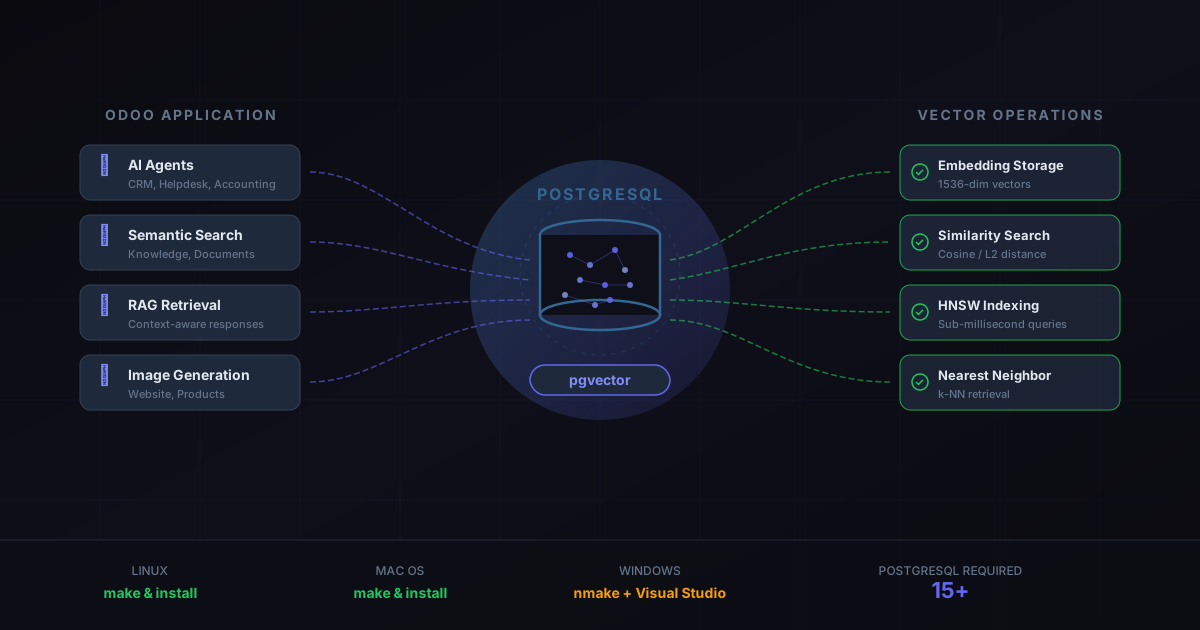
If you run Odoo on your own servers and have been wondering why the AI features everyone talks about — the agents in CRM, the semantic search in Knowledge, the RAG-powered context retrieval — simply don’t appear in your instance, there’s a single missing piece: a PostgreSQL extension called pgvector.
Odoo’s cloud-hosted instances have had pgvector baked in since the AI rollout began. But self-hosted deployments were left with a documentation gap. No mention of the extension, no installation steps, no explanation of why it matters. That gap just closed.
What pgvector Actually Does for Odoo
Vector databases have become the infrastructure layer beneath every modern AI application, and pgvector brings that capability directly into PostgreSQL — the same database Odoo already uses for everything else. Instead of bolting on a separate vector store like Pinecone or Weaviate, pgvector adds vector storage and similarity search as native PostgreSQL operations.
For Odoo specifically, pgvector powers three critical AI pathways. First, semantic search across the Knowledge and Documents modules: when a user types a natural language question, Odoo converts it into a vector embedding and searches for the closest matching content using cosine similarity. Second, RAG (Retrieval-Augmented Generation) for the AI agents — before an agent generates a response, it retrieves relevant context from the database using vector lookups, which is what makes the difference between a generic chatbot answer and one that actually knows your business data. Third, the image generation and content suggestion features that rely on finding semantically similar products, contacts, or records.
Without pgvector installed, PostgreSQL simply doesn’t understand vector data types. The AI features fail silently or never appear in the interface at all.
The PostgreSQL 15 Requirement
There’s a version gate worth noting: pgvector requires PostgreSQL 15 or higher. If your self-hosted Odoo instance is running on PostgreSQL 14 or earlier — which is common for deployments that haven’t upgraded their database server in a few years — you’ll need to upgrade PostgreSQL before pgvector can be installed. This is a non-trivial step that involves database migration, but it’s also a prerequisite for several other PostgreSQL performance improvements that benefit Odoo independent of AI features.
Installation on Linux and macOS
The installation process on Unix-based systems is straightforward but requires compilation from source. You clone the pgvector repository, run make to compile, and thensudo make install to place the extension files where PostgreSQL can find them. The entire process takes under a minute on modern hardware.
After installation, you enable the extension in your Odoo database with a single SQL command:CREATE EXTENSION vector;. From that point forward, PostgreSQL understands vector columns, and Odoo’s AI features activate automatically the next time the application starts.
The simplicity of this path is worth emphasizing. There’s no configuration file to edit, no Odoo module to install, no API key to provision. The extension just needs to exist in PostgreSQL, and Odoo detects it.
Windows Is a Different Story
Windows installations require more effort. Instead of a simplemake, you need Visual Studio with C++ support installed, and the compilation runs through Microsoft’snmake tool. The process also requires setting thePGROOT environment variable to point to your PostgreSQL installation directory, running the x64 Native Tools Command Prompt as an administrator, and then executing the build commands from there.
It’s not complicated, but it’s the kind of setup where one wrong path or missing permission sends you into a debugging spiral. For organizations running Odoo on Windows servers, the recommendation is clear: follow the steps exactly, test in a staging environment first, and keep the official pgvector installation notes bookmarked for troubleshooting.
Why This Matters Beyond AI Features
The addition of pgvector to Odoo’s self-hosted stack signals a broader architectural direction. Odoo is building its AI layer directly into PostgreSQL rather than introducing a separate infrastructure dependency. That’s a meaningful choice for the self-hosted audience specifically — the kind of organizations that chose on-premise deployments to keep their stack simple and their data local.
A separate vector database would have meant another service to maintain, another backup to configure, another failure point to monitor. By keeping everything in PostgreSQL, Odoo lets self-hosted administrators add AI capabilities without expanding their infrastructure footprint. Your existing PostgreSQL backups, your existing monitoring, your existing connection pooling — it all still applies. The vectors are just another column type.
What to Do Right Now
If you manage a self-hosted Odoo instance and want AI features working by next week, the checklist is short. Verify your PostgreSQL version is 15 or higher. Clone pgvector and compile it. Run the SQL command to create the extension. Restart Odoo. The AI features should appear in the interface within minutes.
For organizations still on PostgreSQL 14, this becomes a two-step project: upgrade PostgreSQL first, then install pgvector. Both steps are well-documented, but they require database downtime and should be tested against a copy of production data before going live.
The gap between Odoo’s cloud and self-hosted AI capabilities just got a lot smaller. The only thing standing between your on-premise instance and the full AI feature set is a single PostgreSQL extension that takes minutes to install.