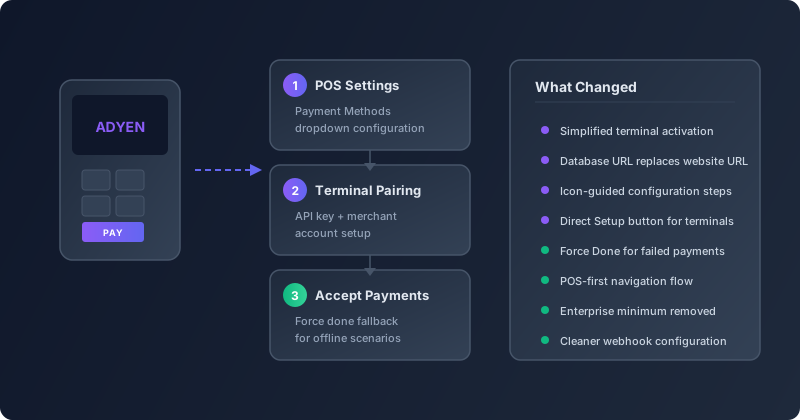
Setting up a card terminal shouldn’t require a certification in payment infrastructure. But until recently, connecting an Adyen terminal to Odoo’s Point of Sale felt exactly like that — a scavenger hunt through multiple configuration screens, vague references to “website URLs,” and an opening paragraph that essentially told small businesses not to bother because Adyen was for enterprises processing ten million or more annually.
That entire experience just got rebuilt from the ground up. The latest update to Odoo’s POS module reworks the Adyen terminal integration with a philosophy that should have been there from the start: configure it from the place where you actually use it.
The Setup Now Starts Where It Should
The biggest change is structural. Previously, connecting an Adyen terminal meant jumping between the Payment Providers page in Accounting, the Payment Methods list, and the POS Settings screen — three separate locations with dependencies that weren’t always obvious. If you configured the provider first but forgot to create a payment method, the terminal wouldn’t appear in your register. If you created the payment method but skipped the webhook configuration, the terminal would pair but silently fail on transactions.
Now the flow starts in POS Settings. You open the Payment Methods dropdown, select or create your Adyen method, and a direct Setup button takes you to the terminal configuration. The system walks you through API key entry, merchant account selection, and terminal pairing in a single linear path. No more context-switching between modules.
Adyen Is No Longer Just for Enterprise
The old documentation opened with a conspicuous note that Adyen required businesses to process “more than 10 million annually.” That language is gone. The updated integration acknowledges what Adyen itself has been doing for years — offering flexible minimums that make its terminals accessible to mid-sized retailers, not just department store chains.
For Odoo users running smaller retail operations, this is a meaningful shift. Adyen’s terminal hardware is well-regarded for reliability and speed, and the removal of the soft gate in the documentation signals that Odoo now treats the integration as a mainstream option rather than an edge case for high-volume merchants.
Database URLs Replace Website URLs
A subtle but important terminology change runs through the entire configuration flow. Every reference to “website URL” in the webhook and callback configuration has been replaced with “database URL.” This matters because Odoo instances don’t always sit behind a public website — many retail deployments run on internal networks or use Odoo.sh databases that have a database URL but no customer-facing website at all.
The old terminology caused real confusion. Support tickets regularly came in from retailers who entered their storefront domain instead of their Odoo instance URL, breaking the callback chain between Adyen and the POS. The new phrasing eliminates that ambiguity entirely.
Force Done Catches What the Network Drops
Retail environments are not server rooms. Wi-Fi drops. Ethernet cables get unplugged when someone rearranges the counter. A customer taps their card, the terminal processes the charge, and then the confirmation packet never makes it back to the POS because the network hiccupped for three seconds.
The new configuration explicitly documents the Force Doneoption — a manual override that lets cashiers mark a payment as complete when the terminal confirms the charge but the POS doesn’t receive the callback. It’s the kind of feature that sounds minor until you’re standing at a register with a line of customers and a payment stuck in limbo.
The previous version buried this capability deep in troubleshooting notes. Now it’s part of the standard workflow documentation, positioned as a normal operational tool rather than an emergency workaround.
Icon-Guided Steps and Cleaner Navigation
The configuration instructions now reference specific interface elements by their icons — the copy icon for duplicating API keys, the plus-circle icon for adding new webhook endpoints, the gear icon for terminal settings. Previous versions described these actions in prose that assumed you already knew where things were, creating a chicken-and-egg problem for first-time setup.
Cross-references between the Adyen payment provider page and the POS terminal page have also been tightened. Instead of sending users to “navigate to the Adyen payment provider,” the docs now use direct section references that link to the exact paragraph. For anyone who has ever clicked a cross-reference link in Odoo’s documentation and landed on a 2,000-word page with no idea which section they needed, this is a welcome improvement.
What This Means for Retail Operations
The Adyen integration update isn’t about adding new payment capabilities. It’s about removing the friction that prevented existing capabilities from being used. Every change — the POS-first navigation, the dropped enterprise gate, the Force Done visibility, the URL terminology fix — addresses a specific pain point that was generating support tickets and slowing down deployments.
For retailers evaluating card terminal options, the simplified setup path makes Adyen a more practical choice alongside the other terminal integrations already available in Odoo. And for existing Adyen users, the clearer documentation means less time configuring and more time selling.