Retail POS software tends to be designed for the simplest possible scenario: one employee, one register, one payment method. That works fine for a single-owner coffee shop. It falls apart the moment you have three baristas sharing a tablet, a floor manager who needs to authorize a return, and a customer holding up their phone expecting to pay with a QR code linked to whatever payment app is dominant in their country.
Odoo 19.0 tackles both of these friction points in the same release. The Point of Sale module gets a rebuilt multi-employee management system that finally treats shared terminals as a first-class use case, alongside a significantly expanded QR code payment workflow that supports regional standards from India to Brazil to Southeast Asia. Together, these changes represent Odoo’s clearest acknowledgment yet that POS complexity isn’t a bug — it’s the baseline.
Shared Terminals Get a Proper Identity Layer
The most visible change in 19.0 is how employees interact with shared POS hardware. Previous versions handled multi-employee setups with a basic login switcher that felt like an afterthought — functional enough for small teams, but painful at scale. The new system redesigns the entire flow around the assumption that multiple people will use the same device throughout a single business day.
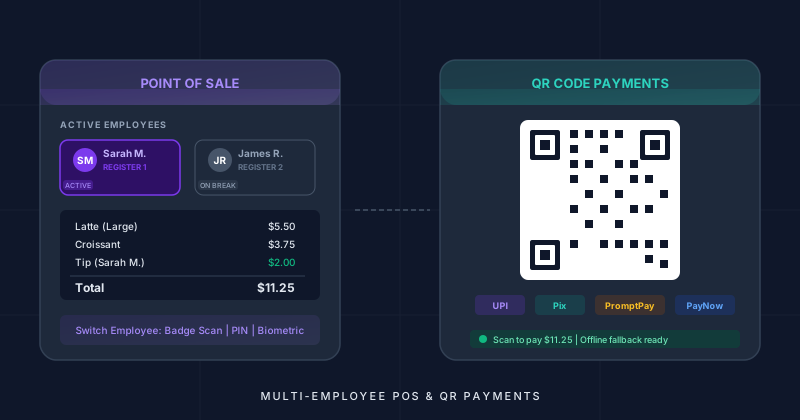
Employees can now authenticate via three methods: badge scanning for environments where speed matters most, PIN code entry for setups without badge readers, and biometric authentication for businesses that want stronger identity verification. The system doesn’t force a single method across the organization. A fast-casual restaurant might use badge taps for counter staff while requiring PIN entry for managers accessing override functions. A jewelry store might mandate biometrics for everyone. The flexibility is the point.
Switching between employees is now nearly instantaneous. When a new employee taps their badge or enters their PIN, the terminal transitions to their session without closing the POS interface. The previous employee’s unsaved work is preserved in the background, so a cashier who steps away mid-transaction doesn’t lose their open order when a colleague takes over the register temporarily.
Per-Employee Tracking Changes the Accountability Model
Authentication is only useful if the system actually does something with the identity information. Odoo 19.0 ties employee identity to every action taken on the terminal, creating a granular audit trail that was previously impossible without third-party add-ons.
Every sale, void, discount, and refund is now tagged with the specific employee who performed it. This per-employee session tracking answers the question that every retail manager eventually asks: “Who sold what, and when?” The data feeds into reporting dashboards where managers can compare individual performance, spot anomalies, and identify training opportunities without relying on manual observation.
Cash register drawers can be assigned to individual employees rather than to the terminal itself. This matters enormously in environments where multiple cashiers share a single physical station across a shift. Each employee’s drawer balance is tracked independently, so discrepancies can be traced to the specific person responsible rather than blamed on the collective.
Tip tracking follows the same principle. In hospitality environments where tips are entered at the POS, each tip is now associated with the employee who handled the transaction. The days of manually splitting a tip pool based on handwritten notes are over — at least for businesses running their POS through Odoo.
Manager Overrides and Controlled Escalation
Not every employee should have the same level of authority on a POS terminal. A cashier ringing up groceries shouldn’t be able to apply a 50% discount without oversight. A new hire processing their first return shouldn’t have unrestricted refund access. Odoo 19.0 introduces a manager override system that handles these scenarios without adding bureaucratic friction to normal operations.
Specific actions — discounts above a threshold, returns over a certain amount, void transactions, price overrides — can be locked behind manager approval. When a cashier attempts a restricted action, the system prompts for a manager authentication. The manager taps their badge or enters their PIN, the action is authorized and logged, and the cashier continues working. The entire interaction takes seconds.
This controlled escalation model balances security with speed. Retail environments can’t afford to have employees calling a manager over a walkie-talkie and waiting five minutes for approval on a routine return. The POS-level override keeps the approval workflow inside the terminal, where the manager can review the details on screen before authorizing.
Shift Handover Without the Guesswork
One of the more practical additions is automatic shift handover summaries. When an employee ends their session — whether they’re clocking out for the day or handing the register to the next shift — the system generates a summary of their activity. Total sales, transaction count, average ticket size, cash collected, discounts applied, returns processed, and tips received are all compiled into a clean report.
The incoming employee starts their session with a clear picture of the register’s current state. Cash drawer balances carry over with full transparency. If the previous shift ended with a discrepancy, the next employee knows about it before they’ve rung up a single sale. This eliminates the most common source of shift-change confusion: the ambiguous handoff where nobody is quite sure how much cash should be in the drawer or whether that pending order was already paid for.
QR Code Payments Go Global
The second major thrust of the 19.0 POS update addresses a payment method that has quietly become dominant in much of the world. QR code payments aren’t a novelty anymore — they’re the primary transaction method in India, Brazil, Thailand, Singapore, and a growing list of other markets. Odoo 19.0 treats them accordingly.
The updated QR code generation flow now supports four additional regional payment standards: UPI for India, Pix for Brazil, PromptPay for Thailand, and PayNow for Singapore. Each standard has its own encoding requirements, metadata fields, and validation rules. Rather than offering a generic QR code that payment apps might or might not recognize, Odoo now generates standard-compliant codes that work natively with the dominant payment apps in each market.
The customer-facing display experience has been overhauled as well. QR codes render faster on secondary screens, reducing the awkward pause between the cashier confirming the total and the customer seeing the code to scan. For busy retail environments where seconds matter, the faster rendering translates directly into shorter queue times.
An offline fallback mechanism addresses the reality that internet connectivity in retail locations is never perfectly reliable. When the connection drops, the system can still generate QR codes using locally cached payment parameters, allowing transactions to continue. Payment confirmation synchronizes when connectivity returns. It’s not a perfect solution — some payment verifications will be delayed — but it’s vastly better than a terminal that simply stops accepting QR payments the moment the Wi-Fi hiccups.
Receipts and the Full Picture
QR code payments also get proper receipt integration. When a customer pays via QR code, the printed or digital receipt now shows the specific payment method used — not a vague “electronic payment” label, but the actual standard (UPI, Pix, PromptPay, or PayNow) along with relevant transaction identifiers. This matters for bookkeeping, for customer disputes, and for the basic professional expectation that a receipt should accurately describe what happened.
The combination of multi-employee management and expanded QR payment support in a single release isn’t coincidental. Both changes address the same underlying problem: POS software that was designed for simplicity struggling to handle the messy reality of how retail actually works. Shared terminals are the norm, not the exception. QR payments are table stakes in half the world. Odoo 19.0 stops treating these as edge cases and starts treating them as core requirements.
For businesses already running Odoo POS, the multi-employee features are available in the module settings with per-terminal configuration. The QR payment standards activate based on the company’s country and configured payment providers. Neither feature requires a migration — they layer onto existing POS deployments as optional capabilities that can be enabled gradually, one terminal or one payment method at a time.