Speed at the register has always been the quiet obsession of every retail and restaurant operator. Shaving a few seconds off each transaction doesn’t sound dramatic until you multiply it across a hundred orders per shift. Odoo just removed an entire screen from that process.
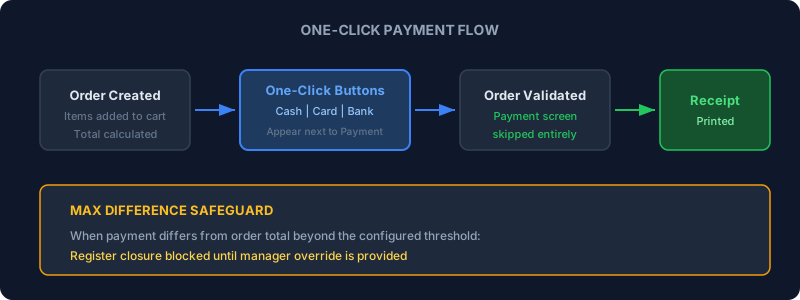
The new one-click payment feature adds shortcut buttons directly alongside the main Payment button in the POS interface. Tap one, and the order validates immediately — no payment screen, no amount entry, no confirmation dialog. The receipt prints (or displays) and the register is ready for the next customer.
How It Works in Practice
Once enabled in POS settings, the feature lets administrators designate specific payment methods as one-click eligible. Cash, credit card, and bank transfer are the typical candidates. Each enabled method appears as a dedicated button next to the standard Payment button on the order screen.
When a cashier taps one of these shortcut buttons, the system assumes the payment amount matches the order total exactly. The order validates, the payment records, and the session moves on. There’s no intermediate screen asking the cashier to confirm the amount or select a payment method — those decisions are baked into the button itself.
One important caveat: for cash payments, the system assumes exact change. If the customer hands over a larger bill and needs change back, the cashier should use the standard Payment button instead, which opens the full payment screen where change can be calculated. The one-click path is built for speed in scenarios where the amount is known — card taps, bank transfers, or exact cash.
What Doesn’t Qualify
Not every payment method can be one-click enabled. Online payments, delivery-linked methods, payment terminals that require cardholder interaction, and ID-verified payment types are excluded. This makes sense — you can’t skip the checkout screen when the payment method itself requires its own interaction flow.
The feature targets the high-frequency, low-friction transaction types: the coffee shop where every order is a contactless card tap, the quick-service restaurant where cash payments are exact, the counter where a regular customer pays by bank transfer. These are the scenarios where the payment screen was pure overhead.
The Maximum Difference Safeguard
Alongside one-click payment, Odoo introduces a maximum difference setting for POS sessions. It’s a separate feature, but it addresses the obvious concern that comes with faster payments: what happens when the register doesn’t balance?
The setting lives in POS payment configuration and lets managers define the maximum acceptable discrepancy between expected and actual cash drawer amounts. When a cashier closes their session and the difference exceeds this threshold, the system blocks the closing until a manager provides an override.
This creates a practical control loop. One-click payments make the checkout faster, but the maximum difference setting ensures that speed doesn’t come at the cost of accountability. If a cashier accidentally validates a cash payment as exact when the customer actually needed change, the discrepancy surfaces at session close rather than hiding in the daily report.
Events Integration: POS Sales Now Visible on Event Forms
In a related update, Odoo now displays a POS Sales smart button directly on event forms. When event tickets are sold through a Point of Sale terminal — common for on-site box offices and door sales — event organizers can see those transactions without switching to the POS module. The button appears automatically once the first POS sale is recorded, giving a unified view of both online and in-person ticket revenue.
Combined with the one-click payment buttons, this makes POS-based event ticketing noticeably faster. An attendee walks up, the operator taps the ticket product and hits the card payment shortcut, and the sale is done. The event form updates with the new revenue in real time.
Why This Matters for Retail Operations
The checkout screen in a POS system is one of those design elements that makes perfect sense for complex transactions — split payments, partial tenders, gift card redemptions. But for the overwhelming majority of retail transactions, it’s an extra step that adds time without adding value. The customer taps their card, the cashier confirms the amount that was already on the screen, the payment processes. The one-click path collapses that into a single action.
For high-volume environments — food trucks, coffee bars, event concessions, quick-service counters — this is the kind of change that compounds. Five seconds saved per transaction across three hundred daily orders is twenty-five minutes of throughput recovered. Not transformative on paper, but meaningful when the line is out the door.