Walk into any fast-casual restaurant with a digital order board behind the counter showing “Ready” and “Preparing” labels next to order numbers, and you’re looking at exactly the kind of system Odoo just rebuilt from scratch for its Point of Sale module.
The POS preparation display — the screen that tells kitchen staff or retail teams what needs to be prepared — has been completely rewritten. The old interface was functional but flat: a list of orders without meaningful staging or visual hierarchy. The new version introduces configurable processing stages, color-coded timing alerts, card-based order layouts, and a dedicated customer-facing Order Status Screen. It’s a serious upgrade for any business where orders move through multiple preparation steps before reaching the customer.
Named Displays with Category Routing
The configuration now starts with creating named preparation displays — “Main Kitchen,” “Bar,” “Pickup Zone” — each linked to specific POS instances and filtered by product category. A coffee shop can route espresso drinks to the bar display and pastries to the kitchen display, all from the same register. Leave the POS field empty and the display receives orders from every register in the system.
This is category-level routing, not item-level, which keeps configuration manageable. You set up your product categories once (hot drinks, cold drinks, food, desserts) and assign them to displays. When a cashier rings up an order with items from multiple categories, each item routes to the correct preparation station automatically.
Multi-Stage Processing with Alert Timers
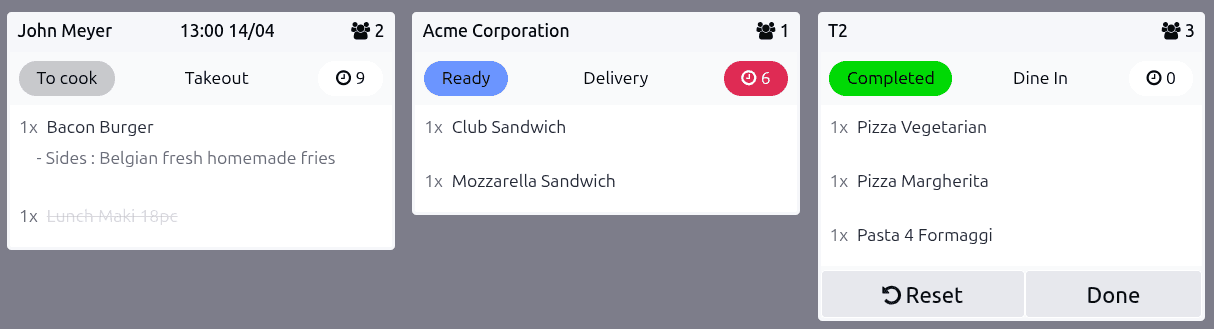
The biggest addition is configurable processing stages. Each display can define its own stages — think “Received,” “Preparing,” “Ready” — with optional color coding and alert timers. Set the alert to five minutes, and any order card sitting in a stage longer than that changes color to flag the delay. The top bar of the display shows order counts per stage, so a kitchen manager can glance at the screen and immediately see how many orders are backed up at each step.
Auto-clear settings handle the cleanup: completed orders disappear from the display after a configurable delay, keeping the screen focused on active work. For restaurants running busy dinner services, this eliminates the manual housekeeping that cluttered the old interface.

Card-Based Orders with Guest Context
Each order appears as a card showing table assignment, order number, customer name, guest count, preset type, scheduled time, and current status. Kitchen staff see exactly who they’re cooking for and how long the order has been waiting. Clicking individual items marks them as completed; clicking the entire card completes all items at once. When every item on a card is done, the order advances to the next stage automatically.
The side panel adds filtering by time range, preset types, and product categories, plus zoom controls for screens mounted at different distances. A “Clear All Orders” button handles end-of-shift resets. And the Recall button brings back orders that were completed prematurely — because in a real kitchen, mistakes happen and the last thing you need is to lose track of an order that was marked done too early.
The Customer-Facing Order Status Screen
The genuinely new piece is the Order Status Screen: a customer-facing display that shows which orders are “Ready” and which are “Almost there.” It’s the digital board at the pickup counter, and it runs on any browser-capable screen — a tablet mounted on the wall, a TV connected to a mini PC, or even a customer’s phone if you share the URL.
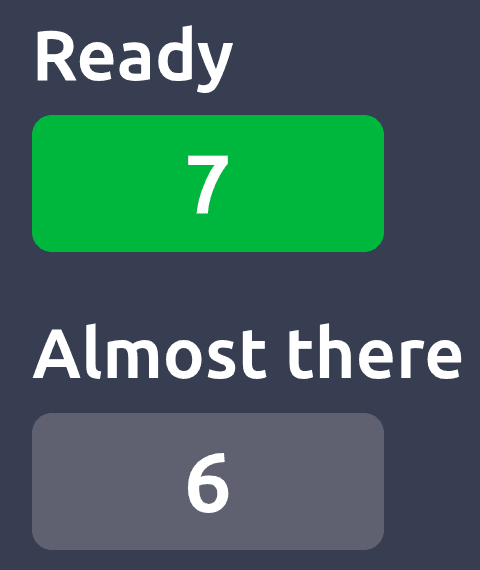
Each receipt prints the order number, so customers know what to watch for. The screen updates in real time as kitchen staff advance orders through stages on the preparation display. No additional hardware is required — this runs in a standard web browser. The only limitation is that IoT boxes aren’t supported for this particular screen, so you need a device with a browser, not just a dumb display connected through Odoo’s IoT infrastructure.
Restaurant Setups Get a Default Display
For POS configurations running in restaurant mode, Odoo now auto-creates a default preparation display. This means restaurants don’t have to manually set up their kitchen display from scratch — they get a working baseline the moment they enable restaurant features. The documentation also adds a cross-reference from the main restaurant POS page, positioning the preparation display as the digital alternative to printing paper kitchen tickets.
That cross-reference matters more than it sounds. Previously, users had to know that the preparation display feature existed and go looking for it. Now it’s surfaced directly in the restaurant workflow documentation, which is where most restaurant operators start their Odoo configuration.
Built for Real Service Environments
What makes this overhaul significant isn’t any single feature — it’s that the preparation display finally works like a proper kitchen display system instead of a developer prototype. Color-coded alerts, multi-stage workflows, category routing, customer-facing screens, and auto-clear logic are table-stakes features for dedicated KDS products from companies like Toast or Square. Having them built into the same system that handles inventory, accounting, and employee scheduling is Odoo’s structural advantage — but only if the implementation is actually usable. This rewrite makes it usable.