Project management inside an ERP creates a tension that standalone tools like Asana or Monday.com never have to deal with. The project data lives next to financial records, HR information, and internal communications. Sharing a project with a freelancer or a client means carefully controlling what they can see, because the wrong access level does not just expose task details — it can expose business data that has no business leaving the organization.
Odoo has offered basic project sharing for a while, but the controls were binary: a project was either internal or shared. That changes with a new visibility and collaboration framework that gives project managers fine-grained control over who sees what, without requiring them to understand Odoo’s underlying access rights system.
Three Visibility Levels
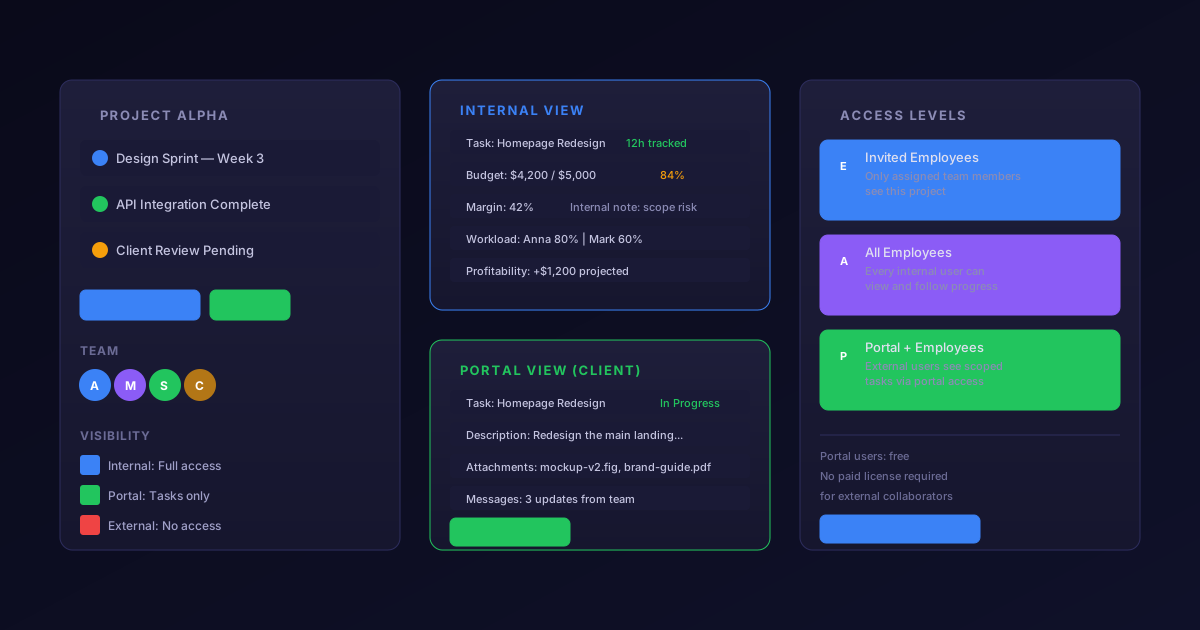
Every project now has a visibility setting with three options. “Invited Employees” restricts the project to team members who are explicitly added as followers or assigned to tasks. Other employees in the organization cannot see the project in their project list, search results, or dashboards. This is designed for sensitive projects — M&A due diligence, executive initiatives, HR investigations — where visibility needs to be limited even within the company.
“All Employees” makes the project visible to every internal user. This is the default and works for standard operational projects where transparency is more valuable than secrecy. Any employee can view the project and its tasks, though editing permissions still follow Odoo’s standard access rights.
“Invited Portal Users and All Employees” extends visibility to external users who have been granted portal access. This is the collaboration mode — the setting you use when clients, vendors, freelancers, or agency partners need to see specific tasks and provide updates without getting access to the full Odoo backend.
What Portal Users Actually See
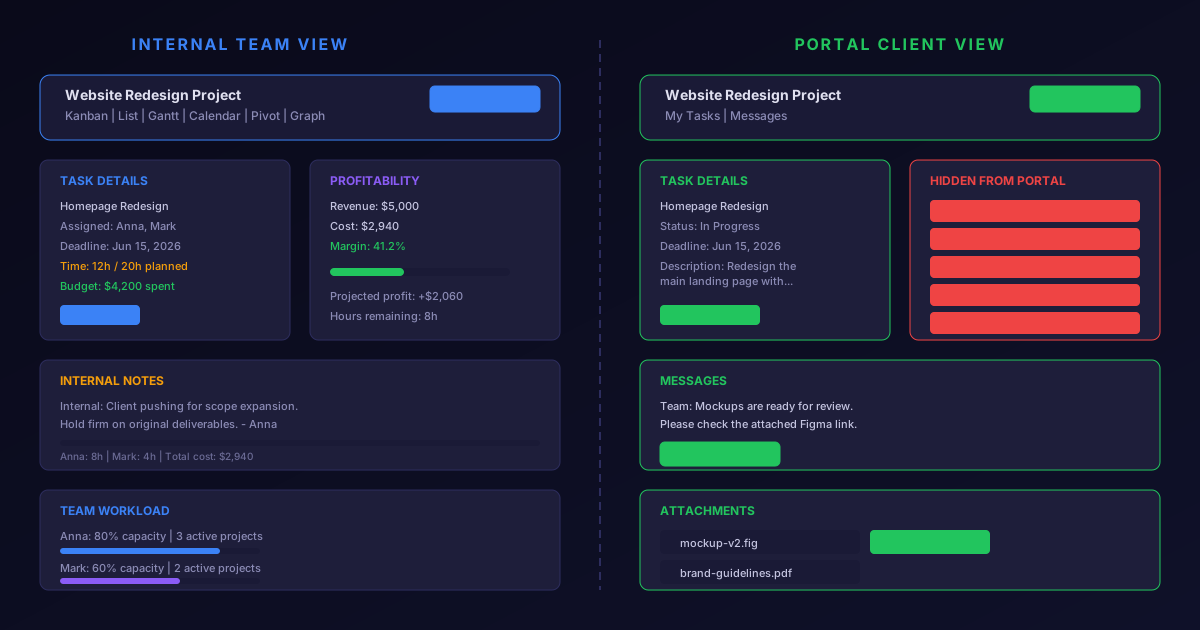
The portal view for external collaborators is deliberately limited. Portal users see the tasks assigned to them, the task descriptions, attached files, and the message thread. They can update task stages if the project allows it, upload deliverables, and post messages that the internal team receives as chatter notifications.
What they cannot see matters more than what they can. Portal users do not see time tracking entries. They do not see internal notes marked as such. They do not see other users’ workload or capacity. They do not see project-level analytics, profitability metrics, or planned versus actual hour comparisons. The firewall between the internal project view and the portal view is thick enough that sharing a project with a client does not accidentally reveal how much time you are spending on their work or how much margin you are making on their contract.
This separation is maintained at the field level. When a portal user views a task, the template literally renders a different set of fields than what an internal user sees. It is not a CSS-based hide — the data is not sent to the browser at all, so it cannot be discovered through browser developer tools or API calls.
Collaboration Without Licensing Overhead
Portal users in Odoo do not consume a paid user license. This is a significant distinction from standalone project management tools where every collaborator — including external participants who log in once a week to update a single task — counts against the subscription headcount.
For agencies managing client projects, consulting firms tracking deliverables, or manufacturers coordinating with subcontractors, this means inviting external stakeholders does not trigger a per-seat cost discussion. The project manager adds the external contact, selects the tasks they should see, and sends the invitation. The external user gets a portal login and sees exactly the slice of the project that was shared with them.
Practical Implications for Service Businesses
The combination of visibility controls and portal collaboration addresses a workflow that service businesses have been cobbling together with workarounds for years. The typical pattern was: use Odoo Projects internally for time tracking and resource planning, then duplicate key milestones into a shared Google Sheet or a client-facing tool like Notion or Basecamp for external communication. Every status update had to be made in two places. Every file had to be uploaded twice. Every question from a client required someone to translate between the internal and external views manually.
With granular visibility, the project lives in one place. Internal team members see the full picture. External stakeholders see their scoped view. Updates flow naturally through the chatter, and the project manager does not have to maintain a parallel communication channel.
The feature does not replace dedicated client portal solutions for businesses that need branded experiences, custom workflows, or document management beyond what Odoo’s portal offers. But for the majority of project-based businesses that just need a clean way to loop clients into task progress without exposing the internal machinery, it eliminates a tool and a workflow that should never have been necessary in the first place.