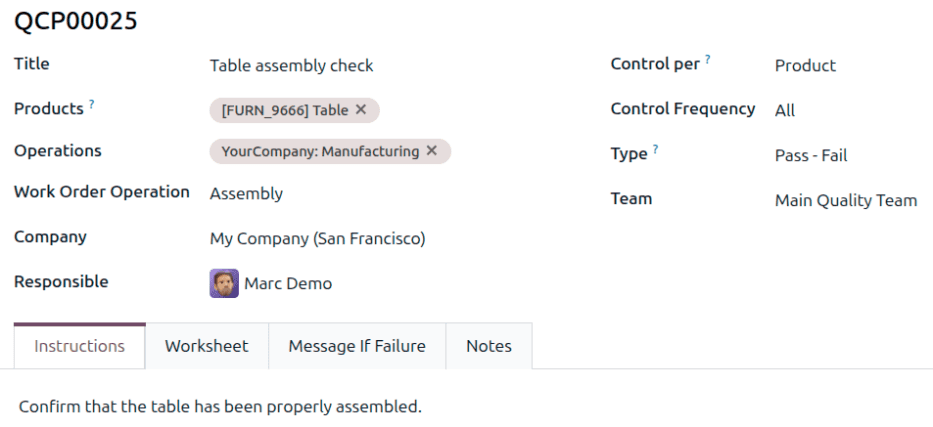
Quality control in manufacturing lives or dies on the details of how inspections are configured. Set up checks too aggressively and you create bottlenecks on the production floor. Set them up too loosely and defects slip through to customers. The configuration form for Quality Control Points is where those decisions get encoded into the system, and Odoo has just redesigned it with several changes that give quality managers more precise control over when and how inspections fire.
On-Demand Checks Join the Frequency Options
Previously, Quality Control Points offered three frequency settings: checking every operation, checking a percentage of operations, and checking at defined intervals. The update adds a fourth option — on-demand. This lets quality teams define a control point that exists as a template but does not trigger automatically. Instead, inspectors can manually invoke the check when circumstances warrant it.
This matters for situations where a quality check is not needed on every run but should be available when something looks off. A machine that has been recently serviced might need an extra inspection cycle. A new batch of raw material might warrant additional scrutiny until confidence is established. On-demand checks let quality teams respond to real conditions rather than relying solely on statistical schedules.
Partial Testing Gets a Percentage Field
The previous approach to partial testing used a checkbox-based system for configuring partial transfer tests. The redesigned form replaces this with a dedicated percentage field that lets quality managers specify exactly what proportion of operations should be inspected. The field label has been updated from the older “Every #% of Operations” to the cleaner “#% of the time” phrasing.
The distinction is more than cosmetic. A percentage field is more intuitive to configure than a checkbox that implies an all-or-nothing choice. Quality managers can set a 10% sampling rate for routine components and a 50% rate for critical ones, tuning the inspection burden to match the risk profile of each product or process step.
Device Specification for Picture-Based Checks
Quality checks of the “Take a Picture” type now include an optional Device field. This lets administrators specify which hardware should be used for capturing the inspection image — a particular camera, a microscope connected to the workstation, or a barcode scanner with an integrated camera. Specifying the device at the control point level ensures consistency across inspections, so the same type of check always produces comparable images regardless of which operator runs it.
Success Conditions for Worksheet Checks
Worksheet-based quality checks — inspections where the operator fills out a structured form rather than measuring a single value — now support a Success Conditions field. This allows quality managers to define the criteria that determine whether a worksheet inspection passes or fails, rather than leaving that judgment entirely to the operator.
For regulated industries where quality documentation must show objective pass/fail criteria, this is a significant improvement. The success condition makes the quality decision auditable: here is what we checked, here is what the threshold was, and here is whether it passed. That chain of evidence is exactly what auditors look for during quality system reviews.
Cleaner Form Layout and Streamlined Fields
Beyond the functional additions, the form itself has been reorganized. The Company and Responsible fields have moved earlier in the layout, putting organizational context at the top where it belongs. The Control per and Control Frequency sections have been restructured with clearer formatting. And the Step Document field — which previously included options for specifying a particular page of an operation worksheet — has been simplified by removing the sub-options that added complexity without proportional value.
The documentation language has been tightened throughout. Phrases like “are used to automatically create” quality checks have been shortened to simply “create” quality checks. These are small changes individually, but collectively they reduce the cognitive load of configuring quality inspections — which matters when the people doing the configuration are quality engineers, not software specialists.