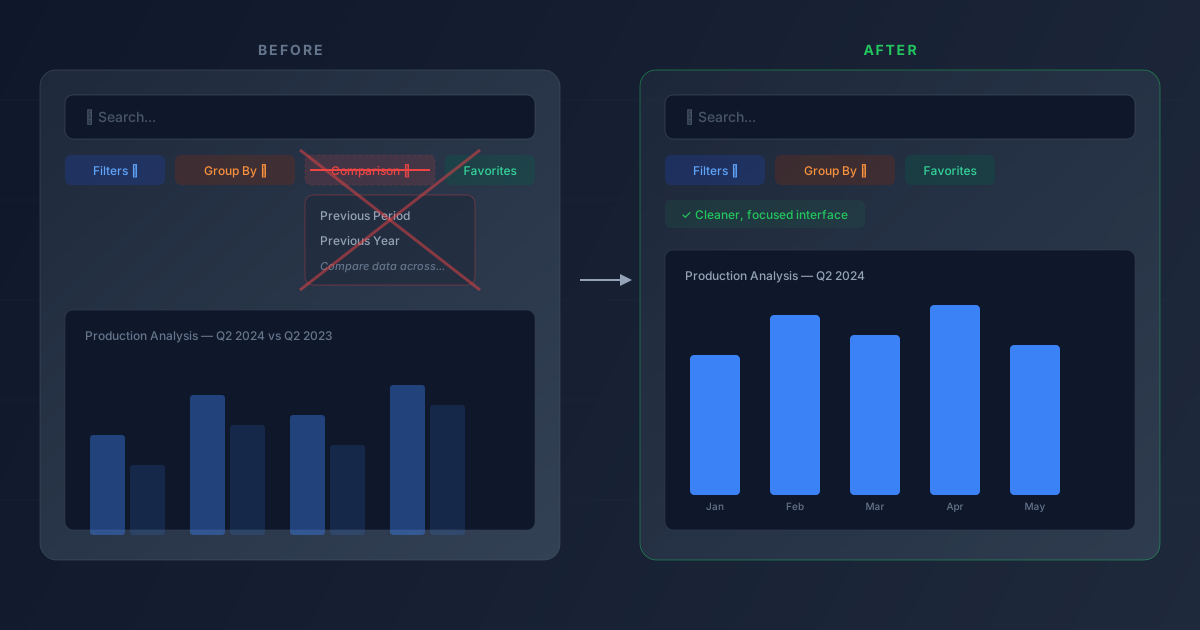
If you’ve used Odoo’s reporting dashboards in the past few years, you probably noticed a fourth option in the search bar alongside Filters, Group By, and Favorites: a Comparison dropdown that let you overlay data from a previous period or previous year onto your current report. It turned bar charts into side-by-side comparisons, added secondary lines to line charts, and split pivot tables into before-and-after columns.
That option is gone. Starting with version 18.2, Odoo has removed the Comparison toggle from the search bar entirely, and the change has now propagated across all supported versions.
What the Comparison Feature Actually Did
The Comparison dropdown appeared in any reporting view that had time-based filters active. If you were looking at a Production Analysis report filtered to Q2 2024, clicking Comparison gave you two choices: Previous Period (which would overlay Q1 2024 data) or Previous Year (which would overlay Q2 2023 data).
The overlay worked differently depending on the chart type. Bar charts showed paired bars — one solid for the current period, one faded for the comparison period. Line charts added a second line. Pie charts split into two halves. Pivot tables added comparison columns with absolute and percentage differences between the two periods.
It was a quick way to eyeball trends without exporting data or building custom reports. The feature lived in the search bar because it was technically a filter modifier: it didn’t change which records you were looking at, but added a second dataset alongside them.
Why It Was Removed
Odoo hasn’t published a detailed rationale, but the removal pattern is consistent with how the platform has been evolving its reporting stack. Over the past several versions, Odoo has been investing heavily in its spreadsheet integration, custom dashboard builder, and the reporting engine’s native capabilities. The Comparison toggle was a blunt instrument — it could only compare the immediately previous period or the same period last year, with no way to customize the comparison window, adjust for business calendars, or handle partial periods gracefully.
For users who needed serious period-over-period analysis, the feature was too limited. For users who didn’t need it, it was an extra button cluttering the search bar. The middle ground — people who used it occasionally for quick checks — is the group most affected by the removal.
What Disappears From the Interface
The practical impact is the removal of the Comparison dropdown from the search bar across all reporting and dashboard views. This includes the Manufacturing dashboard, Purchase reports, Sales analysis, Accounting reports, and every other view that previously supported the feature. The two associated image assets that documented the feature — showing the comparison section in the search bar and the resulting side-by-side chart output — have also been retired from the official documentation.
The Filters, Group By, and Favorites dropdowns remain unchanged. The search bar is now a three-option interface instead of four, which is marginally cleaner but means one less capability available directly from the reporting view.
How to Get Period Comparisons Now
The removal doesn’t mean period comparison is impossible in Odoo — it just means the one-click overlay from the search bar no longer exists. The alternatives require more steps but offer more flexibility.
Odoo’s built-in spreadsheet integration can pull data from multiple periods into a single sheet, with full control over which periods you compare and how the data is presented. The dynamic reporting features in the accounting module support multi-period views natively. And for users comfortable with the technical tools, custom analysis views can be created using Odoo Studio or server-side report definitions.
The tradeoff is clear: the old feature was instant but inflexible. The replacements are more powerful but require intentional setup. For teams that relied on the quick comparison during weekly reviews or stand-ups, building a saved spreadsheet or custom dashboard that replicates the functionality is probably worth the one-time investment.
It’s a small change in surface area, but it reflects Odoo’s broader direction: removing general-purpose shortcuts that half-solve a problem, and steering users toward purpose-built tools that solve it completely.