The Rental module in Odoo has always drawn a line between two kinds of rentable things: physical items that leave your warehouse and non-physical offerings that don’t. Computers, bikes, and camera equipment fall on one side. Hotel rooms, storage units, and on-site labor fall on the other. Until now, the configuration details for both lived on the main Rental landing page, sandwiched between the order dashboard and general settings in a way that made them easy to scroll past.
That’s changed. Product type configuration now has its own dedicated section under the “Configure products” area, giving each setting the space it needs and making the distinction between Goods and Services impossible to miss.
The Goods and Services Split
The terminology is straightforward but the operational implications run deep. A Goods rental product is anything physical that gets removed from company stock, delivered to a customer, and eventually returned. Think vehicles, construction equipment, or formal wear. When you rent out a good, Odoo generates delivery and return receipts, tracks the item through a dedicated Customer/Rental inventory location, and monitors it until it comes back.
A Servicesrental covers everything else: installation work, photography bookings, deposits, and — here’s the interesting one — physical spaces that never actually leave the company’s possession. Hotel rooms and workstations qualify as service rentals because the customer comes to the item rather than the item going to the customer. No stock movement, no delivery receipt, but the same rental period tracking and invoicing logic applies.
Delay Costs and Padding Time
The settings page, accessible through Rental → Configuration → Settings, now organizes default values more clearly. Late return fees are configured as per-hour and per-day amounts with a trigger threshold — you set how many hours overdue a rental must be before fees kick in. You can also pin these defaults to a specific product or leave them global.
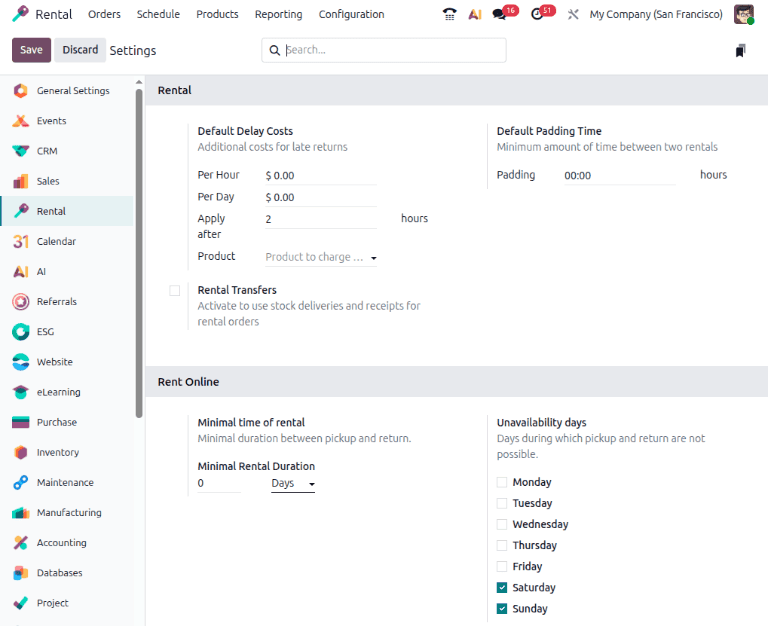
Padding time is the buffer Odoo enforces between consecutive rentals of the same item. If you set it to four hours, a bicycle returned at noon can’t be reserved again until 4 PM. This prevents the common operational headache of back-to-back bookings that don’t account for cleaning, inspection, or transit time.
Both of these defaults can be overridden at the product level through the Hourly Fine, Daily Fine, and Reserve Product fields on individual product forms. The page-level settings act as sensible defaults that apply across the catalog unless you say otherwise.
Six Apps That Make Rentals Actually Work
One of the more useful additions to this dedicated page is an explicit list of the app integrations that unlock different rental capabilities. This matters because the Rental module’s power scales directly with which other Odoo apps are installed, and it wasn’t always obvious which apps controlled which features.
The breakdown is now documented clearly:
- Sales enables online payments, quotation templates, variants, and the PDF Quote Builder
- Sign adds document signing for rental agreements
- Planning automatically matches service products with available employees based on schedule
- Project auto-generates project tasks when rental quotes are confirmed
- Inventory enables warehouse delivery and return receipts, product tracking, variants, and downtime management
- eCommerce exposes rental products on the online shop with minimum duration rules and unavailability days
For businesses running the Rental module in isolation, none of these integrations are required. But for anyone doing service rentals with employee scheduling, or equipment rentals with warehouse tracking, the right combination eliminates hours of manual coordination.
Nightly Rental Periods for Hospitality
Rental periods — the time units used to calculate rates — have always been configurable through Rental → Configuration → Rental Periods. But the Nightly period type deserves special attention because it works differently from every other option.
While standard periods use a duration and unit (say, 1 day or 4 hours), the Nightly period replaces those fields with explicit Check-in and Check-out time fields on a 24-hour clock. Set check-in at 15:00 and check-out at 11:00, and Odoo calculates rental rates based on actual overnight stays rather than calendar days.
This is purpose-built for hotels, co-working spaces, and storage facilities where the rental unit is a night rather than a day. The distinction matters financially: a guest checking in Friday evening and leaving Sunday morning is two nights, not three days. Getting that calculation wrong means either overcharging customers or under-reporting revenue.
Finding What You Have
The product search interface also gets documented in the new section. Navigating to Rentals → Products shows all rentable items with a default Rental filter applied. Removing that filter and selecting Goods, Services, or both from the preset filters gives a Kanban view where goods cards show the rental rate and stock on hand, while service cards display the name, variant count, and rental price.
It’s a small detail, but knowing that the Kanban cards surface different information depending on product type helps rental managers quickly assess availability without opening every product form individually.
Why the Separation Matters
Moving product type configuration to its own page isn’t just housekeeping. The Rental module’s feature set has grown substantially, and cramming settings, product classification, and app integration details into the main landing page meant that new users had to parse everything at once. The dedicated page creates a natural learning path: understand what you’re renting, configure the defaults, set up your integrations, then go build your first order.
For existing Rental users, the settings themselves haven’t changed. Everything works exactly as before. But the next time someone asks “what’s the difference between a goods rental and a service rental?” there’s now a clear, standalone answer that doesn’t require them to read through the entire module overview first.