Moving a self-hosted Odoo database to Odoo Online has always required a support ticket. You open it, attach your database dump, include your subscription number and desired URL, and wait for the team to handle it. Simple enough in theory. In practice, the handoff was a mess.
Customers would submit tickets thinking they had included everything, only to receive a reply asking for the database version, the preferred hosting region, the admin email address, and several other details that weren’t mentioned in the documentation. Each round of clarification added days to what should have been a straightforward process. Odoo has now fixed this by expanding the official migration checklist from three items to seven.
What You Used to Need
The old documentation listed three things: your subscription number, the URL you wanted for your Odoo Online instance, and a dump file of your database. That was it. Three bullet points, no context about what else the migration team needed to actually process the request.
Anyone who has been through a database migration knows that three data points aren’t enough. The support team needed to know which region to deploy in, what version the database was running, who the primary administrator was, and whether the customer wanted a test run before going live. All of that information was gathered through follow-up emails, turning a single-touch process into a multi-day conversation.
The New Seven-Item Checklist
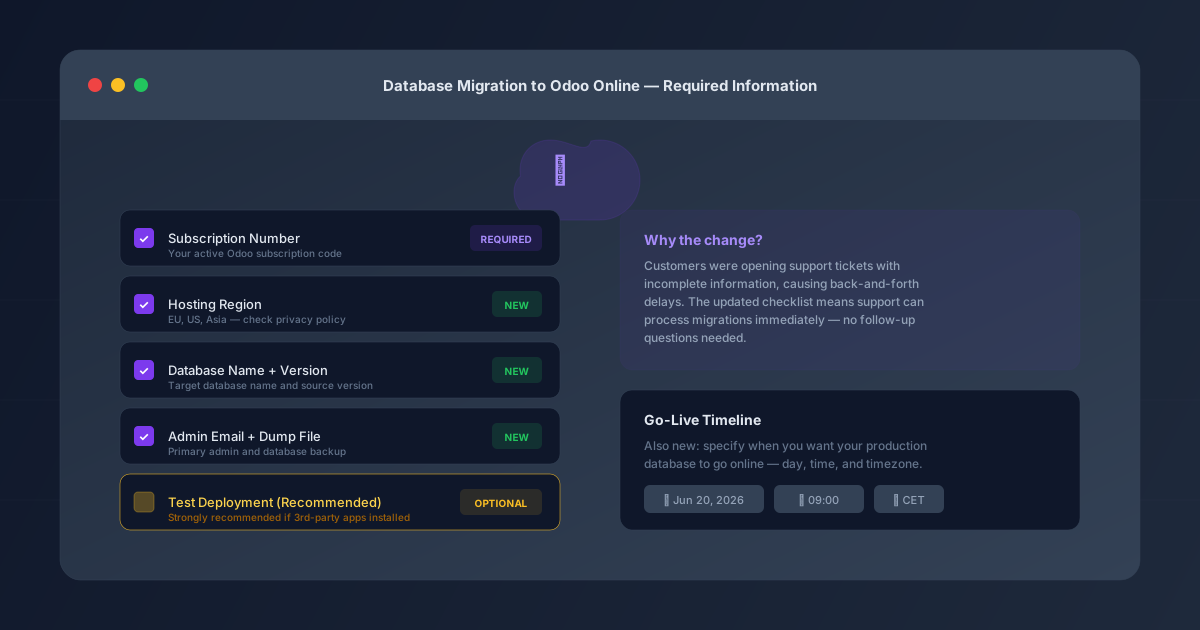
The updated documentation now requires seven pieces of information in the migration request. The original three remain: subscription number, desired URL, and database dump. The four additions are hosting region, database name, the version the source database runs on, and the email address of the primary administrator.
The hosting region is particularly important because Odoo operates infrastructure in multiple geographic zones, and the choice affects latency, data residency compliance, and which privacy regulations apply. The documentation now directs customers to check the privacy policy for available regions rather than leaving it as a surprise question from support.
The version field matters because migrations from older versions (the documentation now covers databases as far back as 16.0) may require different handling than recent ones. Knowing the source version upfront lets the migration team prepare the right tooling before they even open the dump file.
The Test Deployment Option
Beyond the seven required items, the checklist now includes two optional but recommended additions. The first is a test deployment — described with the explicit note that it is “strongly recommended, especially if you have ever installed third-party apps.”
That qualifier about third-party apps is doing a lot of work. Odoo Online doesn’t support custom or third-party modules the way a self-hosted instance does. If your database includes apps from the Odoo app store, custom developments, or community modules, a test deployment can reveal compatibility issues before they become production problems. Better to discover that your custom invoice template breaks in the SaaS environment during a test than during the go-live.
The second optional item is a production timeline: the specific day, time, and timezone when you want the live database to go online. This lets the migration team schedule the cutover during your preferred maintenance window rather than processing it whenever they get to it in the queue.
Why This Matters Beyond Documentation
This isn’t just a documentation update — it’s a process redesign. When the support team receives a ticket with all seven items present and correct, they can process the migration directly without sending a single follow-up message. The customer doesn’t wait for clarification emails. The support agent doesn’t juggle partially complete tickets. The migration moves from received to processed in one touch.
For companies planning a migration from self-hosted to Odoo Online, the expanded checklist also serves as a preparation guide. Knowing that you need to decide on a hosting region, identify your primary admin, confirm your database version, and consider a test deployment means you can gather all of that information before you even open the support ticket. The migration becomes a planned event rather than an improvised exchange with the support team.
It’s the kind of change that doesn’t make headlines but saves hours of accumulated frustration for everyone involved. The old list was technically correct but practically incomplete. The new one tells you everything the other side of the ticket needs to know, which is exactly what a checklist should do.