Every ecommerce manager knows the cross-sell problem. You have a catalog of five hundred products. You know that people who buy the standing desk usually want the cable management tray and the monitor arm. You know that the wireless keyboard should suggest the matching mouse as an alternative. But mapping those relationships manually, product by product, is the kind of task that gets started with good intentions and abandoned by the fortieth SKU.
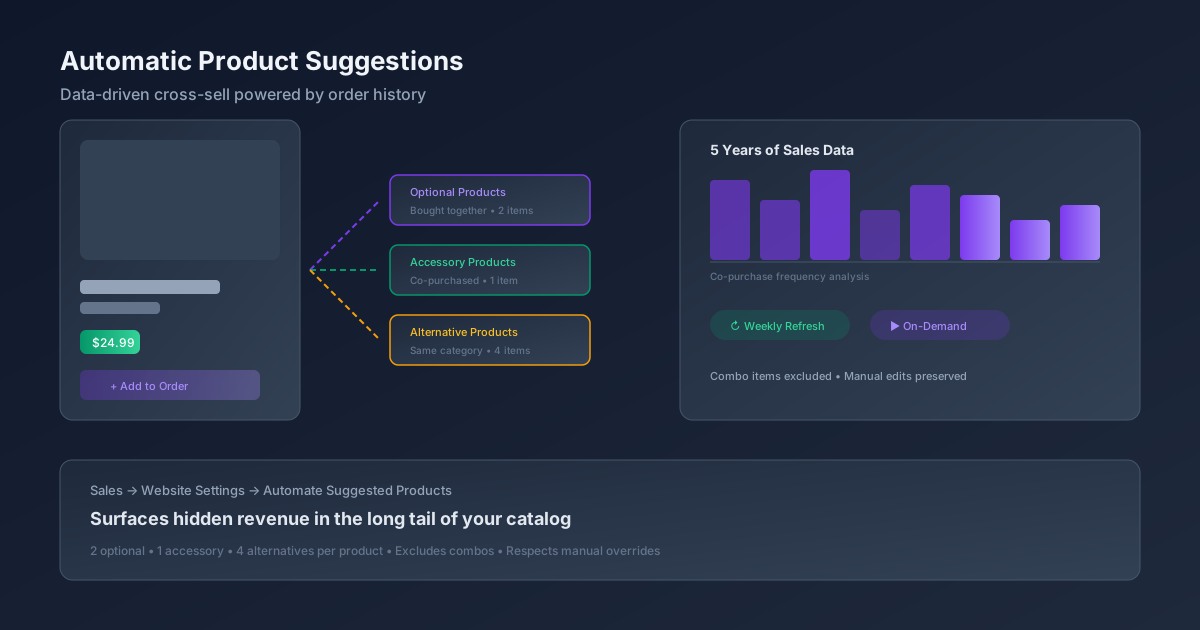
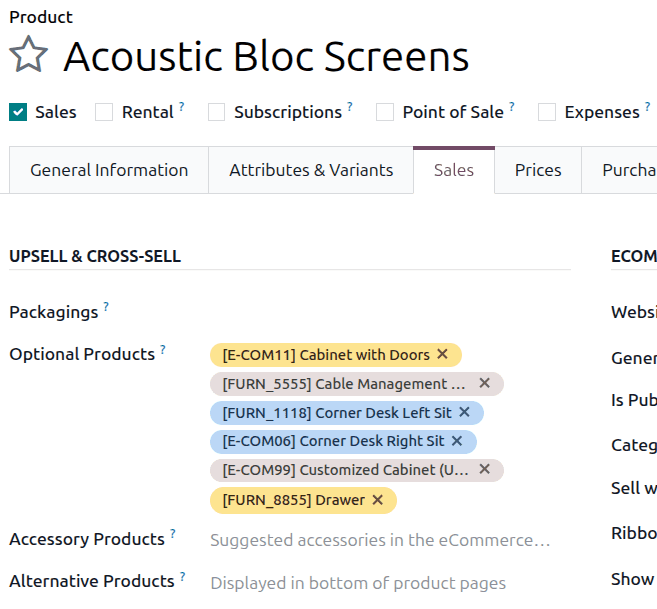
Odoo just shipped an answer to this: automatic product suggestion. The system now analyzes up to five years of historical sales order data and populates three product relationship fields — Optional Products, Accessory Products, and Alternative Products — without anyone touching a spreadsheet or clicking through product forms one at a time.
How It Decides What to Suggest
The logic behind the suggestions is deliberately simple, and that’s what makes it effective. Optional Products and Accessory Products use a “bought together” approach. The system looks at which items frequently appear in the same sales orders and surfaces the most common pairings. When multiple products co-occur, the highest-priced item becomes the “main” product, and the others are assigned as its optional or accessory companions.
Alternative Products take a different path. Instead of purchase history, the system relies on shared product categories and attribute configurations set in the eCommerce and Variants tabs. If two products occupy the same category and share similar attributes, they show up as alternatives to each other — the kind of “you might also consider” suggestion that helps customers compare without leaving the product page.
The display limits keep things practical: up to two optional products, one accessory, and four alternatives per item. That’s enough to be helpful without turning every product page into a wall of cross-sell noise.
Turning It On
The feature requires the eCommerce module to be installed, since the product relationship fields are part of the ecommerce product infrastructure. Once that’s in place, the setup is a single checkbox: navigate to the Website settings and enableAutomate suggested products in the eCommerce section.
After activation, the system runs an initial analysis of the last five years of confirmed sales orders, then schedules a weekly refresh to keep suggestions current as ordering patterns shift. There’s also an on-demand option — an Update suggested products action that lets merchandising teams trigger a recalculation whenever they want, without waiting for the weekly cycle.
Where Manual Control Still Matters
The automation is deliberately deferential to human judgment. If someone manually edits any of the three suggestion fields on a product, the automation stops updating that specific field for that specific product. The idea is that a merchandising team’s explicit decisions should never be overwritten by an algorithm. If you’ve hand-picked the cross-sell lineup for your flagship product, those choices stick — the system only fills in the blanks on products nobody has touched.
Combo items are also excluded from the analysis entirely. Since combos are bundles with their own pricing and component logic, treating them as individual purchase signals would produce misleading correlations.
Why This Changes the Cross-Sell Equation
Most ERP systems treat cross-sell as a merchandising task: someone sits down with the product catalog, maps out the relationships, and maintains them as new products are added. That works fine when you have fifty products. It breaks down at five hundred, and it becomes actively harmful at five thousand — because the products that don’t get manually configured simply have no cross-sell at all, which means the most neglected parts of the catalog are also the least monetized.
Automated suggestion flips this. Every product with sufficient order history gets suggestions, regardless of whether anyone on the merchandising team has gotten to it yet. The tail end of the catalog — the accessories, the replacement parts, the niche variants — finally gets the same cross-sell treatment as the best sellers.
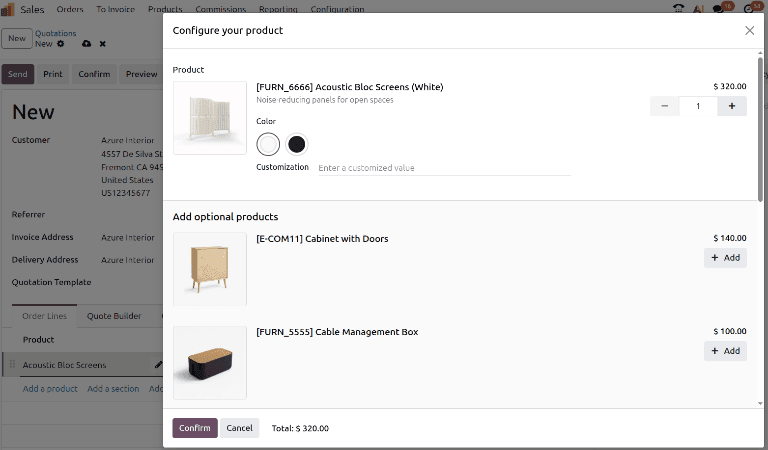
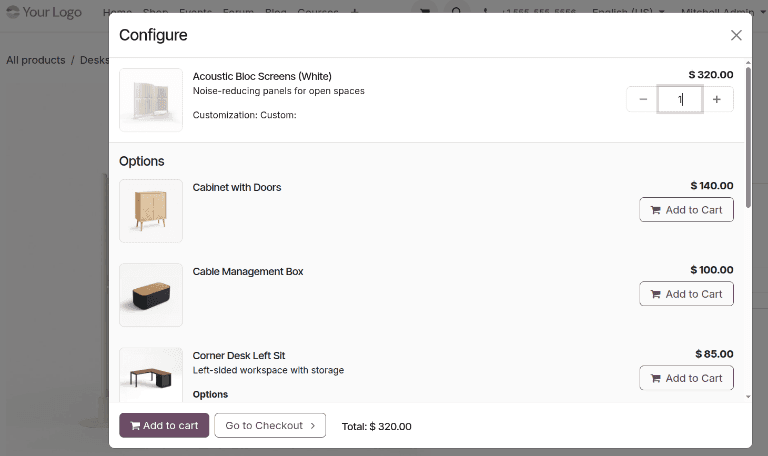
For businesses running both Odoo Sales and Odoo eCommerce, this means the same suggestion engine feeds both the sales team’s quotation builder and the storefront’s product pages. A suggestion that shows up when a sales rep builds a quote is the same one that appears when a customer browses the webshop — consistency that most businesses achieve only by maintaining two separate recommendation systems.
The Five-Year Window
The choice of a five-year lookback period is worth noting. It’s long enough to capture seasonal patterns and product lifecycle relationships — the printer cartridge that gets reordered annually, the seasonal accessory that only sells in Q4 — without drowning in data from product lines that have been discontinued. The weekly refresh cycle means suggestions evolve as ordering patterns change, so a product pairing that made sense two years ago but has since fallen off gradually loses its weighting.
It’s not a recommendation engine in the machine learning sense. There’s no collaborative filtering, no embeddings, no neural network. It’s co-purchase frequency analysis with sensible defaults. And for most mid-market businesses, that’s exactly the right level of sophistication — powerful enough to surface non-obvious product pairings, simple enough that someone on the team can explain exactly why a particular suggestion appeared.