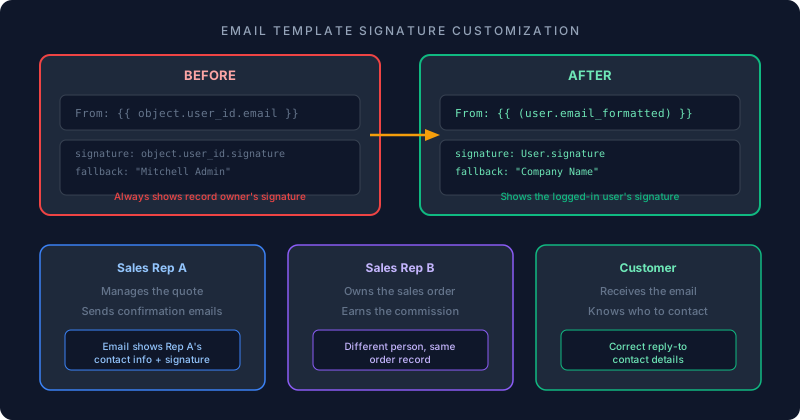
Here is a scenario that every mid-size sales team running Odoo has encountered: Rep A manages the customer relationship, sends quotes, and handles follow-up calls. Rep B owns the sales order in Odoo because they get the commission. When Rep A sends the order confirmation email, the customer sees Rep B’s name, email, and signature at the bottom. The customer has never spoken to Rep B. They reply to an inbox that goes nowhere useful.
This mismatch between who sends the email and whose signature appears is one of those small workflow problems that creates a disproportionate amount of confusion. It’s not a bug exactly — the email template is working as designed, pulling the signature from the employee assigned to the record. But the design assumption doesn’t hold when responsibility for a customer is split across team members.
Odoo has now published a formal way to fix this, and it requires changing exactly two things in the email template code.
The Root Cause
Odoo’s Sales email templates use object.user_id as the default context for the signature. The object is the sales order. The user_idis whoever Odoo considers the owner of that record — typically the salesperson assigned for commission purposes.
This works perfectly when one person does everything: creates the quote, emails the customer, and closes the deal. It breaks down the moment two people touch the same opportunity. The person clicking “Send” on the email is not necessarily the person whose signature should appear, but the template doesn’t know that.
Fixing the From Field
The first change is in the email template’s Email Configuration tab. The default Fromfield references the record owner’s email. Replacing it with {{ (user.email_formatted) }} switches the sender address to whoever is actually logged in and clicking Send.
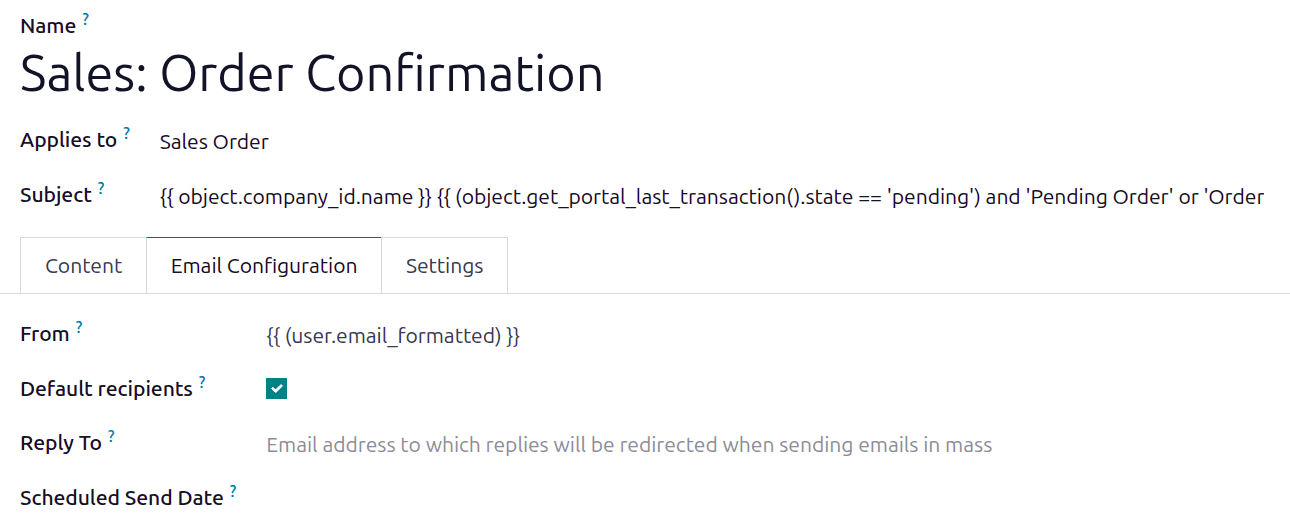
This is a subtle but important distinction. The uservariable in Odoo’s template engine refers to the currently authenticated user — the person performing the action right now. The object.user_id refers to the user assigned to the record, which could be someone entirely different. Swapping one for the other changes whose email address appears in the From line.
Replacing the Signature Code
The second change happens in the template’s HTML code. In the Content tab, switching to code view reveals two instances of object.user_id.signature buried in the template markup. Both need to be replaced with User.signature.
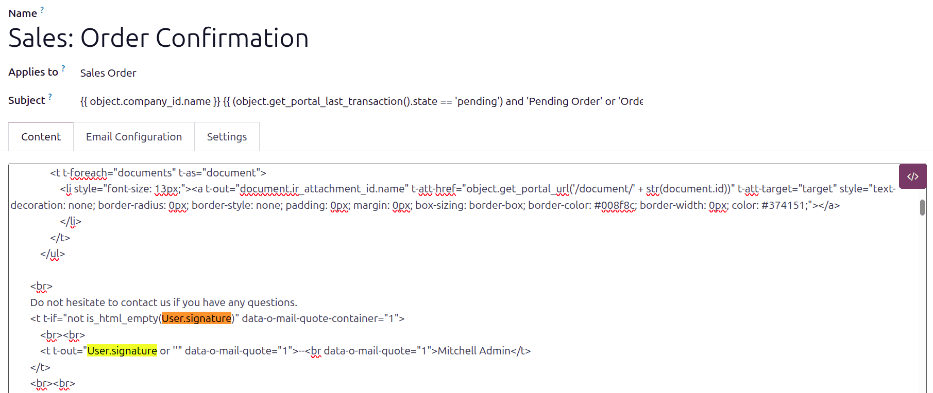
The effect is immediate. After saving the template, every order confirmation email sent from the Sales module will display the logged-in user’s signature instead of the record owner’s. If Rep A sends the email, Rep A’s phone number, title, and signature block appear at the bottom. The customer knows exactly who to call back.
The Company Name Fallback
There’s a useful secondary tweak built into this change. Odoo email templates include a fallback signature for users who haven’t configured their own — by default, it displays “Mitchell Admin,” Odoo’s demo user. That placeholder has appeared in more production emails than anyone at Odoo probably intended.
The recommended fix is to search the template code for “Mitchell Admin” and replace it with the company name. It’s a one-line change that prevents the demo user’s name from leaking into customer-facing communications when someone forgets to set up their signature.
When This Matters
This change addresses a specific organizational pattern: teams where the person managing customer communication is not the same person who owns the sales record. That includes account management structures where a dedicated AM handles post-sale communication while the original salesperson retains record ownership, teams where inside sales reps handle quoting while field reps own the relationship, and any organization where commission tracking and customer communication are deliberately separated.
For solo operators or teams where one person owns the entire sales cycle, the default template behavior works fine. But for anyone who has ever had a customer reply to the wrong person because the email signature didn’t match the sender — this is the fix that should have existed from day one.