There is a particular kind of friction that plagues every team using business software. Someone spends three minutes filtering a sales order list to show only sent quotations, grouped by customer, sorted by amount descending. They see something interesting and want a colleague to look at the same view. So they walk over to the other person’s desk, or they type “go to Sales, then Orders, then filter by Status equals Sent, then group by Customer” into a chat message. The information was right there, one click away on their screen, but sharing it required reconstructing the entire path from memory.
One Link, Full Context
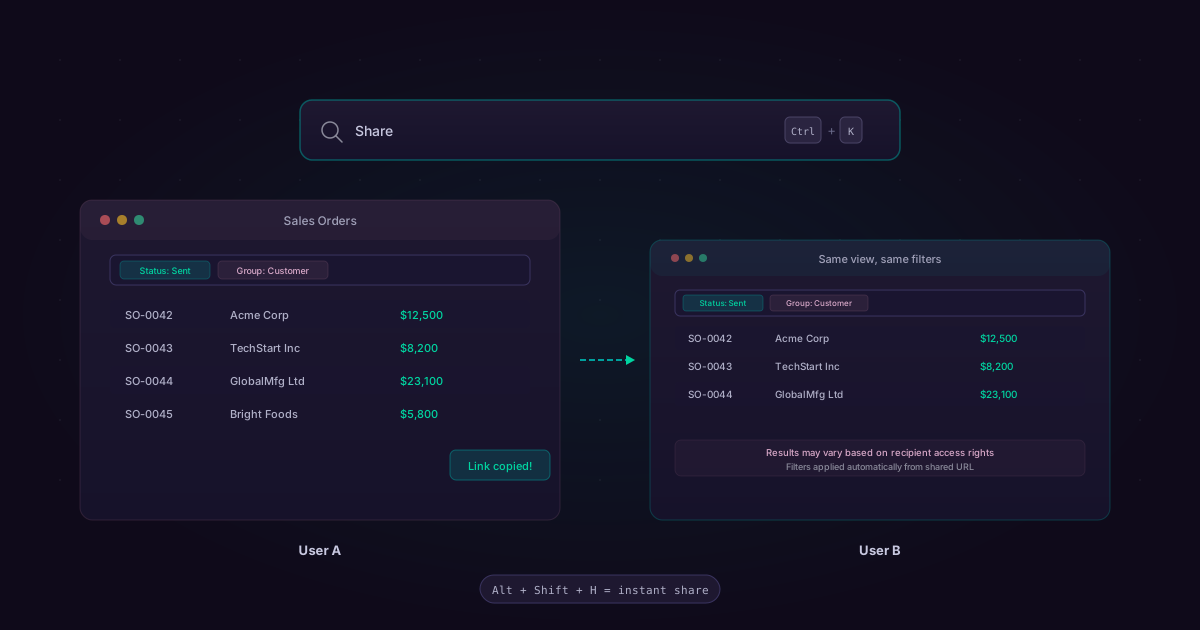
Odoo now solves this with enriched view URLs. When a user shares a link from any list, kanban, pivot, or graph view, the URL encodes not just the page and model, but the complete search state: every active filter, every grouping level, every sort order. The recipient clicks the link and lands on precisely the same data perspective the sender was looking at.
The mechanism is deliberately lightweight. There are two ways to trigger it. The first is through the command palette: press Ctrl+K (or Cmd+Kon Mac), type “Share,” and select the share action. A link is copied to the clipboard. The second is even faster: a dedicated keyboard shortcut, Alt+Shift+H (or Ctrl+Shift+H on Mac), copies the enriched URL directly without opening any dialog at all. One keystroke combination, and the link is ready to paste into a chat, an email, or a task description.
What the Recipient Sees
When someone opens a shared enriched URL, the filters and groupings are restored automatically. The active filters appear in the search bar as tag-style chips, just as if the recipient had applied them manually. Any groupings show up as collapsible sections in the view. The experience is seamless enough that most recipients will not even realize they are looking at a state-encoded URL rather than a standard page link.
There is one important caveat, and Odoo handles it transparently. Access rights still govern what each user can see. If the person who shared the link has manager-level access to the CRM but the recipient has sales rep access, the recipient will see the same filters and groupings applied, but the underlying data may differ. They might see fewer rows, or certain columns may be hidden. The shared link defines the perspective, not the permissions. This is the correct design choice—the alternative would be a security hole—but it is worth understanding when sharing views across roles.
Why This Is a Bigger Deal Than It Sounds
Small collaboration features like this tend to fly under the radar during major release announcements. Nobody writes a keynote slide about “you can share a filtered view.” But in practice, the inability to share a precise data perspective is one of the most common sources of miscommunication in teams running on ERP systems. A sales manager says “look at last month’s pipeline” and the rep opens the current month. An accountant asks someone to review “the outstanding invoices grouped by aging bucket” and the colleague applies the wrong filter combination.
The enriched URL eliminates this class of miscommunication entirely. “Look at this” becomes a link, not a set of instructions. The sender and recipient see the same thing. That alignment is worth more than most feature bullet points suggest.
The Command Palette as a Platform
It is also worth noting where Odoo chose to surface this feature—inside the command palette. The Ctrl+K command palette has been quietly growing into one of Odoo’s most versatile power-user interfaces. Search for records, navigate between apps, toggle developer mode, and now share views—all from the same modal. Adding share as a command palette action rather than as a toolbar button is a deliberate design decision. It keeps the standard interface uncluttered while making the feature instantly accessible to anyone who has internalized the palette as their primary navigation tool.
The dedicated Alt+Shift+H shortcut is even more telling. Odoo reserved a global keyboard shortcut specifically for this action, which signals that the team expects it to become a high-frequency interaction. They are not wrong. Once a team discovers that sharing a filtered view is a two-key operation, the old workflow of verbally describing filter combinations feels impossibly clunky by comparison.