Every developer platform lives or dies by the quality of its “hello world” moment. If the first tutorial is confusing, verbose, or dated, new developers bounce — and they take their potential contributions with them. Odoo has just rebuilt that critical first experience from the ground up.
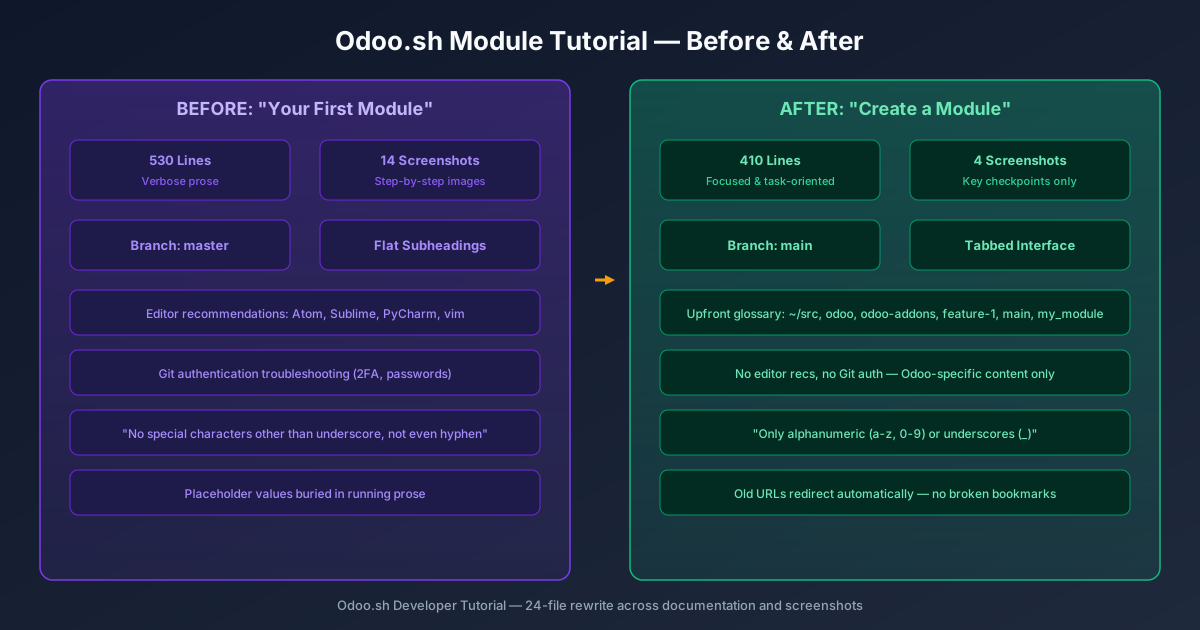
The old tutorial, titled “Your First Module,” was a 530-line walkthrough cluttered with fourteen step-by-step screenshots, inline editor recommendations (Atom, Sublime Text, PyCharm, vim), and detailed Git authentication troubleshooting for two-factor setups. It worked, but it read like a document that had been patched over several release cycles rather than written with a clear pedagogical arc.
The Rename Says More Than You Think
Changing the title from “Your First Module” to “Create a Module” is a small shift in language that signals a larger shift in philosophy. The old title was warm and inviting but assumed you were brand new. The new title is task-oriented — it tells you what you’ll accomplish, not how you should feel about it. That’s a meaningful distinction when the audience includes experienced Python developers evaluating the platform, not just absolute beginners.
The same directness runs through the rest of the rewrite. Instead of burying placeholder values in running prose (“assuming your repository is called odoo-addons and your branch is feature-1…”), the new version opens with a formal glossary block that defines every placeholder upfront:~/src, odoo, odoo-addons,feature-1, main, my_module. Readers know immediately which values to swap for their own, instead of discovering them mid-instruction.
Tabs Replace Subheadings for Dual Workflows
The most visible structural change is the adoption of a tabbed interface throughout the tutorial. Where the old version used flat subheadings (“From Odoo.sh” / “From your computer”) that required scrolling past irrelevant sections, the new version uses interactive tabs that let developers toggle between the two paths without losing their place.
This isn’t just a formatting preference. A developer working from the Odoo.sh online editor has a fundamentally different workflow than one cloning the repository locally. The tabbed layout acknowledges that difference without forcing either audience to wade through instructions meant for the other. It also reduces the visual weight of the page — you see only the path you’re on.
Fourteen Screenshots Become Four
The old tutorial included fourteen separate PNG screenshots walking through every click and dialog. The new version condenses this to four carefully chosen images: creating a development branch, viewing the branch, connecting to the database, and seeing the finished module installed. That’s a seventy-percent reduction in visual clutter.
Fewer screenshots isn’t always better, but in this case the cuts are well-chosen. The removed images were mostly redundant — showing intermediate states that didn’t add information beyond what the text already described. The four remaining screenshots cover the moments where a visual confirmation genuinely helps: “does my branch exist?” and “is my module showing up?”
‘Master’ Is Gone. ‘Main’ Is Default.
Every reference to the master branch has been replaced with main throughout the tutorial. This catches Odoo up with a convention that most of the development world adopted years ago, but that plenty of enterprise platforms have been slow to update in their documentation.
For new developers following the tutorial, this eliminates a common point of confusion. If they’ve created their repository using modern defaults (where mainis the production branch), the old tutorial’s references to masterwould send them down a debugging path before they’d even written their first model.
Tighter Module Naming Rules
The old tutorial included a vague warning: “Do not use special characters other than the underscore for your module name, not even a hyphen.” The new version is precise: “Only use alphanumeric characters (a-z, 0-9) or underscores (_) when naming your module.”
That specificity matters more than it might seem. Module naming errors are one of the most common stumbling blocks for new Odoo developers, because a malformed module name produces cryptic import errors rather than a clear “invalid name” message. Telling developers exactly which characters are allowed, rather than listing what’s forbidden, prevents the mistake at the source.
What Got Cut Tells You Where Odoo Is Headed
The editorial choices in what was removed are as revealing as what was added. Gone are the editor recommendations, the Git authentication walkthroughs, and the verbose explanations of intermediate states. Odoo is betting that its developer audience in 2026 already knows how to use Git and has a preferred editor. The tutorial no longer tries to teach version control alongside module development.
This is a mature decision. First-party documentation that tries to be everything to everyone usually ends up serving nobody well. By stripping the tutorial down to what’s Odoo-specific — how to structure a module, how to connect it to an Odoo.sh branch, how to test it in a running instance — the guide stays focused on the knowledge that only Odoo can provide.
Redirect rules have been put in place so that anyone bookmarking or linking to the old “first module” URL will land on the new page automatically. That’s a small detail that a lot of documentation rewrites get wrong, and it suggests this update was handled with the kind of care that the onboarding experience deserves.