Setting up SMS in an ERP platform has traditionally meant navigating a maze of API keys, carrier documentation, and compliance checklists. Odoo’s SMS Marketing module has always supported text messaging, but the setup instructions were scattered across FAQ pages and Twilio integration guides with no single starting point for someone who just wanted to send their first campaign.
That changes with a new dedicated configuration page that consolidates everything a first-time user needs into one linear flow. The page focuses on Odoo’s built-in IAP (In-App Purchase) SMS service, which sends messages directly from the database using prepaid credits — no third-party carrier account required.
Two Paths, One Clear Default
The configuration guide acknowledges that Odoo supports two SMS delivery methods: the native IAP service and a Twilio integration. Rather than presenting both equally and forcing a decision, the documentation leans heavily toward IAP as the path of least resistance. Twilio gets a mention and a link for companies with stricter compliance requirements or existing carrier relationships, but the page makes it clear that most businesses should start with IAP and evaluate whether they need anything more.
This is a smart editorial choice. The IAP route requires almost no technical setup — you register an SMS account within Odoo, buy credits, and start sending. There’s no OAuth flow, no webhook configuration, no carrier-side dashboard to maintain.
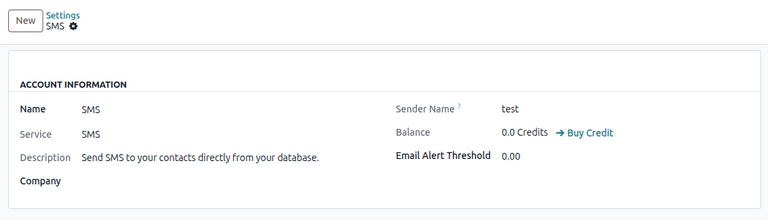
Credits Instead of Contracts
Odoo’s SMS pricing model runs on prepaid IAP credits rather than monthly carrier contracts. Users purchase credit packs directly from within the database, and each SMS deducts from the balance based on the destination country and message length. The new configuration page walks through the credit purchase flow with screenshots, making it clear exactly where to click and what to expect on the billing side.
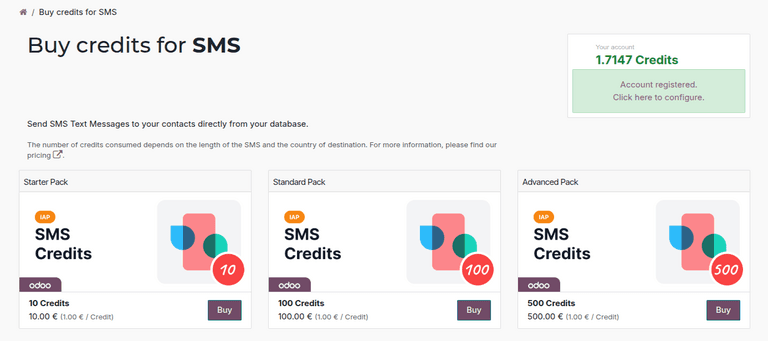
For small and mid-size businesses that send SMS campaigns sporadically — appointment reminders, order confirmations, flash sale announcements — the credit model avoids the overhead of maintaining a carrier subscription during quiet months. You pay for what you send.
Sender Name Rules That Actually Get Explained
One of the more useful additions is clear guidance on sender name configuration. SMS sender names need to be between 3 and 11 alphanumeric characters, and different countries enforce different rules about what recipients see. The documentation spells this out plainly instead of burying it in a footnote, which should reduce the support tickets from businesses wondering why their sender name got rejected or displayed differently than expected.
Test Before You Blast
The configuration page includes a testing section that covers two verification paths: sending a test through an SMS marketing campaign and sending through a contact form. This matters more than it sounds. SMS delivery is notoriously opaque — messages can fail silently due to carrier filtering, number formatting issues, or regulatory blocks in specific countries. Having a documented test workflow before committing to a full campaign send saves both money and embarrassment.
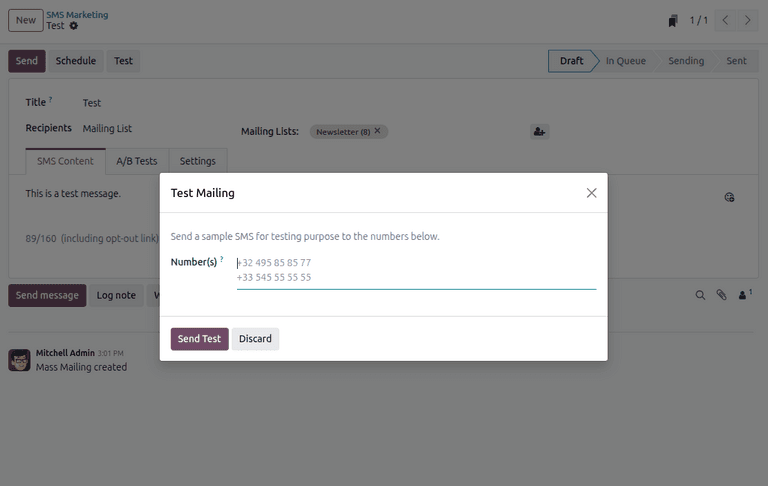
The testing documentation is particularly candid about US and Canadian number restrictions, where SMS regulations have tightened significantly. Businesses targeting North American audiences will want to verify delivery to those regions specifically before scaling up.
Why a Configuration Page Matters
This might seem like a minor documentation addition, but it addresses a real friction point. SMS Marketing in Odoo has been fully functional for years, but the lack of a clear starting point meant that first-time users either stumbled through the setup or gave up and used a standalone SMS tool alongside their ERP. A single, structured configuration page removes that barrier and keeps the SMS workflow inside the same system where the contacts, campaigns, and analytics already live.
For businesses already running Odoo’s Email Marketing module, adding SMS as a parallel channel is now a ten-minute configuration task rather than a research project.