There’s a particular kind of frustration that comes with software that has a feature but doesn’t properly explain how to turn it on. Odoo’s SMS Marketing module has been capable of sending bulk text messages for years, but actually setting it up meant piecing together information from a pricing FAQ page, an IAP overview buried in general settings, and a couple of tooltip descriptions that assumed you already knew what you were doing. That gap just closed.
Odoo now has a dedicated SMS Marketing configuration page that walks through the entire setup process — from account registration to credit purchasing to sending a test message — in a single, sequential document. It’s the kind of thing that should have existed from day one, and its arrival is worth understanding for anyone who has been eyeing SMS as a marketing channel but got stuck at the “now what?” step.
Two Paths: Built-In IAP or Bring Your Own Twilio
The first thing the new guide clarifies is that Odoo gives you two ways to send SMS messages. The default path uses Odoo’s own IAP (In-App Purchase)service — a prepaid credit system where you buy credits that get consumed every time a message is sent. The alternative is connecting your own Twilio account, which gives you more control over routing, sender numbers, and per-message pricing but requires managing a separate provider relationship.
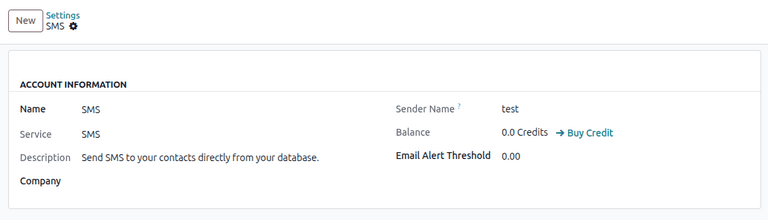
For most businesses getting started with SMS marketing through Odoo, the IAP path is the path of least resistance. No API keys to configure, no webhook endpoints to manage, no Twilio console to navigate. You register, verify your phone number, set a sender name, buy credits, and you’re sending messages. The tradeoff is pricing transparency — IAP credit costs vary by destination country and message length, and you’re locked into Odoo’s rates rather than negotiating your own volume pricing.
Account Registration and Sender Identity
Setting up the IAP SMS service starts in Settings, where you register an SMS account by entering a mobile number for verification. After entering the verification code, you configure a sender name— the identity that recipients see when your message arrives. This name must be between 3 and 11 alphanumeric characters, which means you’re working with something like “MyBrand” or “AcmeCo” rather than a full company name or phone number.
That character limit isn’t arbitrary. It’s a constraint imposed by SMS carrier networks that handle alphanumeric sender IDs. Some countries don’t support alphanumeric senders at all and will override your name with a short code or local number. The documentation doesn’t dive into country-specific carrier behavior, but understanding that your chosen sender name may not render identically everywhere is important context for any team planning international SMS campaigns.
How Credit Pricing Works
SMS through Odoo’s IAP works on a prepaid credit model. You purchase credit packs through the IAP portal, and each message sent deducts credits from your balance. The cost per message varies by two factors: the destination country and the character count of the message.
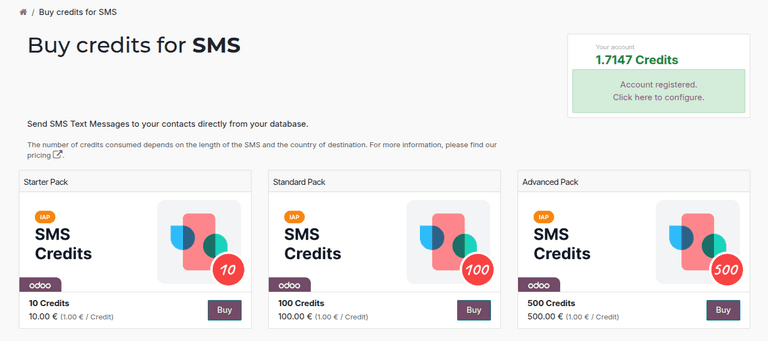
Standard SMS messages are capped at 160 characters using the GSM-7 encoding. Go beyond that, or use special characters that require Unicode encoding (which drops the limit to 70 characters), and the message gets split into multiple segments — each consuming its own credits. A 200-character message to a French mobile number costs more than a 100-character message to the same number, not because the rate changed but because you’re consuming two message segments instead of one.
Testing Before You Commit Budget
The testing workflow is the part that was most conspicuously missing from previous documentation. Odoo supports two testing methods for SMS campaigns: sending a test message from within a marketing campaign draft, and sending a direct SMS from a contact’s form view.
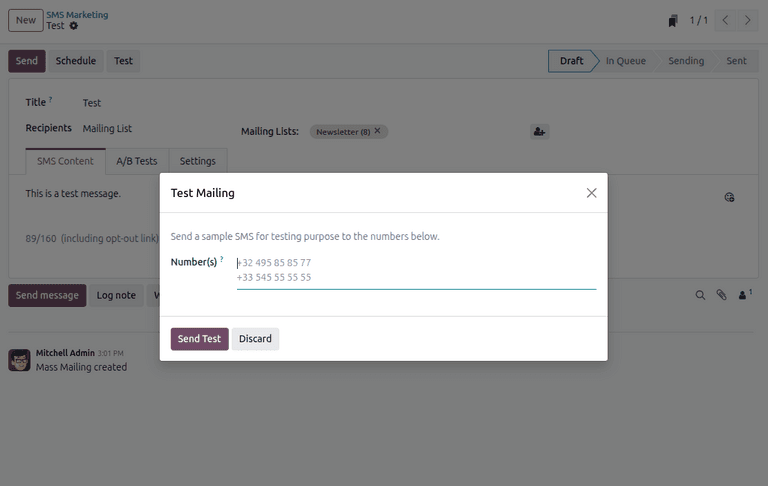
The campaign test method lets you preview exactly how a message will render with dynamic placeholders replaced by real data, send it to a specific number, and verify delivery before blasting it to your full recipient list. The contact form method is simpler — you pick a contact, type a message, and send — but it’s useful for verifying that your IAP account is properly connected and that messages are actually reaching phones.
Both methods consume real credits, so they’re not “free tests” in the traditional sense. But spending a fraction of a credit to verify your sender name renders correctly and your message content doesn’t get truncated is obviously worth it compared to discovering problems after sending ten thousand messages.
Why This Matters Beyond the Feature Itself
SMS marketing has a fundamentally different engagement profile than email. Open rates consistently land above 90%, response times are measured in minutes rather than hours, and the format forces brevity that email has never managed to impose on marketers. But SMS also carries higher per-message costs and stricter regulatory requirements around consent, which means the cost of misconfiguration is real.
Having a proper setup guide — one that takes a team from “we have the module installed” to “we just sent a verified test message” in a single document — removes the barrier that kept SMS as a perpetual “we should try that someday” item on the marketing backlog. The feature was always there. The on-ramp was what was missing.