Anyone who has tried to look up how pivot tables work in Odoo’s built-in Spreadsheet app knows the frustration: you land on a single, enormous page that covers pivot tables, charts, clickable links, and financial data functions all in one scroll. Finding the specific section you need means hunting through hundreds of lines of documentation that were never meant to live together.
That just changed. Odoo has split its overloaded Spreadsheet insert guide into four focused pages, each covering exactly one topic. The result is a documentation structure that mirrors how teams actually use the tool — you look up pivot tables when you need pivot tables, not when you need to wade through chart instructions to get there.
Four Pages Replace One
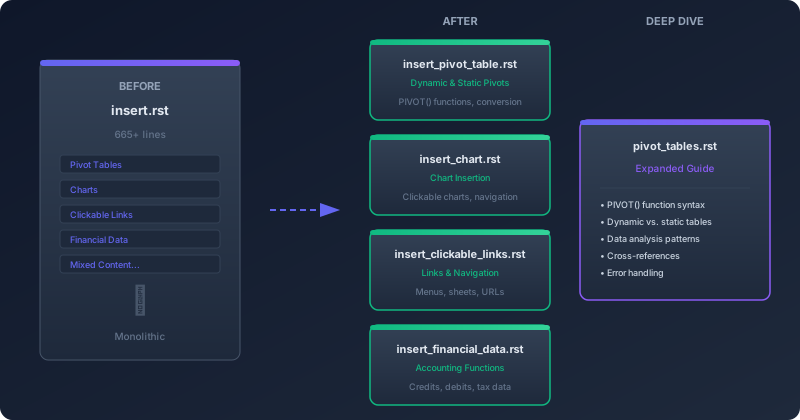
The original insert.rst file — 665 lines of mixed content — has been broken into dedicated pages. insert_pivot_table.rst now owns everything about creating pivot tables from Odoo database views, including the distinction between dynamic and static pivots, the PIVOT() function syntax, and how to convert between the two formats. insert_chart.rst covers chart insertion and the clickable chart feature that lets users navigate directly to Odoo views from within a spreadsheet. insert_clickable_links.rst handles cell-based and chart-based links to menus, sheets, and external URLs. insert_financial_data.rst documents the Odoo-specific spreadsheet functions that pull accounting data like credits, debits, and tax-year figures directly into cells.
The Pivot Table Deep Dive
Beyond the structural split, the pivot table documentation itself received a significant expansion. The new pivot_tables.rst page in the “Work with Data” section now provides a thorough walkthrough of PIVOT() function behavior, error handling patterns, and the practical differences between dynamic pivot tables (which update automatically when the underlying Odoo data changes) and static pivot tables (which freeze a snapshot for offline analysis or sharing).
The documentation also adds proper cross-references between pages using :ref: directives instead of the previous :doc: links. That means internal references now point to specific sections rather than entire pages, making it possible to link directly to, say, the static-to-dynamic conversion instructions from the dashboard building guide.
Why This Matters for Spreadsheet Power Users
Odoo’s Spreadsheet module has quietly become one of the most capable built-in productivity tools in any ERP system. It supports live connections to database views, real-time collaboration, and functions that pull structured business data into familiar spreadsheet formulas. But the documentation never kept pace with the feature set. A single catch-all page made it hard for users to discover capabilities they didn’t know existed — especially the financial data functions that let accounting teams build custom reports without leaving the spreadsheet interface.
The modular structure fixes that discoverability problem. Each page now has its own title, its own search footprint, and its own table of contents. A finance manager searching for how to pull trial balance data into a spreadsheet will land on the financial data page instead of a general insert guide. A data analyst looking for pivot table syntax will find the PIVOT() function reference without scrolling past chart configuration instructions.
The Broader Pattern
This restructuring reflects a trend across Odoo’s documentation team: breaking apart legacy monolithic pages into topic-focused guides. The same pattern has appeared in the rental module, quality control documentation, and time-off configuration pages over the past several weeks. For users who rely on search to find answers, smaller, focused pages consistently outperform large omnibus guides — both in search engine results and in the time it takes to find a specific answer.