Managing how employees earn paid time off has always been one of those deceptively complex HR problems. Some companies grant vacation up front on January 1st. Others tie it to tenure — you earn more days the longer you stay. And a surprising number of organizations still track accrual in spreadsheets because their ERP made it too painful to configure properly.
Odoo’s Time Off module now addresses this by pulling accrual plan management out of the main configuration page and giving it a dedicated interface. The new standalone accrual plans page lives under Configuration and handles everything from basic hourly accrual to multi-tier seniority systems with carry-over rules and balance caps.
How the New Accrual Plan Form Works
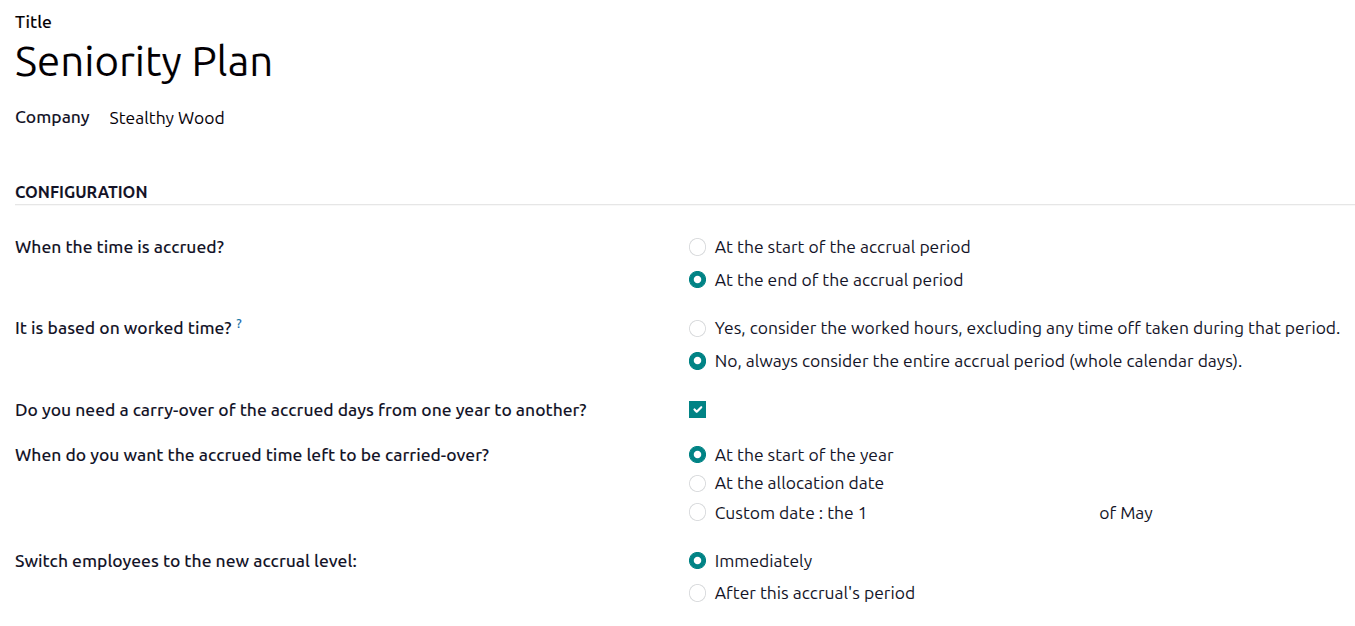
Creating an accrual plan starts with a title and an optional company scope. In multi-company databases, you can restrict a plan to a single entity or leave it available across all companies — a detail that matters for organizations with different leave policies per subsidiary.
The configuration section asks three foundational questions. First: does time accrue at the start or end of each period? This determines whether an employee gets credit when a pay period opens or only after it closes. Second: should accrual count only actual worked hours, or treat the entire calendar period as worked time? Choosing worked hours means that days spent on leave — marked as absences — don’t contribute to accrual. It’s the difference between earning four vacation days in a month versus three, depending on whether someone took a week off.
Third: when does carry-over happen? Options include January 1st (the default for calendar-year companies), the employee’s allocation date (useful for anniversary-based systems), or a custom date you specify.
Milestone-Based Seniority Tiers
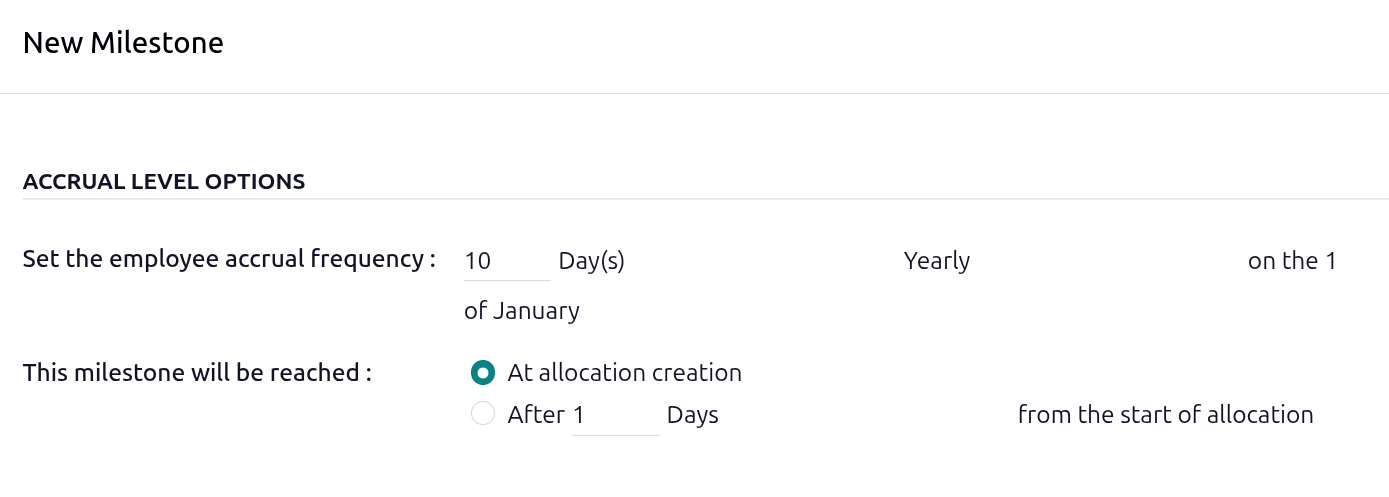
The real power sits in the milestone system. Each accrual plan supports multiple milestones, and each milestone defines a distinct earning rate that kicks in at a specific point in the employee’s tenure.
A milestone sets two things: how much time the employee earns, and how often they earn it. The frequency options cover practically every payroll cadence — hourly, daily, weekly, twice monthly, monthly, twice yearly, yearly, or per hour worked. The earning amount supports four decimal places, so you can configure fractional accrual like 0.0385 days per hour if your math demands it.
Each milestone also has a trigger condition. It can activate immediately at allocation creation, or after a specified number of days, months, or years from the start of the allocation. This is how you build seniority tiers: the first milestone might grant 10 days per year starting immediately, a second milestone bumps it to 15 days after three years, and a third reaches 20 days after five years.
Carry-Over Rules That Actually Match Policy
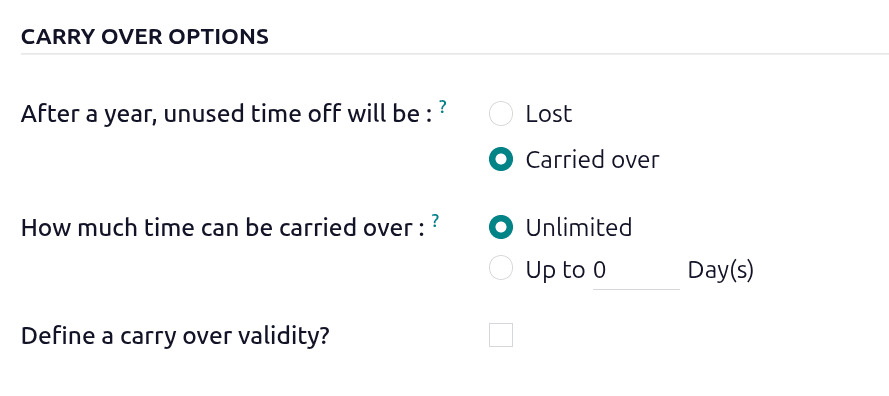
Every milestone gets its own carry-over configuration. Unused time off at the end of the year can either be lost entirely or carried over, and if carried over, you control how much and for how long.
The carry-over limit can be set to unlimited — everything rolls forward — or capped at a specific number of days. On top of that, you can set an expiration period for carried-over time. If an employee rolls over 5 days but doesn’t use them within, say, 90 days, they’re forfeited. This two-layer control (amount cap plus expiration window) handles the most common policy patterns: use-it-or-lose-it, limited rollover, and unlimited accumulation with a decay timer.
Yearly Caps and Balance Caps

Each milestone also supports two types of caps. A yearly cap stops accrual once the employee has earned a set number of days in a calendar year — even if their frequency would otherwise generate more. A balance cap puts a ceiling on total accumulated time: if the employee’s available balance reaches the limit, the plan pauses until they use some leave.
These caps interact with milestones in practical ways. In the first three years, you might set a balance cap of 30 days. After year three, the cap rises to 45 days. After five years, it jumps to 100. The caps scale with the milestones, preventing runaway accumulation at every tier while still rewarding loyalty.
The Full Picture: A Seniority Plan in Practice
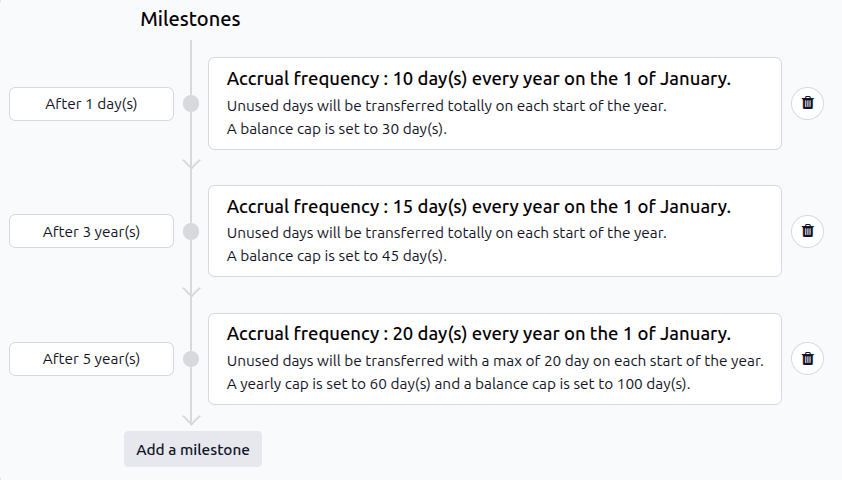
Consider a mid-size company with a standard seniority-based PTO policy. New hires earn two weeks (10 days) per year. After three years, they move to three weeks (15 days). After five years, four weeks (20 days). All accrual happens on January 1st of each year.
In the old configuration, this required workarounds — multiple leave allocations, manual adjustments, or custom development. With the new accrual plan form, it’s three milestones on a single plan. The first fires immediately, the second after 36 months, the third after 60 months. Each has its own carry-over rules and balance caps.
The carry-over might allow unlimited rollover for the first five years (to help newer employees build a safety net), then restrict it to 20 days per year once they hit the highest tier. The balance caps — 30, 45, and 100 days respectively — prevent any single employee from hoarding months of leave while ensuring long-tenure employees still accumulate meaningfully.
Why Splitting This Out Matters
Moving accrual plans into their own configuration space does more than clean up the interface. It signals that Odoo treats accrual management as a first-class configuration concern, not a subfeature buried inside Time Off settings. For HR teams managing multiple leave policies across departments, regions, or seniority levels, having a dedicated list view of all accrual plans — with the ability to edit, clone, and compare them side by side — changes how they think about policy design.
The worked-time basis toggle alone solves a problem that trips up many implementations. When an employee takes a week of sick leave, should their vacation accrual slow down? In some jurisdictions, yes. In others, it’s legally required to keep accruing regardless. Having this as a per-plan toggle instead of a global setting means companies operating across borders can model both approaches simultaneously.
For organizations that have been managing PTO accrual in spreadsheets alongside their ERP, this is the kind of native capability that eliminates the shadow system entirely. The math, the milestones, the carry-over logic, and the caps all live in one place — auditable, consistent, and tied directly to the leave balances employees see on their dashboards.