Public holidays are one of those HR configurations that seem trivially simple until you actually try to get them right across a multi-country, multi-shift organization. Which holidays apply to which employees? Do night-shift workers get the same coverage as day-shift staff? What happens when someone submits a leave request for a day that’s already marked as a public holiday?
Odoo just gave these questions their own workspace. Public holidays now live on a dedicated configuration page inside the Time Off module, pulled out of the crowded general settings where they used to share space with accrual plans, leave types, and approval workflows.
Why Odoo Doesn’t Pre-Configure Any Holidays
An interesting design choice worth understanding: Odoo ships with zero public holidays configured, regardless of which country localization you install. That’s deliberate. Public holidays vary not just by country but by region, state, canton, and sometimes even by municipality. A French company with offices in Alsace observes different holidays than one headquartered in Paris. A US company needs to decide whether to include state-specific holidays alongside federal ones.
Rather than shipping an incomplete or overly generic list, Odoo starts blank and lets each company define exactly which days qualify. The new dedicated page makes this process faster by putting the creation form and the holiday list in the same view.
What the Configuration Form Covers
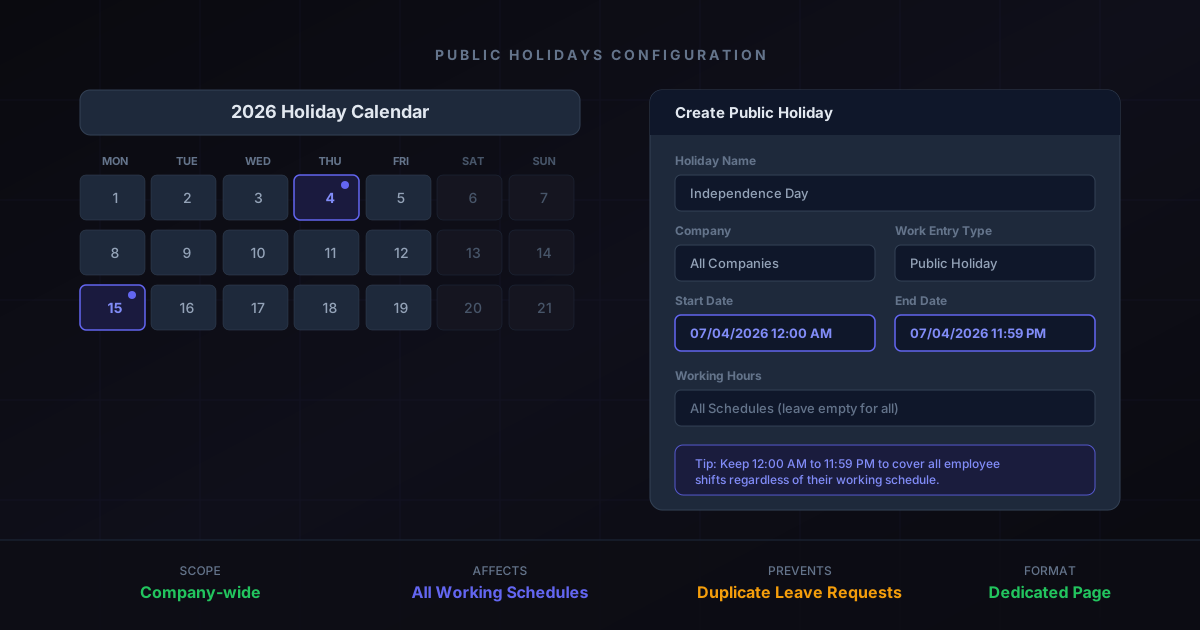
Each public holiday entry takes five fields. The Nameis self-explanatory — “Independence Day,” “Christmas,” “Eid al-Fitr.” The Company field scopes the holiday to a specific legal entity, which matters for multi-company databases where different subsidiaries observe different calendars.
Start Date and End Datedefine the holiday window. The default is midnight to 11:59 PM on the same day, and Odoo now explicitly recommends keeping those times unchanged. The reason is practical: if you narrow the time window — say, setting the holiday to start at 8 AM and end at 5 PM — employees on evening or night shifts won’t be covered. The full 24-hour window ensures every working schedule is handled automatically.
The Working Hoursfield is optional and acts as a filter. When left empty, the holiday applies to everyone in the company. When set to a specific working schedule, only employees on that schedule receive the holiday. This handles the edge case where certain shifts or departments don’t observe particular holidays — a manufacturing plant that runs through a regional holiday while the office is closed, for example.
Finally, Work Entry Typecontrols how the holiday appears in payroll calculations. The default “Public Holiday” type integrates with the Payroll module to ensure holiday pay is calculated correctly according to the applicable labor laws.
The Duplicate Leave Request Problem
One of the quiet benefits of proper public holiday configuration is what it prevents. Without public holidays defined in Odoo, employees will submit regular leave requests for those days. Those requests consume their leave balance, require manager approval, and create extra administrative work — all for a day the company was already planning to close.
With public holidays properly configured, Odoo automatically blocks leave requests for those dates. The calendar shows them as non-working days, leave balances aren’t affected, and managers don’t have a stack of redundant approvals to process. This also cascades into the Planning and Calendar modules, which use the same working schedule data to determine employee availability.
Cross-Module Consistency
The move to a standalone page is part of a broader restructuring of the Time Off module. Accrual plans already received their own dedicated interface, and leave type configuration was separated earlier. Public holidays were the last major component still embedded in the general settings.
This separation matters because public holidays affect more than just Time Off. The Payroll module checks them for holiday pay calculations. The Planning module excludes them from shift scheduling. The Calendar module marks them as unavailable slots. Manufacturing uses them to calculate realistic production timelines. Having a clean, dedicated interface for managing these dates makes it easier to audit what’s configured and catch gaps before they cascade into incorrect payroll or missed production deadlines.
What This Means for HR Teams
For day-to-day HR operations, the change is simple: there’s now a direct menu path to manage public holidays without wading through general module settings. For organizations managing holidays across multiple companies or countries, the dedicated page offers a clearer overview of what’s configured where, making it harder to miss a holiday for one entity while having it correctly set for another.
The practical advice hasn’t changed: set up your public holidays at the start of each year, keep the time range at full 24-hour coverage, and leave the Working Hours field empty unless you have a specific reason to restrict it. What has changed is that doing this is now a focused task on its own page rather than a side errand buried inside a larger configuration screen.