Managing time off types in Odoo used to mean scrolling through a sprawling settings page that mixed type definitions with allocation rules, approval workflows, and payroll configurations. For HR managers setting up a new leave policy, the experience was functional but cluttered — every type you created required navigating past unrelated settings to reach the fields that mattered.
That interface has been restructured. Time off type configuration now lives on its own page, organized into clearly defined sections that separate general information, approval chains, allocation rules, and payroll integration. The form itself has been reorganized with updated labels and a layout that reflects how HR teams actually think about leave policies.
Six Default Types, Unlimited Custom Ones
The system ships with six preconfigured types: Paid Time Off, Sick Time Off, Unpaid, Compensatory Days, Extra Time Off, and Extra Hours. These cover the most common leave categories and can be used as-is or modified. But most businesses need more granularity — bereavement leave, jury duty, parental leave, sabbaticals — and the new type creation form makes building these straightforward.
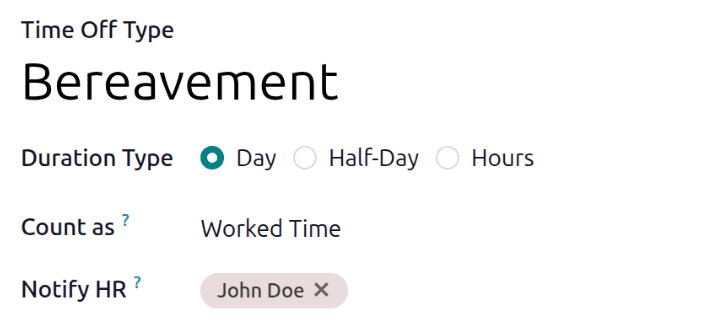
The only required fields are the type name, duration format, how it’s counted, and the approval level. Everything else is optional, which means you can spin up a simple leave type in under a minute or configure a complex one with allocation limits, negative caps, and payroll integration in about five.
Duration Formats That Match Real Policies
One of the first decisions when creating a type is how employees request it. Odoo now offers three distinct duration modes: Day (full 8-hour blocks), Half Day (4-hour blocks), and Hours (any hourly increment).
This matters more than it might seem. A sick leave policy that allows hourly requests lets employees take two hours for a doctor’s appointment without burning a full day. A vacation policy set to full-day mode prevents the administrative headache of tracking partial days across a 200-person company. The duration format shapes both the employee experience and the HR team’s workload.
The Count as field determines whether the leave type counts as Worked Time or Absence for accrual calculations. Paid time off typically counts as worked time so employees continue to accrue during vacation, while unpaid leave counts as absence.
Four-Tier Approval Chains
The approval system has been surfaced more clearly in the new layout. Each time off type can use one of four approval configurations:
- None Needed— requests are automatically approved, useful for types like compensatory time where the entitlement is already verified
- By Time Off Officer— only the designated HR officer approves, which works for centralized HR teams
- By Employee’s Approver— the direct manager or designated approver handles it, ideal for decentralized organizations
- By Employee’s Approver and Time Off Officer — both must approve, providing dual-control for sensitive leave types like extended medical leave or sabbaticals
The same four-tier system applies independently to allocation requests, so you can have vacation time that requires manager approval for requests but HR approval for additional allocation.
Allocation Controls With Employee Override Options
The allocation section determines whether a leave type requires pre-allocated days or operates on an open-request basis. When allocation is required, HR sets the balance and employees draw from it. When it’s not, employees can request the time off directly.
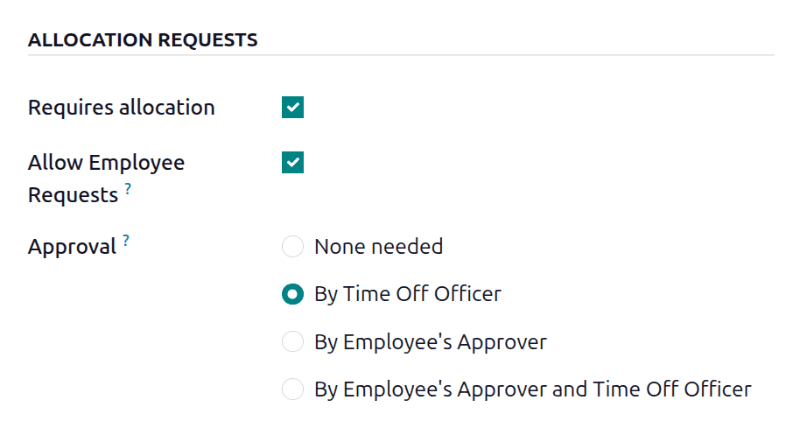
The Allow Employee Requeststoggle adds flexibility for types where employees might need more than their allocation. If someone has ten vacation days allocated but needs twelve for a trip, enabling this option lets them submit a request for the extra two days. The request still goes through the approval chain — it’s not automatic — but it creates a clear paper trail rather than forcing side-channel conversations with HR.
Negative Balances With Hard Limits
This is the feature that HR managers in fast-growing companies have been waiting for. The Allow Negative Cap option lets employees request more time off than they currently have, going into a negative balance up to a defined limit.
The use case is straightforward: an employee with three vacation days remaining needs five days for a planned trip. If the negative cap is set to five, the system allows the request and shows the employee at negative two days. Those days either get recovered through future accrual or handled through whatever policy the company has in place for deficit balances.
The hard limit prevents abuse. Setting it to five means no one can go more than five days negative, regardless of how many requests they submit. This gives companies the flexibility to accommodate reasonable exceptions without opening the door to unlimited borrowing against future accruals.
Payroll Integration Through Work Entry Types
For organizations running Odoo Payroll alongside Time Off, each leave type can now be mapped to a specific work entry type. When an employee takes approved time off, the system automatically generates the corresponding payroll work entry — ensuring that payslips reflect the correct pay treatment for each category of leave.
This eliminates the manual step where payroll administrators had to cross-reference approved leave requests against work entry classifications. Sick leave that should be paid at 100%, vacation at regular rate, and unpaid leave at zero all flow through automatically based on the type configuration.
Dashboard Customization

The display section at the bottom of the form controls how each type appears on the Time Off dashboard. Each type gets a color and a cover image (icon), which might sound cosmetic but actually serves a practical purpose: when employees are scanning their leave balances across six or more types, color-coded cards with distinct icons make it dramatically faster to find the right one.
The Hide On Dashboardoption is equally useful for the opposite reason — administrative leave types that employees don’t directly interact with can be hidden from their view, reducing clutter without removing the types from the system.
The Configuration Details That Matter
A few other settings in the configuration section deserve attention because they solve specific operational problems:
- Ignore Public Holidays automatically subtracts public holidays from leave requests, so a week-long vacation over July 4th uses four vacation days instead of five
- Require Supporting Document forces employees to attach documentation for types like extended sick leave or jury duty
- Deduct Extra Hours lets overtime hours offset leave requests, so an employee who worked two extra hours only needs three hours of leave for a five-hour absence
- Eligible for Accrual Rate determines whether the leave type counts toward worked time in accrual plan calculations
- Allow Request on Top lets employees stack additional time off requests on top of this type
Why the Restructuring Matters for HR Teams
The old configuration flow worked, but it required HR administrators to understand the full Time Off module before they could configure individual types effectively. By giving type management its own page, the configuration becomes self-contained. An HR manager can set up a new bereavement leave type — with three-day allocation, no approval required, and payroll integration — without navigating through unrelated settings about accrual plans or dashboard layouts.
For companies with complex leave policies spanning multiple countries and employment classifications, the standalone page also makes it easier to audit and compare types side by side from the list view before diving into individual configurations.