If you’ve ever tried to reconcile US sales tax obligations using a European-built ERP, you know the pain. Most systems treat tax as a flat percentage attached to a transaction. That works fine in countries with a single national VAT rate. It falls apart completely in the United States, where a single sale can trigger overlapping obligations to a state, a county, a city, and sometimes a special taxing district — each with its own rate, its own exemption rules, and its own filing requirements.
Odoo has just shipped a feature that American businesses have been asking about for years: a dedicated US Tax Report that breaks every transaction down by jurisdiction level, shows exactly how much falls into exempt, non-taxable, and taxable buckets at each tier, and maps the whole thing to a structure that actually mirrors how US tax returns get filed.
Four Jurisdiction Levels Where There Used to Be None
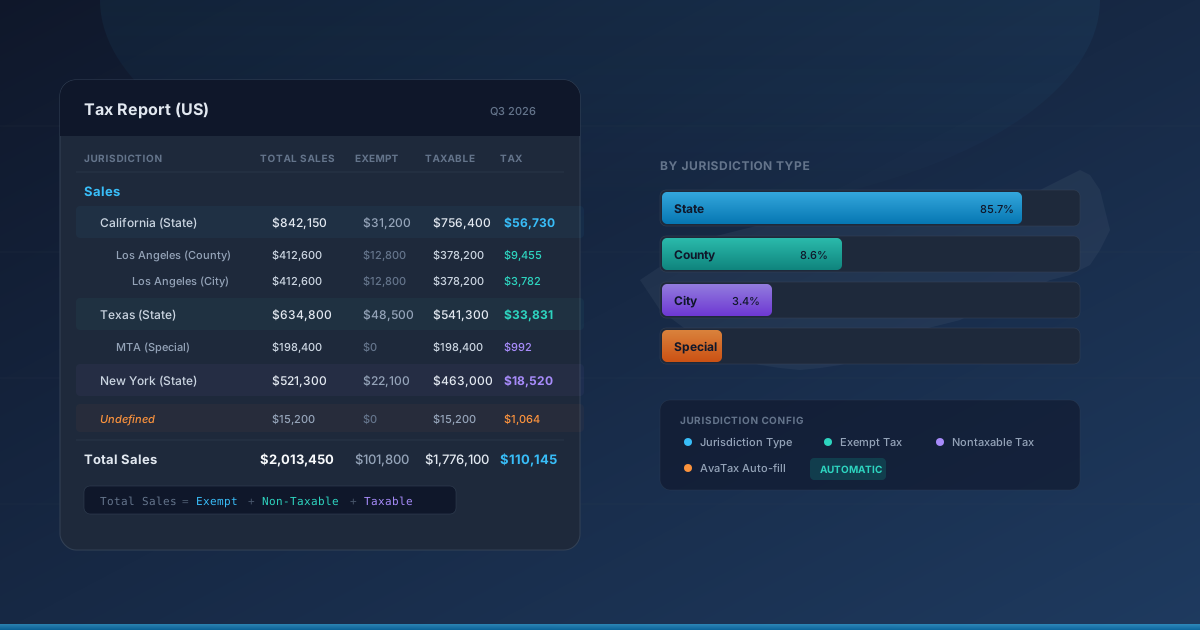
The foundation of the new system lives in each tax record’s Advanced Options tab. Odoo has added a US-specific configuration block with a Jurisdiction Type field that accepts four values: State, County, City, and Special. Alongside it sit dedicated fields for specifying the exact State, County, and City the tax applies to.
This isn’t just labeling. The jurisdiction assignment controls how the tax appears in the new report, where it rolls up in aggregated views, and how it interacts with exemption logic. A 6.25% Texas state sales tax, a 2% Dallas County tax, and a 1% Dallas city tax are no longer three indistinguishable line items. They’re three distinct obligations, each mapped to its governing authority.
The configuration also includes Exempt Tax and Nontaxable Tax mapping fields. These let you link each jurisdiction’s standard tax to its exempt and nontaxable counterparts, so the system knows that when a sale qualifies for a state-level exemption, the exempt amount still needs to be reported under that state’s jurisdiction — not just silently zeroed out.
AvaTax Does the Heavy Lifting Automatically
For businesses already running Avalara’s AvaTax integration, the jurisdiction mapping is largely automatic. When AvaTax calculates tax on a transaction, it now feeds the Jurisdiction Type, State, Exempt Tax, and Nontaxable Tax fields back into Odoo without manual intervention.
The only fields AvaTax doesn’t auto-populate are County and City. That’s a practical limitation — Avalara returns jurisdiction codes rather than the specific county or city name as Odoo stores them, so those two fields need a manual assignment. For most businesses, this is a one-time setup per tax record rather than an ongoing task, since the jurisdiction structure of your nexus states doesn’t change often.
If you’re not using AvaTax, all six fields are available for manual configuration. It’s more setup work upfront, but the reporting payoff is the same.
A Tax Report That Thinks in Jurisdictions
The real payoff is the new Tax Report (US), accessible from Accounting → Reporting. Open it and the first thing you notice is structure. Instead of a flat list of tax amounts, the report organizes everything into two top-level groups — Sales and Purchases — then breaks each down by state. Within each state, you see county-level, city-level, and special-district subtotals.
The column layout mirrors actual filing requirements: Total Sales, Exempt, Non-Taxable, Taxable, Tax Rate, and Tax. The relationship between them follows a clean formula: Total Sales equals the sum of Exempt, Non-Taxable, and Taxable amounts. No hidden calculations, no mystery rounding. Every number traces back to its components.
There’s also an “Undefined” group that catches any taxes without a jurisdiction assignment. This is Odoo’s way of flagging configuration gaps — if a tax shows up in the Undefined bucket, it means someone needs to go back and assign a Jurisdiction Type. For firms migrating from a setup without jurisdiction tracking, this group serves as a natural cleanup checklist.
US-Specific Financial Statements Join the Menu
The tax report isn’t the only addition to the US reporting toolkit. Odoo has also added a Profit and Loss statement and a Cash Flow Statement to the US reporting menu, both mapped to American accounting conventions.
The Profit and Loss statement swaps European terminology for GAAP-standard labels. “Cost of Revenue” becomes “Cost of Sales.” The bottom line reads “Net Income” instead of “Net Profit.” There’s a dedicated “Net Operating Income” line that American controllers expect to see, and the Other Income section follows the standard formula: Net Other Income equals Other Income minus Other Expense.
Notably, the US version of the P&L omits the Allocations and Withdrawals lines that appear in some European layouts. Under GAAP, those belong on the balance sheet, not the income statement. It’s a small detail, but it’s the kind of thing that makes an auditor’s eye twitch when it shows up in the wrong place.
Why This Matters for Multi-State Sellers
The practical impact hits hardest for businesses with nexus in multiple states — which, after the Wayfair decision, includes most e-commerce sellers above the economic threshold. Before this update, extracting jurisdiction-level tax data from Odoo for filing meant exporting raw transaction data and rebuilding the jurisdiction breakdown in a spreadsheet or a separate tax compliance tool.
Now, the jurisdiction breakdown lives inside the ERP. When it’s time to file with California, you can see exactly how much was collected at the state level, how much went to Los Angeles County, and how much belongs to the city. The exempt and non-taxable columns show what was excluded and why. The tax rate column confirms the rate applied at each level.
For businesses using AvaTax, the workflow becomes nearly automatic: Avalara calculates the correct rate at the point of sale, feeds the jurisdiction classification back into Odoo, and the Tax Report aggregates everything into the exact breakdown needed for filing. The only manual step is the initial County and City assignment, and even that disappears for businesses operating in states without county or city-level taxes.
The Gap That’s Finally Closed
US sales tax compliance has been one of the persistent rough edges in Odoo’s accounting stack. The platform handled international VAT scenarios with sophistication — intra-community supplies, reverse charges, fiscal positions — but treated US multi-jurisdiction tax as an afterthought. Jurisdiction types were absent. Reports lumped everything together. Filing meant leaving the ERP.
This update doesn’t just add a report. It adds the data model that makes the report meaningful: jurisdiction classification at the tax level, exempt and nontaxable mapping, automatic integration with the leading US tax calculation engine, and a reporting layout that matches what state revenue departments actually ask for. For US-based Odoo users, it’s the difference between an ERP that tolerates American tax law and one that actually speaks its language.