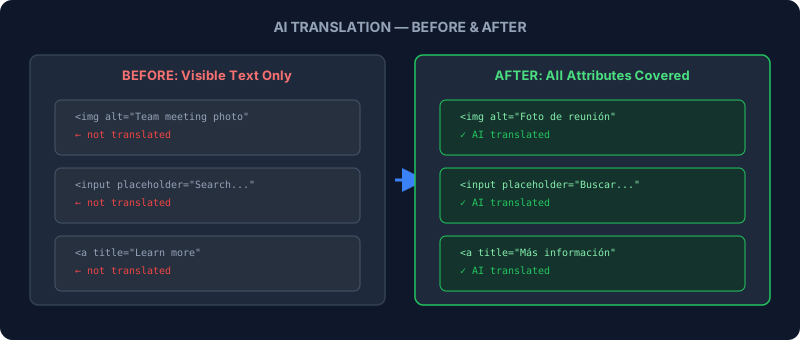
When Odoo first shipped AI-powered page translation in its website builder, it did what you’d expect: it scanned visible text on the page and translated it. Headlines, paragraphs, button labels, menu items — anything a visitor could read got localized in one click. But a multilingual website is more than the words people see.
Image alt text, input placeholders, tooltip titles, and default form values are invisible to most visitors yet critical for two audiences: screen reader users and search engines. A page that shows “Buscar productos” in the heading but still hasplaceholder="Search products..."in the search bar isn’t fully translated. It’s a cosmetic localization with English leaking through the seams.
What the AI Translator Now Covers
The updated translation engine scans four attribute types that were previously ignored: alt on images,title on links and elements, placeholder on input fields, and value on form elements like textareas and submit buttons. Each of these gets sent through the same AI translation pipeline that handles visible content, with results applied in a single pass.
The system is selective about what it touches. Branding elements, promotional badges, and non-translatable framework components are excluded from the scan. This prevents the translator from mangling product names, brand slogans, or technical strings that should stay in their original language regardless of locale.
Why Alt Text Translation Matters More Than People Think
Search engines index alt text as part of their understanding of a page’s content. A French version of a product page with English alt text sends mixed signals to Google about the page’s language. For businesses investing in multilingual SEO, this was a quiet penalty hiding in plain sight — or rather, hiding in the source code where nobody thought to look.
Accessibility is the other dimension. Screen readers announce alt text to visually impaired users. A Spanish-language page where every image description is read aloud in English creates a jarring, confusing experience. The fix sounds simple — just translate the alt text — but doing it manually across hundreds of images on a large website is exactly the kind of tedious work that never gets prioritized.
Preventing Duplicate Translation Requests
A practical improvement shipped alongside the expanded scope: the Translate button now disables itself while a translation is in progress. Previously, impatient users could click the button multiple times, sending duplicate requests to the AI service. Each duplicate consumed credits, added processing time, and occasionally produced conflicting results when responses arrived out of order.
The button re-enables once the translation completes. If the page has no translatable content — either because everything is already translated or the page contains only non-translatable elements — a notification explains why nothing happened instead of silently doing nothing.
Undo Support for Translation Changes
Every translation the AI applies is now registered as a proper history mutation in the website editor. This means the standard undo and redo shortcuts work exactly as expected: hit Ctrl+Z after a translation, and every change — including attribute translations — rolls back cleanly. Previously, some attribute changes bypassed the history system, making it impossible to undo a bad translation without manually editing each element.
Whitespace Preservation Fixes a Concatenation Bug
The update also fixes a formatting issue where translations could accidentally concatenate text segments. When an element contained leading or trailing whitespace around inline formatting tags, the translator would strip the whitespace and join the segments together. A heading like “Enhance Your Experience” could become “Mejore suMejore su experiencia” — duplicated and merged in ways that made no grammatical sense.
The fix preserves whitespace boundaries during translation, ensuring that inline formatting elements like bold, italic, and link tags maintain their spacing relationships in every language.
The Bigger Picture for Multilingual Businesses
Website translation has always been a spectrum. At one end, you translate the homepage headline and call it done. At the other, you localize every string, attribute, metadata field, and microcopy element until the site feels native in every language. Most businesses live somewhere in the middle, translating what’s visible and hoping nobody notices the rest.
Odoo’s approach of extending AI translation to attributes pushes the default closer to full localization without adding manual work. The translator already handled the heavy lifting of page content; now it catches the elements that were falling through the cracks. For businesses running sites in three, five, or ten languages, that’s hundreds of alt tags and placeholder strings they no longer need to track and translate by hand.