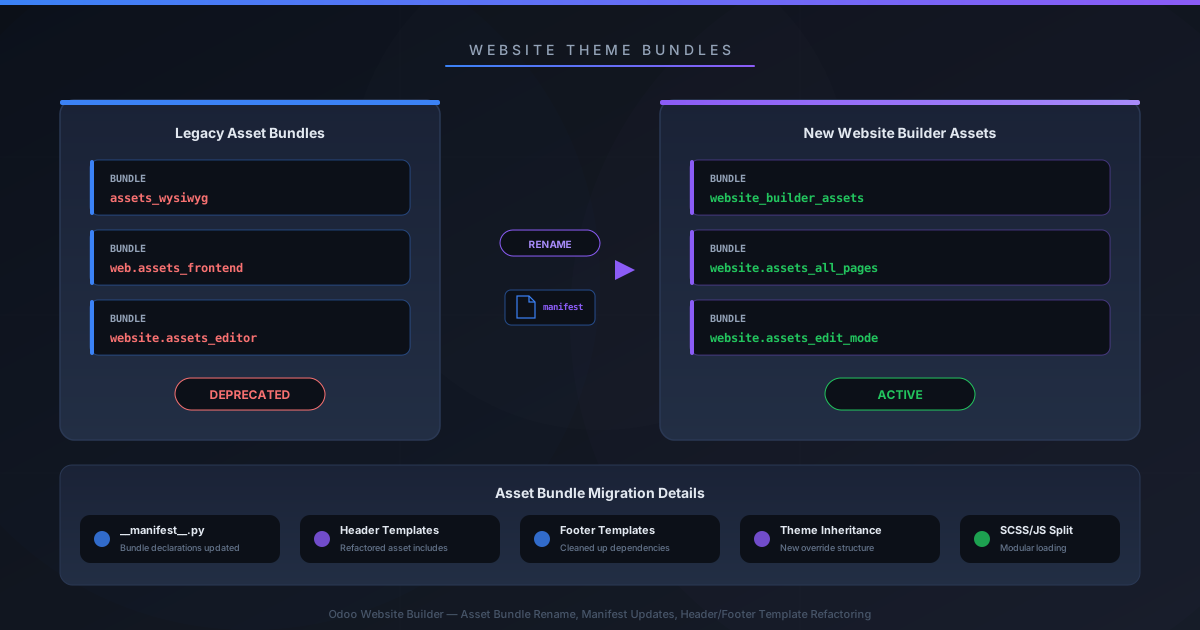
If you build Odoo website themes for a living, your manifest files just broke — quietly. The asset bundle formerly known aswebsite.assets_wysiwyg has been renamed towebsite.website_builder_assets, and the documentation now makes it clear that header and footer templates won’t load unless they’re explicitly declared in that bundle inside your__manifest__.py. No error message. No fallback. Just templates that silently refuse to appear.
The rename is part of a broader cleanup of Odoo’s asset bundle system for website themes. What used to be a grab-bag of WYSIWYG editor assets has been repositioned as the canonical bundle for everything that runs in the Website Builder context — edit-mode styles, builder-specific JavaScript, and now template registrations for headers and footers.
The Bundle Rename Nobody Announced
The old name, website.assets_wysiwyg, was a relic from when the website editor was still called the WYSIWYG editor. The new name, website.website_builder_assets, aligns with Odoo’s rebranding of the editor as the Website Builder. It sounds cosmetic, but bundle names are load-bearing infrastructure. Every theme that referenced the old bundle in its manifest needs to be updated.
The description has also changed. Instead of vaguely referencing the “web editor context,” the documentation now explicitly states this bundle handles the “Website Builder context” — a small wording shift that signals a larger architectural intent. This isn’t just an editor anymore; it’s the toolchain that powers the entire visual builder.
Every Bundle Now Has a Real Description
Previously, Odoo’s theme development documentation listed asset bundles with terse, unhelpful labels. You’d seeweb._assets_primary_variablesdescribed as “mainly used for the primary_variables.scssfile” — which tells you nothing about why it exists or when to use it.
The updated documentation replaces those one-liners with proper architectural descriptions:
- web._assets_primary_variables— Defines the primary SCSS variables (colors, fonts, spacing) used as the main theming layer across all bundles
- web._assets_secondary_variables— Defines secondary SCSS variables that depend on and extend the primary variables
- web._assets_frontend_helpers— Provides frontend-specific Bootstrap overrides to be included before any frontend SCSS compilation
- web.assets_frontend— Provides the base assets required to render and interact with Odoo’s frontend, where developers can add custom SCSS, JS, or client-side QWeb templates
- website.website_builder_assets— Carries edit-mode styles, builder-specific JavaScript, and template declarations for the Website Builder context
This matters because Odoo theme development has always been a maze of undocumented bundle dependencies. Put your SCSS in the wrong bundle and your variables compile in the wrong order. Load your JavaScript in assets_frontend instead of the builder bundle and it runs on every page load instead of only in edit mode. With proper descriptions, developers can finally make informed decisions about where code belongs.
Header and Footer Templates Need an Explicit Manifest Registration
Here’s where the change bites. Previously, you could define a custom header or footer template and reference it in your SCSS variables. The template would “just work” because the old asset loading was more permissive about what got included.
Now, the documentation is explicit: after creating your custom header template, you must add the file to your __manifest__.pyunder the website.website_builder_assetsbundle. Then — and only then — you define it as the header template in the Odoo SASS variables. The same applies to footer templates.
The documentation now reads: “Add this file to your__manifest__.py in the bundlewebsite.website_builder_assetsand define explicitly the custom template as the header template in the Odoo SASS variables.” For footers, a parallel instruction appears: “Add it to your __manifest__.py in the bundlewebsite.website_builder_assets.”
If you skip the manifest entry, the template file exists on disk but the Website Builder never loads it. Your header reverts to the default and there’s no warning telling you why. This is the kind of silent failure that can cost hours of debugging, especially if you upgraded from an older version where the implicit loading worked fine.
What Theme Developers Should Do Right Now
If you maintain an Odoo website theme, there are three things to check immediately. First, search your __manifest__.pyfor any reference to website.assets_wysiwyg and rename it to website.website_builder_assets. Second, verify that your header and footer template files are registered in that bundle. Third, test your theme in the Website Builder to confirm that edit-mode styles and custom headers still load correctly.
This isn’t a breaking change in the traditional sense — Odoo didn’t remove the old bundle name from the codebase overnight. But the documentation now points exclusively to the new name, which means every new tutorial, Stack Overflow answer, and community guide will referencewebsite.website_builder_assets. Themes still using the old name will work today but will drift further from the canonical path with each release.
For an ecosystem where theme development has always been a mix of official docs, forum posts, and trial-and-error, having clear bundle descriptions and explicit loading requirements is a genuine improvement. The rename is a nuisance. The documentation it comes with might save you more time than the migration costs.