Odoo’s website builder has long relied on a flat library of building blocks — drag a banner onto the page, drop a text section below it, add a footer. It worked, but the system was showing friction. Blocks sat at a single level of hierarchy, form configuration was scattered across multiple menus, and resizing anything meant hunting for the right property panel. The latest update rewrites the building blocks page from scratch, introducing nested content, a richer form-block system, and physical drag-to-resize handles on every block edge.
The changes ship across multiple Odoo versions through forward-porting, so both current deployments and newer branches pick up the restructured interface.
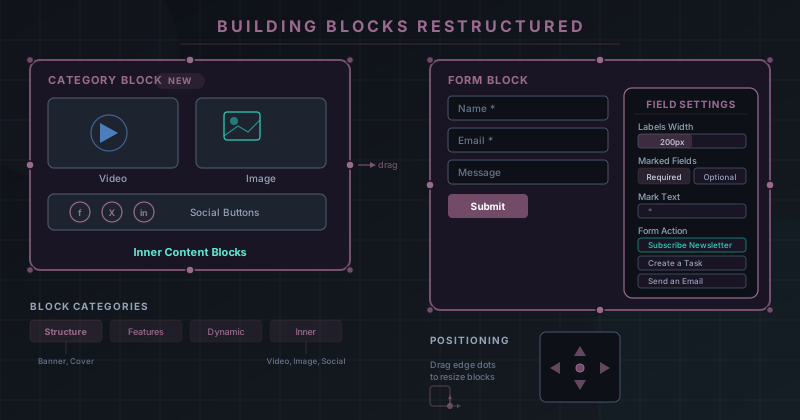
Inner Content Blocks: Nesting Without the Mess
The most structural change is the introduction of “inner content blocks” inside category blocks. Previously, every element lived at the same level — a video block and a text block occupied the same tier in the hierarchy, even when one logically belonged inside the other. Now, category blocks act as containers that can hold subordinate content: videos, images, and social media buttons all nest cleanly inside a parent block.
This isn’t just an organizational convenience. It changes how blocks behave when moved, duplicated, or deleted. Removing a category block removes its inner content with it. Duplicating one carries its children along. The result is a page structure that mirrors what designers actually intend — a “Features” section that contains its own icons, images, and call-to-action buttons as a single composable unit rather than a loose collection of siblings.
Form Blocks Get Real Configuration
Form blocks received the deepest rework. The new form actions tie submissions directly to Odoo’s business applications. “Subscribe to Newsletter” connects the form to the Email Marketing app, so a visitor’s submission creates a mailing list entry without any middleware. “Create a Task” pushes submissions into the Project app as actionable tasks, bridging the gap between a public-facing website and internal project management. Additional model integrations let form submissions flow into whichever Odoo module handles the data.
Field-level settings are equally improved. A new Labels Width control sets how much horizontal space field labels consume, eliminating the guesswork of CSS overrides. The Marked Fields toggle lets builders decide whether required fields or optional fields carry visual indicators, and a Mark Text option controls the exact character or string used for that marker — an asterisk, the word “required,” or whatever the brand demands. A dedicated tab for string and numerical fields surfaces settings specific to text-type inputs, keeping the configuration panel from becoming a wall of unrelated options.
Drag-to-Resize Handles on Every Edge
Every building block now displays resize handles — small dots positioned along its edges and corners. Dragging any of these dots adjusts the block’s dimensions in real time, directly on the canvas. This replaces the previous workflow of selecting a block, finding its size properties in a sidebar, and typing pixel values into input fields.
Alongside the resize handles, new block-positioning controls give builders direct manipulation over where a block sits relative to its neighbors. The combination of drag-to-resize and positional controls turns the builder into something closer to a visual layout tool than a form-driven page editor. Blocks snap, stretch, and reposition without leaving the canvas.
A Clearer Mental Model for Blocks
The restructured Building Blocks page now organizes everything into explicit categories and subcategories. Structure blocks, feature blocks, dynamic content blocks, and inner content blocks each occupy their own section, with clear labels indicating what belongs where. This is a documentation-level change as much as a UI one — the old page presented blocks as a flat grid that grew harder to navigate with every release.
Taken together, these changes address a tension that’s been building in Odoo’s website builder for several versions. As the block library expanded, the flat hierarchy and sparse form options became bottlenecks. Nested content, structured form actions, and physical resize controls don’t just add features — they change the builder’s operating model from a block-placement tool to a composable page-design system. For teams building marketing pages, landing pages, or customer-facing portals inside Odoo, the daily workflow just got noticeably more direct.