Odoo’s electronic invoicing setup has always worked, but it wore its Peppol heritage a little too prominently. Every label, every menu heading, every configuration step pointed squarely at Peppol — which made sense when it was the only game in town, but felt increasingly narrow as Odoo’s invoicing reach grew to cover more countries and more compliance frameworks.
The latest update reframes the entire section under the broader banner of “Electronic Invoicing,” dropping the Peppol-specific naming from the top-level heading while keeping Peppol as the primary protocol underneath. It’s a subtle but meaningful shift: the system is no longer just a Peppol client. It’s an electronic invoicing platform that happens to support Peppol today and leaves room for other protocols tomorrow.
Registration Gets a Proper Identity Step
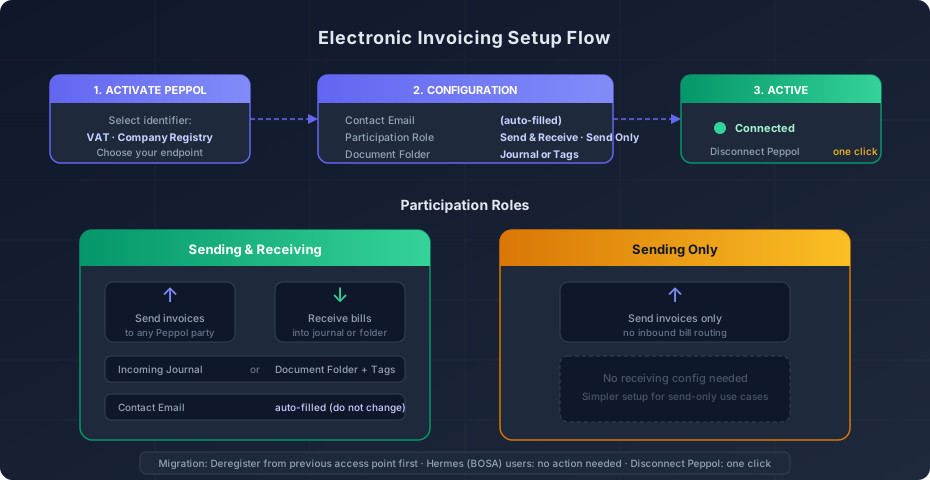
The old registration flow asked you to fill in your details and click through. The updated version starts with an “Activate Peppol” button — renamed from the previous, more generic label — and immediately presents a choice that matters: how do you want to identify your company on the Peppol network? The options are VAT number or company registry number, and the selection determines your endpoint configuration.
This is the kind of upfront decision that used to require digging through documentation to understand. Some countries mandate VAT-based identification for Peppol participants; others use national company registries. By surfacing this choice at the start of registration, Odoo eliminates a class of configuration errors that only showed up when invoices failed to route properly.
Participation Roles: Send Everything or Send Only
The biggest structural addition is the new Peppol Participation Role field, which offers two options: “Sending & Receiving” and “Sending Only.”
This distinction matters more than it might seem. A company that only needs to send electronic invoices to comply with local mandates has a fundamentally different setup from one that also wants to receive vendor bills through the Peppol network. The send-only path skips the entire receiving configuration — no incoming journal selection, no document folder setup, no routing rules. It’s a cleaner onboarding for businesses that handle inbound invoices through other channels.
For companies that choose full two-way participation, the receiving setup has been consolidated into a new Configuration section. Incoming bills can land in a designated accounting journal, or they can arrive as documents in a folder with tags attached for organization. The choice depends on how your accounting team works: journal-based routing puts bills directly into the approval pipeline, while folder-based routing gives more flexibility for pre-processing and review.
Contact Email Locks Down Automatically
One of the quieter changes is the Peppol Contact Email field, which now auto-fills during registration and carries an explicit instruction not to change it. In the previous version, this field was editable without guidance, and modifying it could break the communication channel between your Odoo instance and the Peppol access point.
It’s a small guard rail, but it addresses a real support scenario. Administrators who didn’t realize the email served as a technical identifier — not just a notification address — would update it to a more “appropriate” mailbox and then wonder why their invoices stopped flowing.
Deregistration Goes From a Section to a Button
The old setup had an entire documentation section dedicated to Peppol deregistration, complete with multi-step instructions and warnings. The new version replaces all of that with a single “Disconnect Peppol” action. For Denmark’s localization, the equivalent label reads “Remove from Peppol,” matching the simpler language.
This is a welcome simplification. Deregistration shouldn’t require a knowledge base article to execute. Companies change access points, switch providers, or consolidate their e-invoicing setup — making that a one-click operation removes friction from what should be a routine administrative task.
Migration Path for Existing Peppol Users
Companies already connected through another access point need to deregister from that provider before activating through Odoo’s built-in connection. This isn’t new as a requirement, but the documentation now calls it out explicitly during the registration flow rather than burying it in a troubleshooting section.
There’s one exception: users connected through Hermes, the Belgian BOSA access point, don’t need to take any action. The migration is handled transparently, which is a nice touch for the Belgian market where Hermes has significant adoption.
Document Workspace Becomes Document Folder
A smaller but notable change: what was previously called “Document Workspace” in the Documents app integration is now “Document Folder.” The rename aligns the terminology with how most users actually think about organizing files — folders are intuitive, workspaces are abstract. When configuring where incoming electronic invoices land in the Documents app, the field now reads naturally instead of requiring users to mentally map “workspace” to “that place where my files go.”
What This Means for the E-Invoicing Landscape
The rebranding from “PEPPOL Electronic Invoicing” to plain “Electronic Invoicing” signals where Odoo is heading. As e-invoicing mandates expand beyond the Peppol network — France’s Chorus Pro, Italy’s SDI, India’s GST e-invoicing, Brazil’s NF-e — a Peppol-centric architecture becomes a limitation. The new framing keeps Peppol as the primary integration while creating conceptual space for additional protocols.
The participation role distinction also positions Odoo well for markets where send-only compliance is the initial mandate, with full two-way exchange coming later. Rather than forcing everyone through the same comprehensive setup, companies can start with the lighter send-only path and upgrade to full participation when their trading partners catch up.
For existing users, the migration is straightforward: the registration flow guides you through the new identity selection, the configuration section consolidates settings that were previously scattered, and the simplified deregistration means switching providers is no longer an afternoon project. It’s one of those updates that makes you wonder why it wasn’t always set up this way.