Manufacturing scheduling software faces an inherent tension: it needs to display enormous complexity — dozens of operations, machine dependencies, delivery deadlines, and resource conflicts — while remaining usable by production managers who don’t have time to decode abstract data. Most systems err too far in one direction, either dumbing things down until the planning view is useless for real decisions, or showing everything in a wall of overlapping Gantt bars that requires a PhD in operations research to interpret.
Odoo’s latest manufacturing update takes a more opinionated approach. Version 19.2 splits planning into purpose-specific views, adds visual dependency indicators that communicate blocking relationships at a glance, and introduces conflict detection that flags problems before they cascade into missed deadlines.
Two Planning Perspectives Instead of One
The previous planning interface showed everything in a single view, which worked for small operations but became unwieldy at scale. The redesign separates planning into two distinct perspectives:
- Planning by Productiongroups work orders by manufacturing order. This is the delivery-focused view — you see each production run as a unit, with its constituent operations laid out in sequence. Production managers use this to answer the question: “Will this order ship on time?”
- Planning by Workcentergroups work orders by the physical machine or station where they’ll be executed. This is the capacity-focused view — you see which machines are overloaded, where there’s slack, and where bottlenecks are forming. It answers: “Can my shop floor handle this week’s load?”
Both views support Gantt and Kanban layouts, but they organize the same data around different questions. That’s a small structural change with significant practical impact — you stop wasting time mentally filtering information that isn’t relevant to your current decision.
Gantt View: Arrows That Show What’s Blocking What
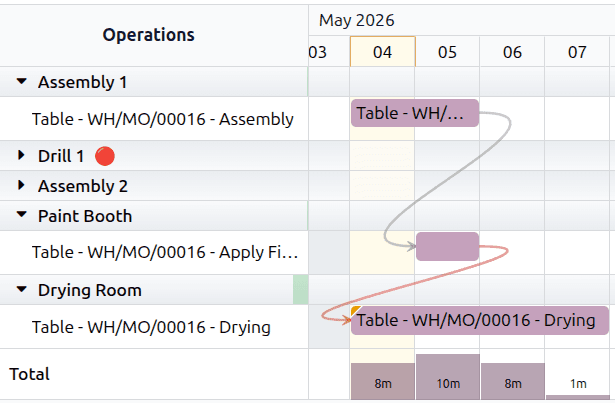
The Gantt chart now draws arrows between dependent work orders, making blocking relationships visible without clicking into each operation. Grey arrows connect work orders in their correct dependency sequence. When something goes wrong — an operation is scheduled before its predecessor completes — the arrow turns orange and a flag appears, making violations immediately obvious.
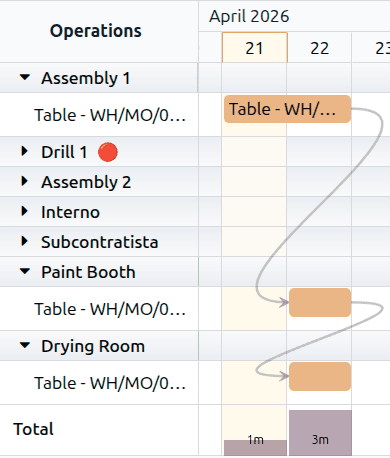
This sounds simple, but most manufacturing Gantt tools show dependencies only when you hover over a specific bar or open a detail panel. Having them always visible transforms the Gantt from a status display into an actual planning tool — you can see at a glance where the schedule is tight, where there’s room to shift operations, and where a delay in one step will cascade into downstream problems.
Kanban View: Blocked Orders Get Visual Weight
Not every production manager works in Gantt charts. For teams that prefer the card-based Kanban layout, the redesign adds visual indicators that surface dependency status without requiring users to click into each card:
- A yellow-orange circlein the bottom corner of a card means the work order is blocked by an incomplete predecessor. You can’t start it yet, and the system makes that obvious.
- Red highlightingon a card means the work order is overdue and hasn’t been started. This distinguishes between “blocked and waiting” (amber) versus “should have started already and didn’t” (red).
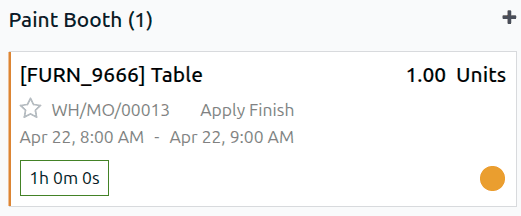
The Kanban view also gains a Plan Ordersbutton that schedules confirmed manufacturing orders that haven’t been assigned dates yet. Previously, unplanned orders just sat in the backlog until someone manually scheduled them. Now, one click triggers the scheduling engine to slot them into available capacity.
Drag-and-Drop Rescheduling With Conflict Detection
Both views now support drag-and-drop rescheduling. Move a work order to a different time slot, and the system offers an Update Planningbutton to confirm the change. But here’s where it gets smart: if moving an operation creates a conflict with its dependencies — say, you schedule painting before assembly — a red exclamation triangle appears next to the Start Date field, warning you before the change is saved.
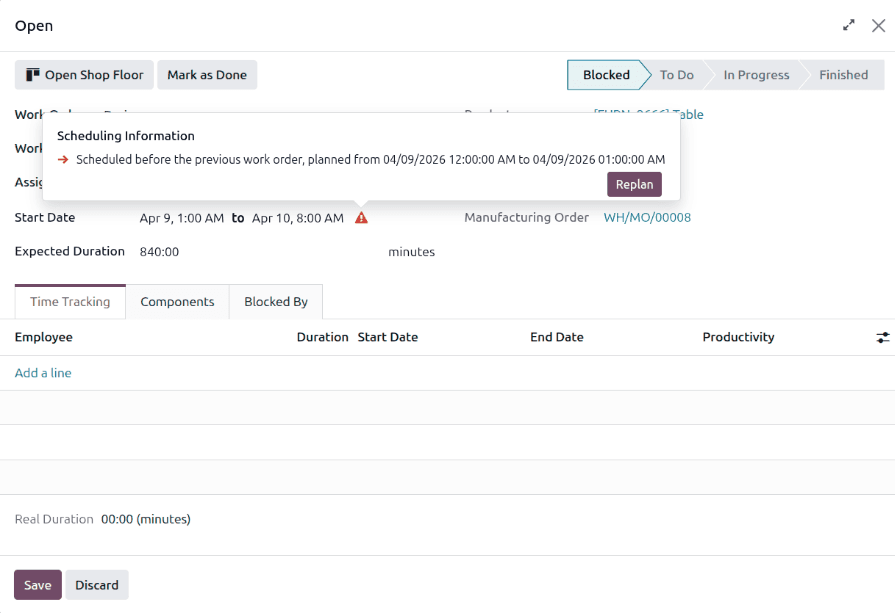
This is conflict detection, not conflict prevention. Odoo still lets you override the schedule if you know what you’re doing — maybe you’re running operations in parallel intentionally, or a predecessor is about to finish and you want to pre-stage the next step. The system informs rather than blocks, which is the right design choice for manufacturing environments where rigid automation often causes more problems than it solves.
The Configuration Entry Point
All of this is gated behind a single setting: Custom Work Order Dependenciesin the Manufacturing app’s configuration (renamed from the less descriptive “Work Order Dependencies” label). Enable it, define which operations depend on which within your bills of materials, and the planning views light up with the dependency information automatically.
For manufacturers already using work order dependencies, the upgrade to 19.2 redesigns their existing planning views with no additional configuration needed. The dependency data is the same — it’s the visualization that’s been overhauled.
Fitting Into the Manufacturing Stack
This planning redesign pairs well with Odoo’s recent bulk BOM component replacement feature and the vendor-to-subcontractor dropshipping workflow. Together, they reflect a manufacturing module that’s moving from “can technically handle complex scenarios” to “makes complex scenarios manageable at a glance.” Production planning was one of the areas where Odoo’s interface lagged behind its underlying capability — the scheduling engine was solid, but the visibility into what it was doing required too much clicking and mental assembly. This update closes that gap.